Last updated: September 2026
Notion AI usage limits can interrupt your work just when an Agent becomes useful. The good news is that you can make your allowance last longer by managing the context you send, keeping persistent instructions lean and using fresh chats at the right time.
The key is not to squeeze every task into one endless conversation. It is to give Notion AI exactly the information it needs for the job — and nothing more.
What Are Notion AI Usage Limits?
Notion AI usage limits cap how much you can use certain AI features within rolling and monthly windows. Your personal Notion Agent, including chat, counts towards this allowance.
Notion currently uses two allowance windows:
- A rolling six-hour allowance that resets after the window refreshes
- A monthly allowance that resets at the beginning of your next billing cycle
If you hit either limit, you need to wait for it to reset or use Notion credits if your workspace owner has enabled them. You can monitor your current allowance under Settings → Notion AI → Usage.
Not every AI feature uses the same allowance. Premium models, Custom Agents and Workers use Notion credits, while AI Meeting Notes has a separate daily cap. You can find the current details in Notion’s guide to AI usage allowances.
Why Do You Keep Hitting Your Notion AI Usage Limit?
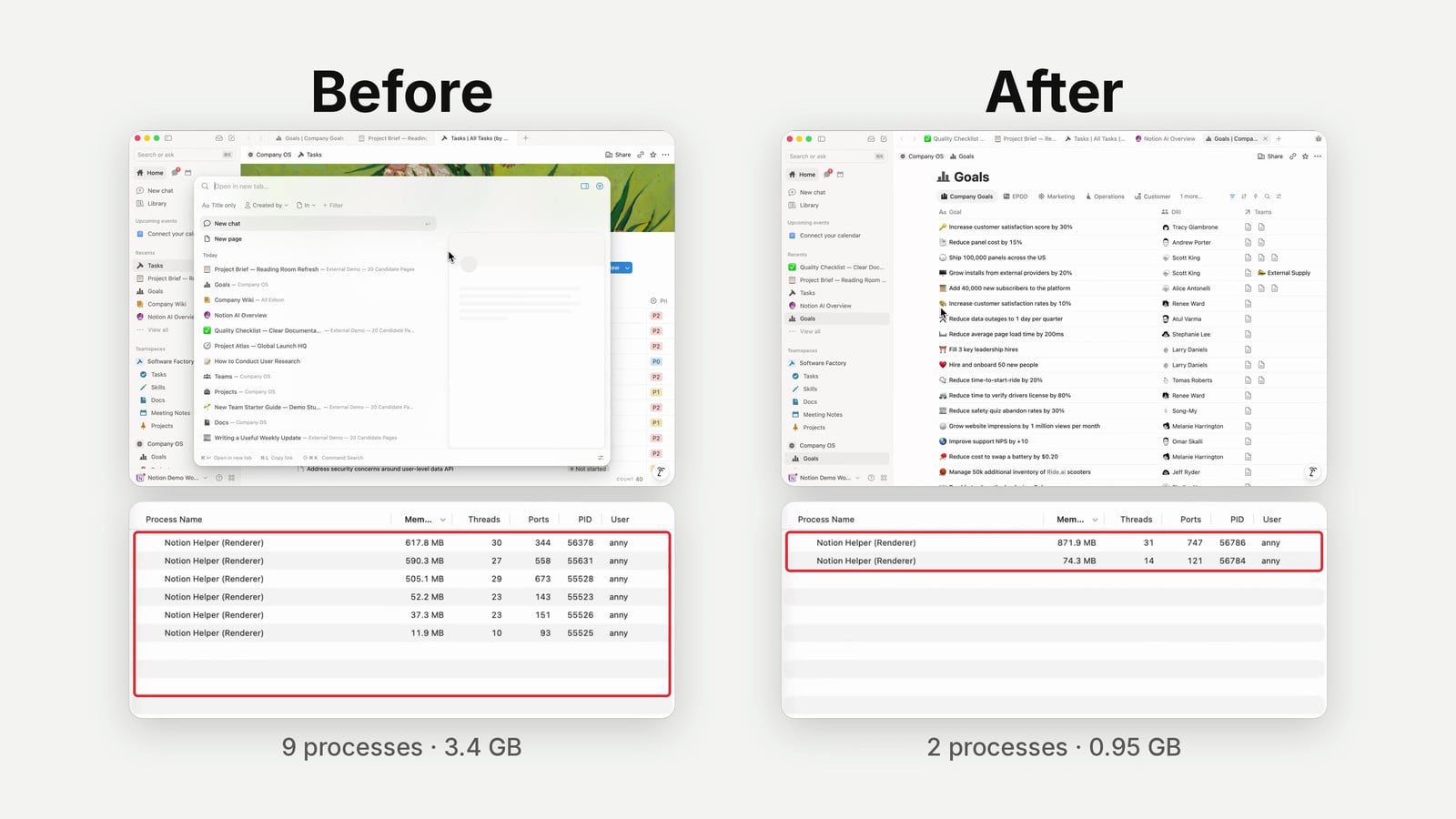
You often hit the Notion AI usage limit because every request needs context. The more material the Agent reads and the more steps it performs, the more usage the job can consume.
Your latest prompt is only one part of that context. A conversation can also include:
- Your earlier messages
- Notion AI’s previous answers
- Personal instructions that apply to every chat
- Skill descriptions available for automatic use
- Pages, databases and external sources the Agent reads
- Tool calls and intermediate research
Think of the context window as a backpack. Every message, page and research result adds weight.
Some of that weight is useful. But if your next request is unrelated, carrying the whole backpack into the new task creates noise and can waste your allowance.
What Does “One Chat, One Job” Mean?
“One chat, one job” means starting a fresh Notion AI conversation whenever you begin a genuinely new piece of work. Keep using the current chat only when the next request depends on what came before.
For example, stay in the same chat when you:
- Research a topic and then ask for a summary
- Draft an article and then revise its introduction
- Design a database and then add the agreed properties
Start a new chat when you:
- Finish writing an article and switch to planning a client workshop
- Research competitors and then ask an unrelated Notion formula question
- Move from one client or project to another
- Only need a small fraction of the previous discussion
Notion’s guidance sometimes encourages you to continue a conversation so the Agent keeps its context. That is sensible for related follow-up questions.
The mistake is turning “keep useful context” into “put everything in one chat”. If the old conversation does not help with the new job, start clean.
Pro Tip: Before sending a prompt, ask: “Would a new colleague need the full previous conversation to do this?” If not, open a new chat.
How Can A Handoff Help With Notion AI Usage Limits?
A handoff moves the essential decisions and learnings from a long chat into a fresh one. You keep the useful context without dragging along every research trail, failed idea and intermediate answer.
This is particularly useful when the work is still related, but the current session has become heavy.
Imagine you use Notion AI to research seven competitor websites. The Agent may read a huge amount of material before identifying the patterns that matter.
When you move from research to writing, you probably need the conclusions — not every page the Agent inspected. A handoff compresses the work into a focused brief for the next session.
A good handoff should capture:
- The goal and current stage of the work
- Decisions already made
- Findings that still matter
- Constraints, requirements and preferences
- Relevant pages, sources and deliverables
- The exact next step
In Notion, you can store these summaries in a dedicated Handoffs database. Keep it separate from your main Docs database because handoffs are temporary working context, not permanent documentation.
Once you use a handoff, mark it as used or archive it. Otherwise, old context can become clutter that future Agents mistakenly treat as current.
When Should You Start A Fresh Notion AI Session?
Start a fresh session when the job changes, the conversation reaches a natural milestone or most of the previous context is no longer useful.
Good handoff points include:
- Research complete → drafting begins
- Strategy agreed → implementation starts
- First draft complete → final editing begins
- Discovery complete → technical specification begins
- One project phase complete → the next phase starts
You do not need a precise token counter to recognise these moments. The goal is not to restart constantly; it is to avoid keeping a session alive by default.
How Should You Optimise Your Notion AI Instructions?
Keep personal Notion AI instructions limited to information that should affect almost every conversation. Move situational workflows into skills that you run only when needed.
Personal instructions are useful for stable preferences such as:
- Who you are and what your organisation does
- The Agent’s role and communication style
- Permanent operating principles
- Default locations for common types of work
They are a poor home for:
- Detailed instructions for rare workflows
- Long brand or writing guides
- Client-specific background
- Step-by-step processes used occasionally
- Large reference documents
Notion describes instructions as persistent preferences that apply to every Agent response, while skills are reusable instructions for specific work. That distinction is useful for both context quality and usage efficiency.
Pro Tip: If an instruction starts with “When I ask you to…”, it probably belongs in a skill rather than your always-on instructions.
Should You Turn Off Automatic Skill Use?
Turning off automatic skill use gives you tighter control over which workflows enter a session. This can reduce irrelevant context and prevents Notion AI from choosing the wrong skill.
Notion can automatically use skills stored in a Skills database when they have a description. According to Notion’s skill documentation, automatic use is enabled by default in that setup, but you can disable it from the Skills tab in your Library or on the skill page.
I prefer manual skill selection for two reasons:
- Skill descriptions are candidates the Agent needs to consider, even when they are irrelevant to the current job.
- Choosing the right workflow is one of your most important responsibilities when operating AI.
This is not an argument against skills. Quite the opposite: skills are one of the best ways to stop Notion AI from rediscovering the same process every time.
Use skills heavily — but invoke them deliberately.
How Can Skills Reduce Notion AI Usage?
Skills reduce Notion AI usage when they capture an efficient, proven route through repeatable work. They should document not only the final instructions, but also how to retrieve the right information.
Suppose you regularly ask Notion AI to find leads that need follow-up in a database with thousands of rows. Without guidance, the Agent may need to inspect the schema, test filters and scan far more data than necessary.
Once it has found the efficient query, add that method to the skill:
- Identify the smallest relevant dataset
- Record the exact database and properties to use
- Specify the required filters and sorting
- Define what the final output should contain
The next session can follow the direct route instead of repeating the discovery.
Should You Use Auto Mode In Notion AI?
Auto mode lets Notion choose a model for each task, while manual selection gives you direct control over quality, speed and credit use. Notion officially recommends Auto when you are unsure which model to choose.
My preference is to choose manually. Model selection is similar to managing a team: part of your job is learning who should handle which type of work.
Use a capable everyday model for most work, then switch deliberately:
- Choose a lighter model for simple transformations or short factual requests
- Choose a stronger model for complex reasoning, research or long-form writing
- Check whether a premium model uses Notion credits before selecting it
I would not claim that switching off Auto will transform your allowance on its own. The bigger benefit is control: you build intuition instead of outsourcing every routing decision to a generic system.
When Do Sub-Agents Save Notion AI Usage?
Sub-agents can keep bulky research out of your main session by returning only focused conclusions. They work best when several independent tasks can run in parallel.
For example, you could ask separate sub-agents to review six competitor websites. Each one returns a short positioning summary, while the primary Agent receives only the findings needed for the next step.
Use sub-agents when:
- Tasks can run independently and in parallel
- Each task needs to read a lot but return only a little
- The primary Agent needs conclusions rather than complete source material
- Each sub-agent has a clear, narrow job
Avoid sub-agents when:
- Every task depends on the previous task’s output
- You need to repeat the same large briefing for every agent
- The coordination costs more than the work itself
- A single focused Agent can complete the job directly
Sub-agents do not make research free. They can still use substantial credits. Their advantage is context control: the main session receives the useful signal without every page of source material.
How Can You Make Your Notion AI Allowance Last Longer?
The fastest way to stay within Notion AI usage limits is to combine clean session boundaries with lean persistent context and deliberate model choices.
| Usage Problem | What To Do | When To Use It |
|---|---|---|
| Unrelated work in one long chat | Start a fresh session | Whenever the job or project changes |
| A related session has become too heavy | Create a handoff | At research, drafting or implementation milestones |
| Personal instructions keep growing | Move situational rules into skills | When instructions apply only to a specific workflow |
| Too many skills run automatically | Disable automatic use | When you want to invoke skills deliberately |
| The Agent rediscovers database logic | Document the efficient query in a skill | For repeatable database workflows |
| Model choice is unpredictable | Select the model manually | When quality, speed or credit use matters |
| Research floods the main session | Use focused sub-agents | For independent, parallel research tasks |
The most important habit is simple: give every chat a clear job. When that job changes, start fresh or create a handoff.
Frequently Asked Questions
How Do I Check My Notion AI Usage Limit?
Open Settings → Notion AI → Usage to see your current allowance. Workspace owners and admins can also monitor credit spending and configure whether members may use credits after reaching their included allowance.
Does Notion AI Usage Reset Every Six Hours?
Notion’s rolling usage allowance resets after its six-hour window refreshes. The monthly allowance is separate and resets at the start of your next billing cycle.
What Happens When I Reach My Notion AI Usage Limit?
Certain Notion AI features pause until the relevant allowance resets. If your workspace owner has enabled Notion credits, you may be able to continue working by spending credits instead. On Business or Enterprise you can also connect your own ChatGPT Plus or Pro plan (Settings → Notion AI → Usage) and pick a GPT model; that session then runs on your ChatGPT plan instead of your workspace’s Notion plan. It does not apply to Custom Agents.
Does A Longer Notion AI Chat Use More Of My Allowance?
A longer chat can require the Agent to process more context, especially when it includes research, pages and earlier answers. Notion does not publish a simple per-message formula, so treat “one chat, one job” as a practical optimisation rather than an exact billing calculation.
How Do I Reduce Notion AI Usage Without Losing Context?
Create a handoff that summarises the goal, decisions, relevant findings and next step. Start a fresh chat with that summary instead of repeating the research or carrying an entire long conversation forward.