Notion agents are incredibly powerful. They’re also incredibly easy to overspend on. With Notion Credits going live on May 4, 2026, every custom agent run now has a price tag — and if you’re still throwing Opus at every single task, you’re quite literally putting money on fire.
I’ve been running custom agents across client projects and our own internal workflows for months. These are the three principles that consistently cut our AI costs by 60–80% without sacrificing output quality — plus two bonus considerations that might save you even more.
Which Model Should You Use for Your Notion Agent?
We all have a sledgehammer problem. When custom agents were free during the exploration period, there was zero reason not to pick the biggest, best model for every job. Opus for everything. Why not?
Because Opus is insanely expensive. And now that we’re paying for compute, it’s worth asking: does this job actually need the most senior, best-paid person in the room?
Here’s a quick cost comparison for common agent tasks:
| Task | Opus Cost | Haiku Cost | Savings |
|---|---|---|---|
| 10,000 support tickets (route & process) | ~$30 | ~$6 | 80% |
| Article summarisation | High | ~1/5th | 80% |
| Invoice data extraction | High | ~1/5th | 80% |
| Classification & formatting | High | ~1/5th | 80% |
Haiku is a fifth of what Opus costs. Across the board. For tasks like routing, extracting, classifying, and summarising, that’s an 80% reduction just by switching the model.
Of course, you can’t give every job to Haiku. It’s a less capable model. The decision comes down to what the job actually asks for:
- Heavy reasoning, creative complexity, advanced analysis — Opus. Pay the premium. It’s worth it here.
- Mid-range reasoning, structured tasks — Sonnet 4.6 or GPT-5.5. Significantly cheaper than Opus. GPT-5.5 is strong on reasoning tasks, though it has less personality (not ideal for a daily assistant, but solid for logic-heavy background work).
- Simple operations: formatting, classification, extraction, summarisation — Haiku, Gemini Flash, or Minimax. Perfect for targeted, repeatable tasks.
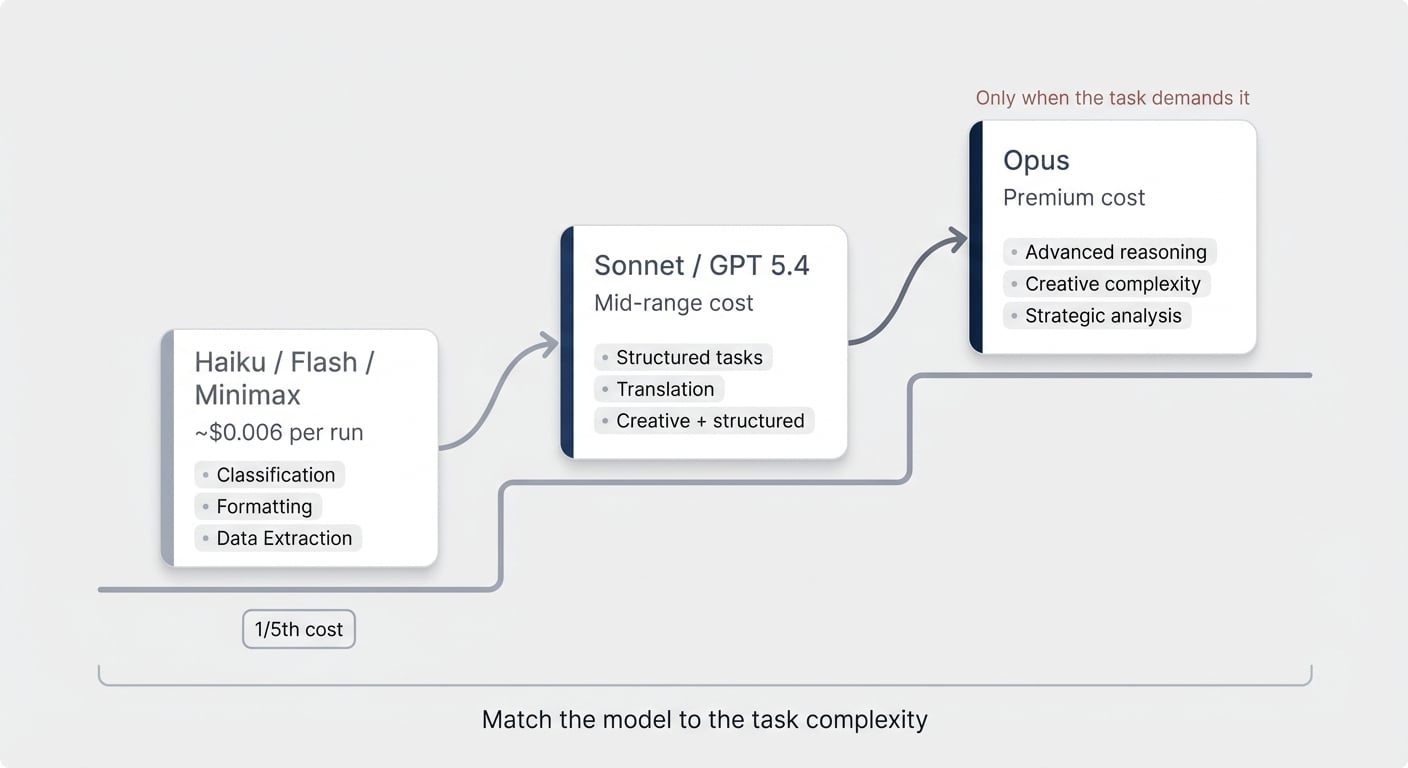
Case in point: our content link optimiser runs every time we publish a blog post. It checks internal links, places affiliate references, and tidies up formatting. Five runs this month. Total consumption: 72 credits. A single Opus run on one article would cost more than that.
Pro Tip: Set the model explicitly. Go to your agent’s settings → scroll to Advanced → Model. Never leave it on Auto. Auto hands the model choice back to the agent — and that choice is your job as the architect. Either the task warrants Opus-level reasoning, or it doesn’t. Make the call. Next to it sits Effort, which controls how hard the model you picked thinks on each run. Its default is a fine place to leave it; it is the dial to reach for when one agent costs more than its job is worth.
One more thing on model selection: the warnings that pop up for smaller models (like prompt injection risks) are worth reading but not worth panicking over. Prompt injection is only a real attack vector if your agent processes external, uncontrolled inputs — incoming emails, website form submissions, public-facing data. If it’s processing internal stuff (a team Slack channel, your own databases), the risk is minimal. Save the smarter model for the external-facing use case.
Why One Big Agent Costs More Than Five Small Ones
This is the insight that catches people off guard. Splitting one agent into five actually reduces your bill.
Here’s the trap: you build one agent to handle an entire workflow. Blog post creation, for example. The agent reads the transcript, writes the article, finds internal links, generates image concepts, writes SEO metadata, and maybe translates the result. Because the writing step requires advanced reasoning, you put the whole thing on Opus.
Now every step runs on Opus. The linking step that Haiku could handle in seconds? Opus. The metadata extraction? Opus. The translation? Opus.
In a monolithic agent, the most complex sub-task determines the model for everything.
Break it apart:
- Write the article → Opus (this is where the reasoning lives)
- Internal linking → Haiku (pattern matching, simple lookups)
- Image concepts → Sonnet (creative but structured)
- SEO metadata → Haiku (extraction and formatting)
- Translation → Sonnet or Haiku (depending on complexity)
Five agents. Three different model tiers. Dramatically lower total cost — because four out of five steps no longer burn premium tokens.
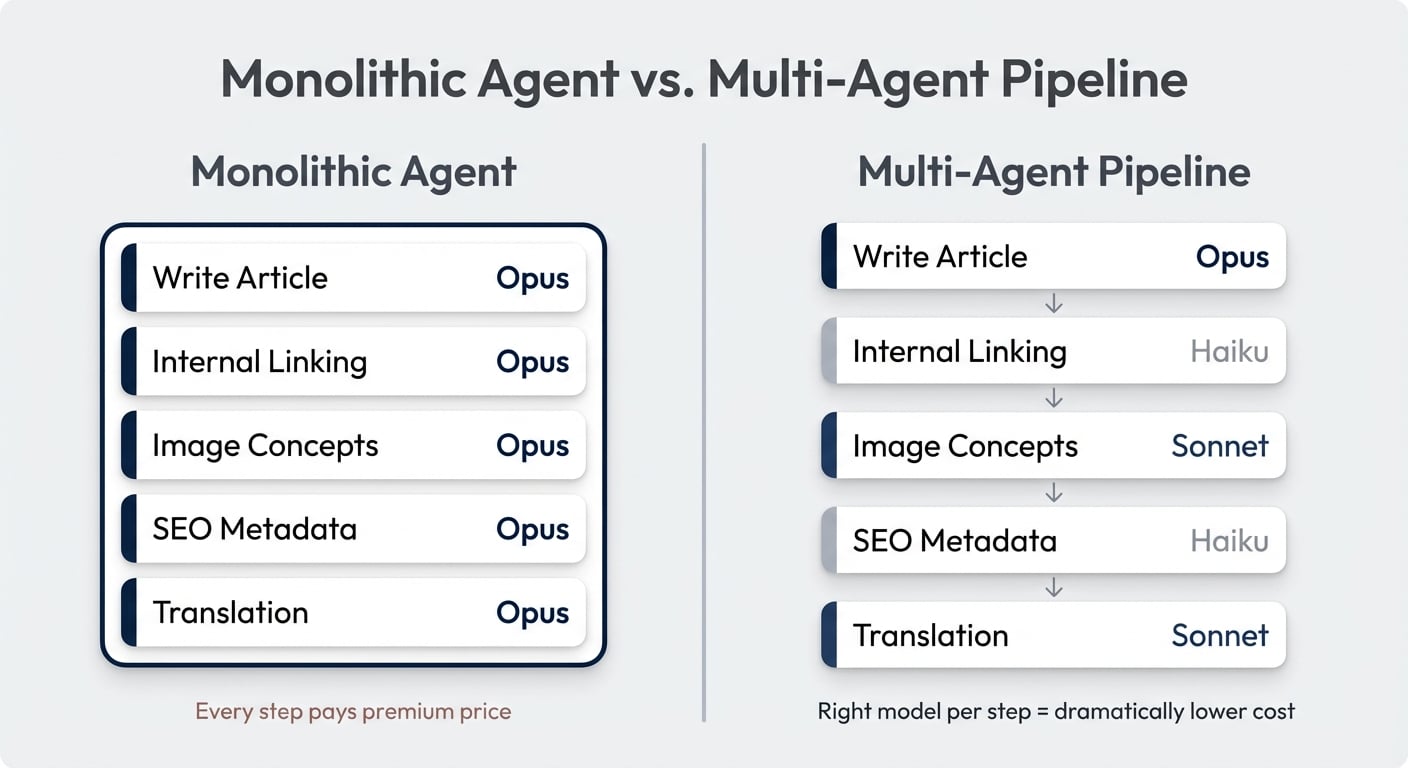
Yes, you can build these multi-agent orchestration flows in Notion today. I recently published a full tutorial on how to set that up.
The chaining works through database triggers: Agent A finishes its job and updates a property → Agent B triggers on that change. It’s not a direct agent-to-agent handoff — it’s system design. And it works remarkably well.
How Progressive Context Disclosure Cuts Your Token Bill
Switching to a cheaper model makes each token cheaper. Progressive context disclosure makes you use fewer tokens in the first place.
The default approach looks like this: you write a massive instruction set covering every edge case, every conditional, every reference document. The agent reads all of it. Then it starts executing step one. By the time it gets to step seven, it’s carrying this enormous context window — and every single step is more expensive because of the accumulated baggage.
Progressive context disclosure flips this. Give the model only as much context as it needs for the next specific step.
Three things happen:
- Better output. The agent is more focused. Less noise, fewer distractions, more accurate results.
- Cheaper early steps. If the full context is, say, 50,000 tokens but step one only needs 5,000 — you just saved 90% on that step’s input cost.
- Conditional loading. Some context is only occasionally relevant. Why load your affiliate link database into every single blog post run when half your articles never mention an external tool?
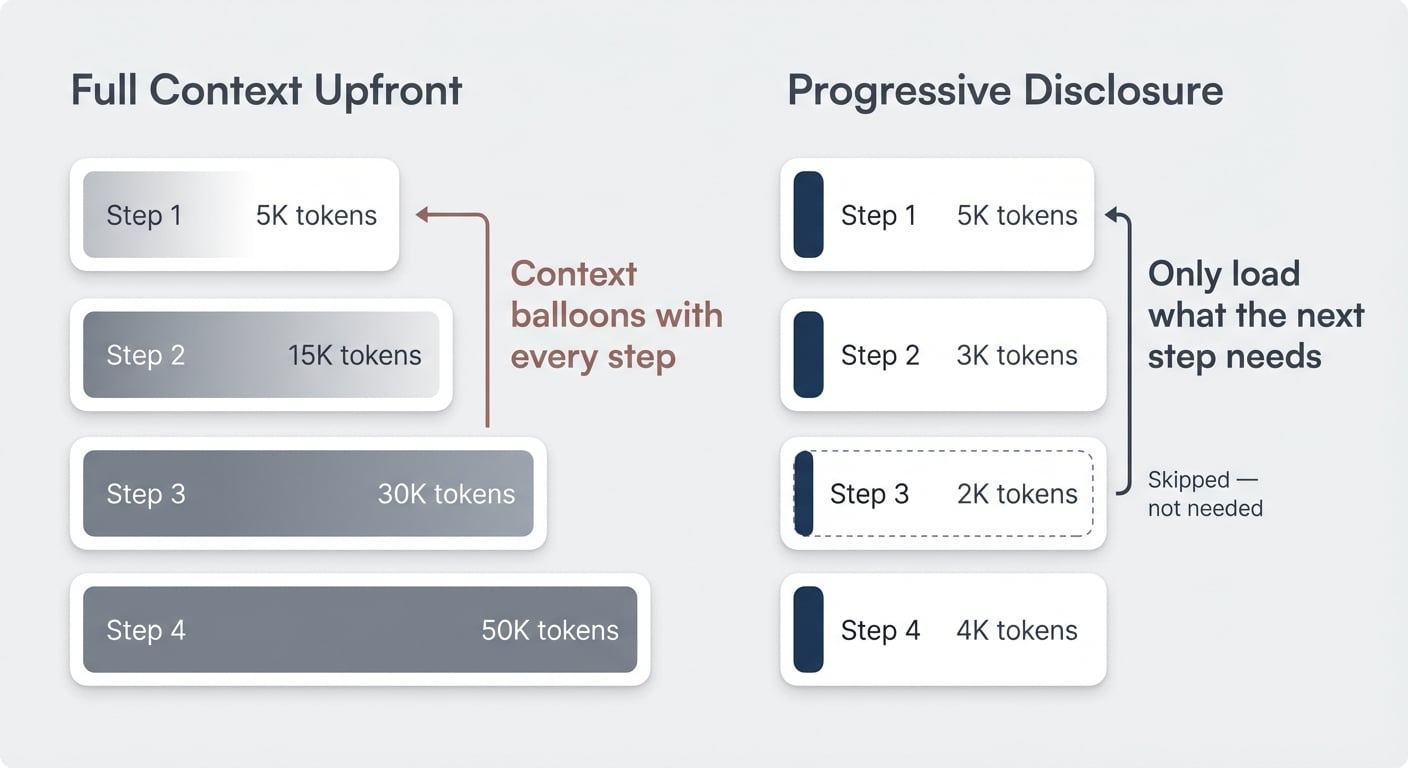
Our link optimiser does exactly this. Step three of its instructions says: check whether the article mentions any products. If yes, load the affiliate reference page. If not, skip it entirely. Most runs never touch that context.
Multi-agent architectures get this benefit naturally. In our content pipeline, the transcript (the longest document by far) is only ever read by the first agent. The link optimiser, the metadata agent, the translator — they only read the finished blog post. Much shorter. Much cheaper.
One monolithic agent doing the same workflow would carry the entire transcript through every step, ballooning the context window and burning through tokens at every turn.
Watch Your Output Tokens Too
This one’s easy to overlook. Output tokens are significantly more expensive than input tokens across all models. If your agent writes a half-page report when all you need is a status line confirming the job is done, you’re paying for words nobody reads.
You can’t always control this — a blog-writing agent has to produce a blog post. But for routing agents, classification agents, data extraction agents? Be explicit in your instructions about output format and length. “Respond with the assigned owner’s name and the ticket ID. Nothing else.” That kind of precision adds up.
Does This Even Need AI? The Deterministic Workflow Check
This principle might reduce your AI bill the most — because the answer might be “don’t use AI at all.”
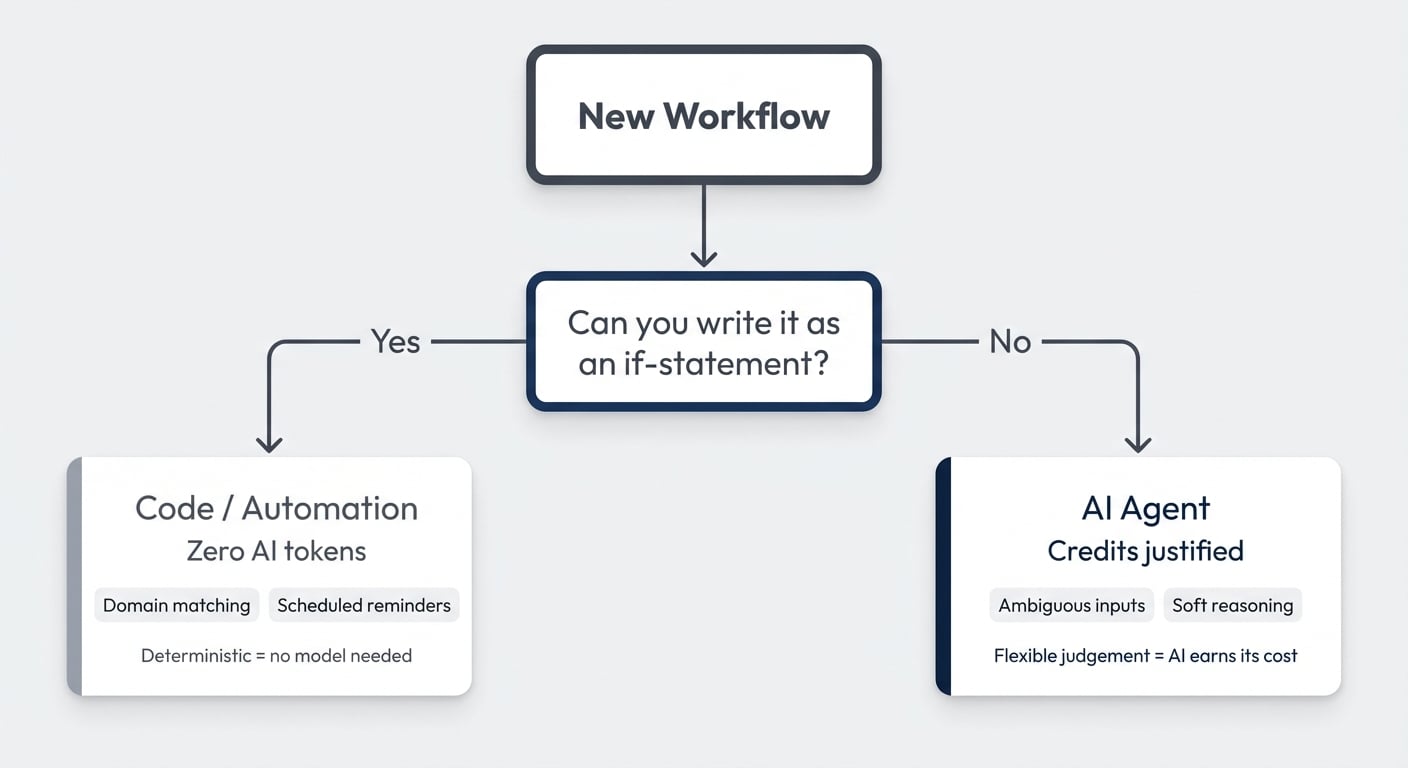
Deterministic means the workflow follows hard rules. If this, then that. No judgement required. That’s not a job for AI. That’s a job for code or no-code automations.
AI earns its cost when you need it to handle messy, flexible, ambiguous inputs — the kind of soft reasoning that used to require a human.
Two examples from our own workflows:
Example 1: Contact matching. Our meeting notes tool pipes contacts into Notion. We need to match each contact to a client in our CRM. An agent could do this. But the logic is simple: check the email domain of the new contact → see if any client has that domain → if yes, link them. That’s deterministic. Domain matching. No reasoning needed. A simple automation handles it perfectly.
Example 2: Client communication reminders. One of the things clients consistently praise us for is proactive communication. We’ve standardised this: every active client hears from us every 48 hours — Monday, Wednesday, Friday. An agent could remind us. But if the project is active and it’s Monday, the reminder should fire. No judgement call. Code.
The pattern: if you can write the decision as an if-statement, it doesn’t need a language model.
Now, two important nuances.
For team rollouts, start with AI anyway. If you’re running an AI activation campaign and getting people comfortable with agents, let them build AI flows even for things that could be deterministic. Learning AI is the priority at that stage. Cost optimisation comes after familiarity.
Use AI to build your deterministic flows. This is the behavioural shift. AI doesn’t have to build AI workflows. Describe your automation in Notion, ask your agent to write an automation prompt, paste it into a tool like Make, and AI builds the deterministic flow for you. Five minutes. No afternoon-long configuration sessions. The automation runs without AI tokens. Best of both worlds.
Should This Be a Skill Instead of a Custom Agent?
One more thing. A lot of what I currently see built as custom agents shouldn’t be agents at all. They should be skills for your personal agent.
Here’s the current reality: your personal agent — the one in your sidebar — is included in your plan. Free. You can run it on Opus 4.8 for most knowledge work. Custom agents cost credits.
So the threshold question for any custom agent is: does this need to run without me?
Three checks:
| Question | If Yes → Agent | If No → Skill |
|---|---|---|
| Is there a reliable, recurring trigger? | Email received, status changed, every Monday 9 AM | You’re starting it manually from chat anyway |
| Does it remove your attention entirely? | Ticket routing: no one monitors the channel anymore | You still have to review, copy-paste, or approve |
| Does it enable scale? | You can now handle 10x the volume | You’re doing the same volume, just slightly faster |
My biggest red flag: someone builds a custom agent and then uses it through the chat interface. With very few exceptions (permission isolation, team-shared workflows), that should be a skill. You’re already sitting in front of the computer. You’re already triggering the task. Run it through your personal agent on Opus for free.
Here’s a real example. I pull my LinkedIn posts into Notion weekly and have a skill that reformats them for cross-posting to Medium. This could be an agent — it’s on a schedule, it’s a recurring task. But I still have to manually paste the result into Medium because they don’t have an API. Whether the page is pre-formatted when I arrive or I run the skill and wait 10 seconds — that’s a two-minute difference. And I’m paying attention either way.
If it ran end-to-end without me? Auto-formatted and auto-published? Worth every credit. But until that last mile is automated, the skill saves me the tokens.
The crawl-walk-run principle applies here too. Start with skills. Get familiar with how AI handles your workflows. Build confidence in the output quality. Then graduate the proven, high-volume, truly autonomous flows to custom agents — and pay for credits knowing exactly what you’re getting.
I’m easily 10 times more productive than I was a year ago. But I’ve also noticed my human context window — the number of parallel AI threads I can hold in my head — is reaching its limits. So the next productivity jump won’t come from more skills. It’ll come from the right agents running the right jobs autonomously. Get started with Notion Consulting to build your own AI workflows. The key word being right.
Frequently Asked Questions
How do I change the model on my Notion custom agent?
Open your agent’s settings, scroll to the bottom under Advanced, and select Model. Pick the specific model that matches the task complexity. Avoid the Auto setting — it hands the model choice back to the agent, which removes your control over cost and behaviour. The same Advanced screen carries an Effort setting governing how much reasoning that model spends per run; leave it on its default unless a high-frequency agent is doing simple work, in which case lower it.
Is Haiku good enough for production Notion agents?
For targeted, repeatable tasks — absolutely. Haiku handles classification, formatting, data extraction, routing, and summarisation reliably. It’s a fifth of Opus’s cost. The rule of thumb: if the task doesn’t require creative reasoning or complex multi-step logic, Haiku (or Gemini Flash, or Minimax) will do the job.
How do Notion Credits work for custom agents?
Notion Credits cost $10 per 1,000 credits, shared across your workspace, and reset monthly without rollover. Credit consumption depends on the model used, how much context the agent processes, how many tools it calls, and how many steps the task requires. Simpler agents on smaller models use fewer credits per run.
What’s the difference between a Notion skill and a custom agent?
A skill is a reusable instruction set that runs through your personal agent — which is included in your plan at no extra cost. A custom agent runs autonomously on triggers and costs Notion Credits. Use skills for tasks you trigger manually. Use agents for tasks that need to run without your attention.
Can I chain multiple Notion agents together?
Yes. Agents can’t call each other directly, but you can chain them through database triggers. Agent A finishes its task and updates a property or creates a page → Agent B triggers on that change. This is how multi-agent orchestration works in Notion today. Here’s a full walkthrough of how to set it up.