Last updated: 20 July 2026
Relay migration has suddenly become urgent: Relay.app is shutting down, and you need to export and rebuild your workflows before they disappear. Free accounts remain available until 15 August 2026, while paying customers have until 14 September 2026—but you should start now rather than attempt a rushed one-to-one rebuild during the final week.
The good news? This is an opportunity to clean up your automation stack and move towards workflows that are easier to scale, cheaper to run and far more flexible.
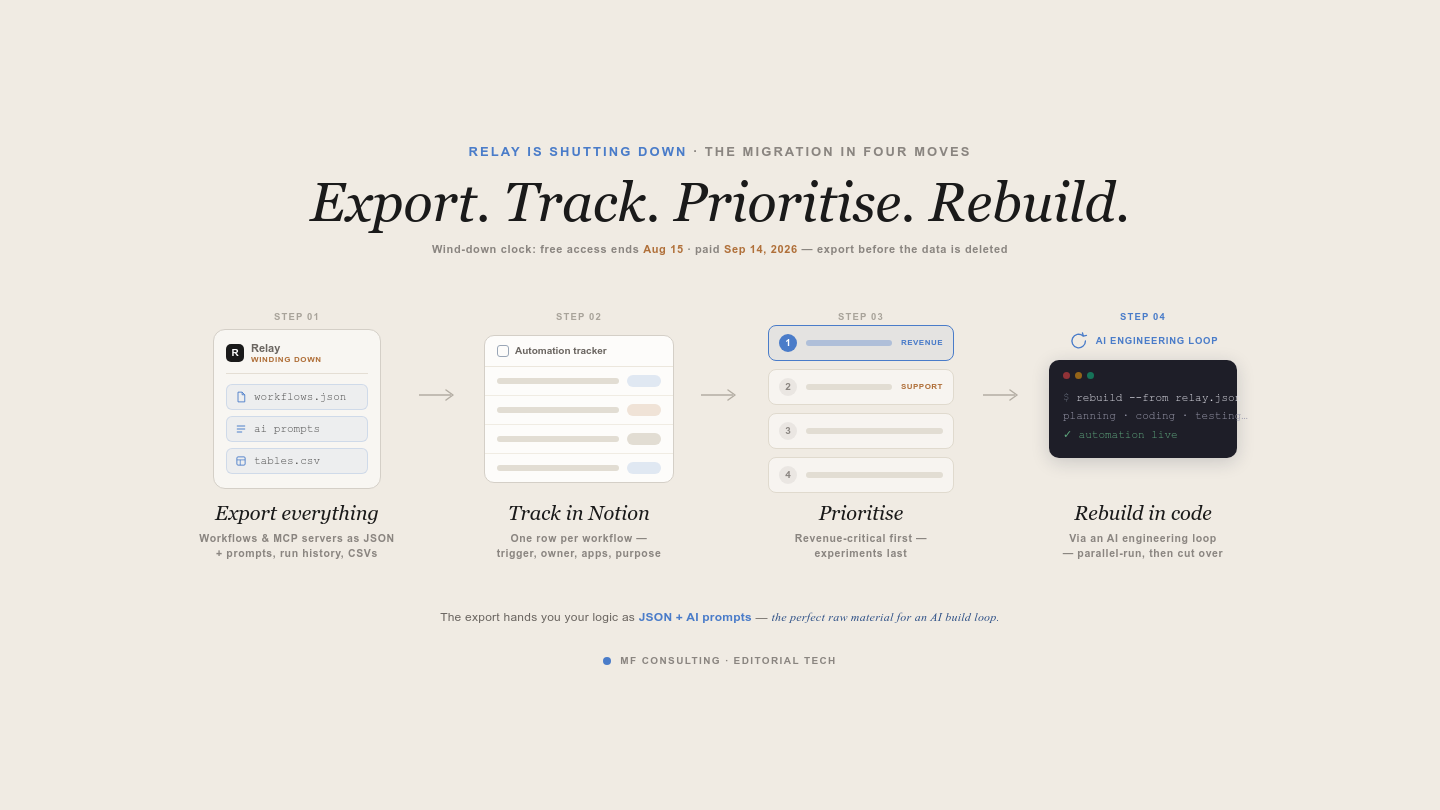
The Relay migration in four moves: export everything, track it in Notion, prioritise by impact, then rebuild in code.
When Is Relay.app Shutting Down?
Relay.app will stop working for free users after 15 August 2026 and for paying customers after 14 September 2026.
According to Relay’s announcement, your existing workflows will continue to run during the wind-down period. Paid customers receive 60 days of free usage, while annual customers should receive pro-rated refunds.
More importantly, Relay provides an export tool for your workflows and data. That export is the starting point for the migration process.
Do not wait until the deadline. Even a simple automation can rely on credentials, prompts and edge-case logic that take time to understand and rebuild safely.
Why Shouldn’t You Simply Move To Another No-Code Tool?
Moving everything directly from Relay to another visual automation builder may solve the immediate problem, but it could leave you facing the same limitations again.
Relay was one of the few no-code tools I still enjoyed using in 2026. Its AI builder made small workflows genuinely quick and convenient. But the wider value proposition of no-code automation is getting harder to defend.
No-code tools originally won because they offered three huge advantages:
- You could ship faster than with custom development
- Non-technical people could build workflows themselves
- Smaller automations became affordable for smaller organisations
AI-assisted coding changes all three.
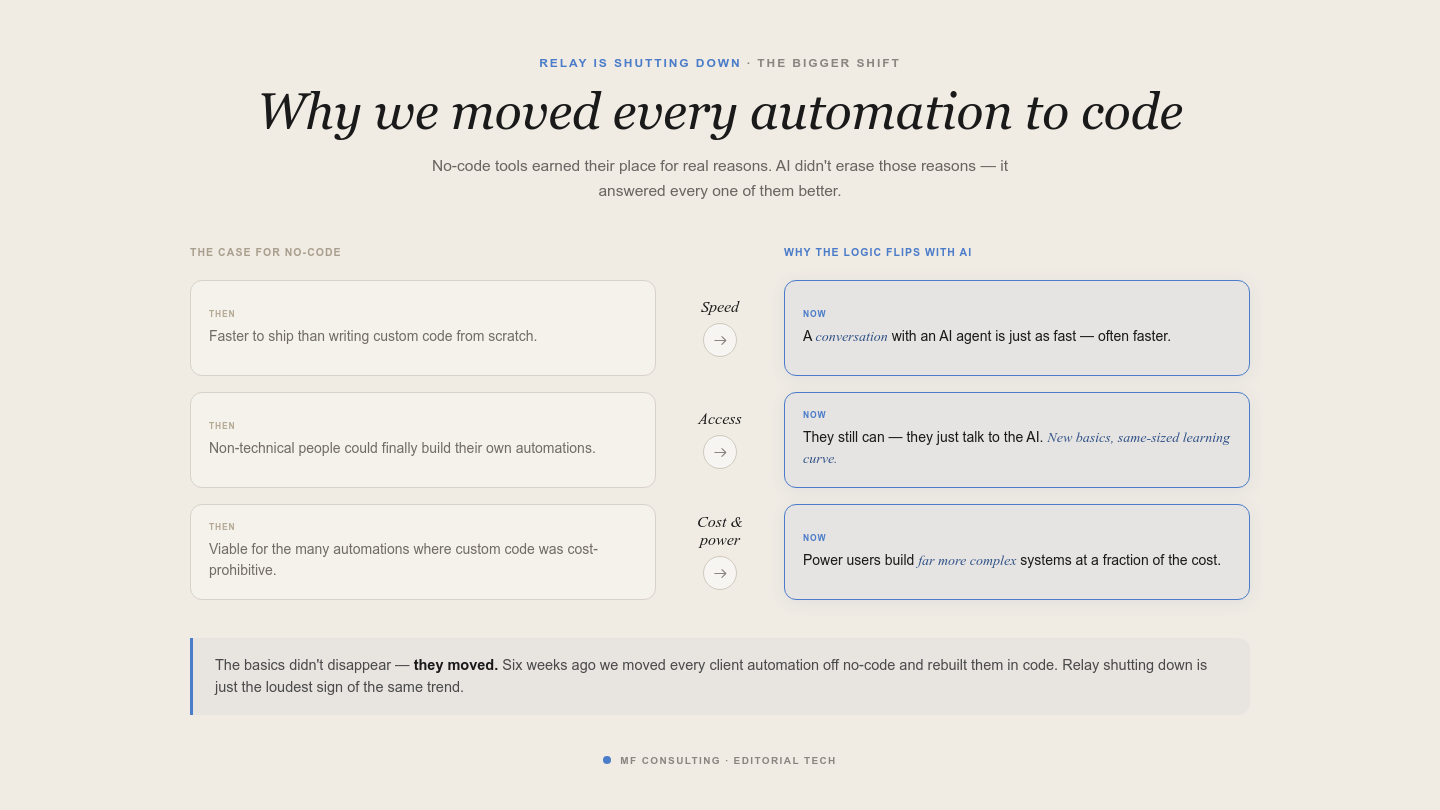
No-code won on speed, accessibility and cost. AI-assisted coding now answers all three — which is why we moved every client automation to code.
You can now explain the business logic to an AI coding agent and let it handle much of the implementation. You still need to understand triggers, actions, APIs and error handling—but you needed to learn similar principles to build reliable no-code workflows.
For me, a 30-minute conversation with an AI agent now often replaces two hours of clicking around a visual canvas.
Code also gives you more room to handle edge cases. In client projects, no-code workflows often forced compromises: an automation could only run once a day, or one awkward scenario had to remain manual because supporting it was too expensive.
AI-engineered code does not remove complexity. It simply makes handling that complexity much more accessible.
Pro Tip: Do not migrate because code sounds more impressive. Migrate when it gives you better control, lower running costs or a workflow that the old tool could not support reliably.
How Do You Export Your Relay Workflows?
You can export your Relay workspace from the shutdown notice inside your account. The download contains the information you need to understand and rebuild your current setup.
Relay’s official export documentation shows that the workspace download can include workflow files, run data, prompts and history.
To get started:
- Log into your Relay workspace
- Open the shutdown notice or your workspace settings
- Click Export Data
- Wait for Relay to prepare the archive
- Download and store the ZIP file somewhere secure
- Unzip it inside a dedicated migration project folder
Treat the export as sensitive. It can reveal internal business logic, AI prompts, customer data and the tools connected to your workflows.
The export does not rebuild anything for you. Its job is to preserve your current setup and give an AI agent enough context to help you map it.
How Can You Audit Your Relay Setup In Notion?
Turn the Relay export into a structured Notion migration tracker before rebuilding individual workflows. This gives you one place to understand what exists, decide what still matters and track the migration.
You can analyse the export with Codex, Claude or Notion AI. Give the AI access to the unzipped files and ask it to identify the entities and relationships before creating anything.
A useful architecture can include:
- Workflows: One entry for every Relay automation
- Systems: The tools touched by each workflow, such as Notion, Slack or Stripe
- Dependencies: Connections between workflows and shared infrastructure
- AI Components: Prompts, models and other non-deterministic steps
- Areas: The business functions supported by each workflow
You probably do not need to import every historical run as a separate database entry. Run history helps you identify active workflows and investigate failures, but a full run database can add noise before it adds value.
In my own export, the AI found 66 active workflows with 371 steps, including 46 AI steps. That immediately turned an unclear migration into a finite project.
Pro Tip: Ask the AI to present its proposed Notion architecture before it creates anything. A five-minute schema review is much faster than cleaning up several badly designed databases.
Which Relay Workflows Should You Rebuild First?
Rebuild workflows based on business impact and migration effort—not the order in which they appear in the export.
The shutdown is a useful forcing function because most automation accounts contain flows that nobody remembers creating. Some are inactive, some duplicate newer processes and some solve problems that no longer exist.
For every workflow, decide:
- Is it still active?
- What breaks if it stops?
- How often does it run?
- Which people or customers depend on it?
- Does it use AI, or is it deterministic?
- Which tools and credentials does it require?
- How difficult will it be to test?
Start with one or two workflows that matter but can tolerate a short interruption. You will learn how your new infrastructure works without putting a critical process at unnecessary risk.
Do not blindly port every flow one to one. Delete what you no longer need, combine duplicates and improve weak business logic while you already have the workflow open.
Where Should Your Code-Based Automations Run?
Your rebuilt automation needs an always-on environment, which can be your own machine, a rented cloud server or Notion Workers.
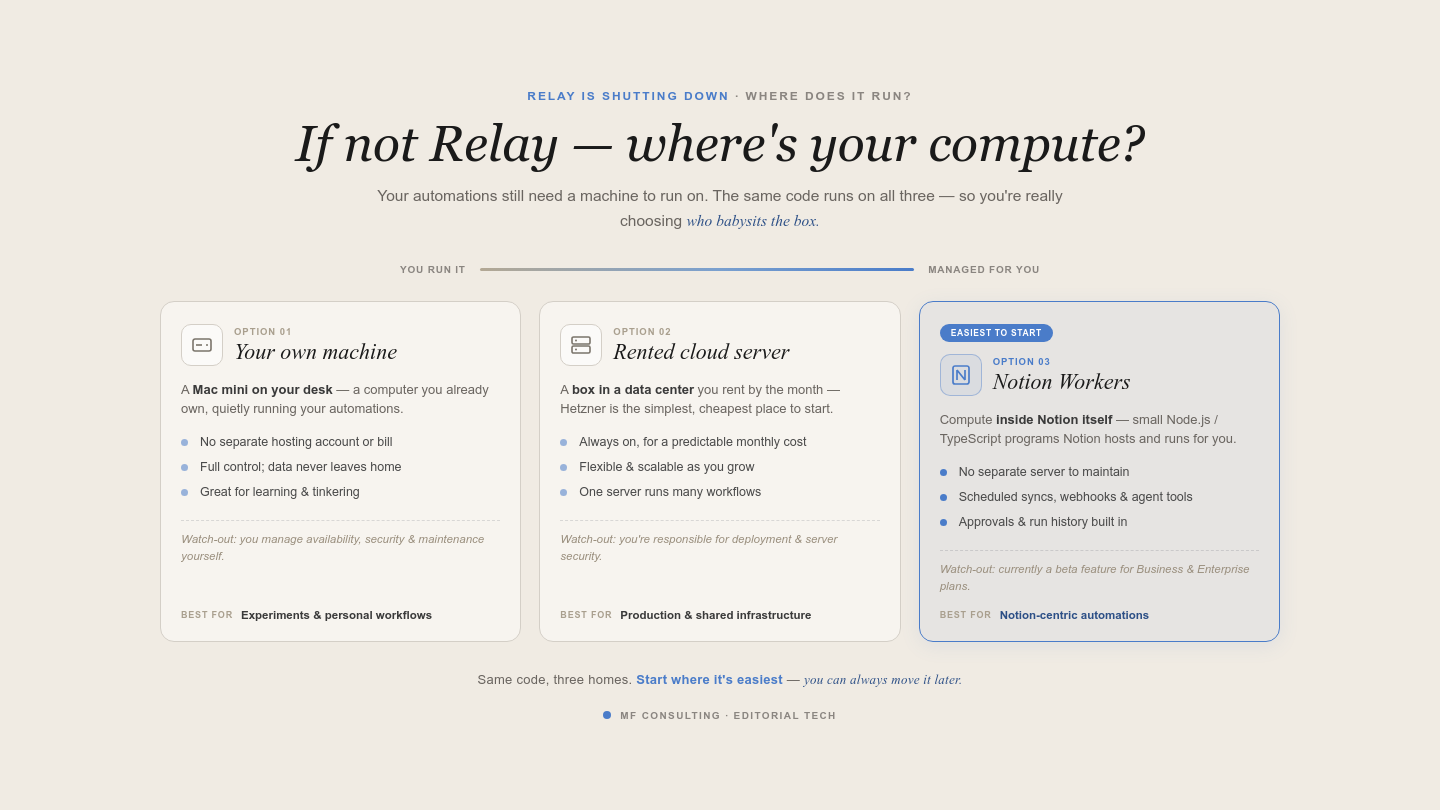
Three homes for your code, from most hands-on to fully managed: your own machine, a rented cloud server such as Hetzner, or Notion Workers.
A script running on your laptop stops when the laptop sleeps or disconnects. That might be fine for experiments, but it is rarely a good production setup.
The main options look like this:
| Hosting Option | Best For | Main Advantage | Main Limitation |
|---|---|---|---|
| Local machine or Mac mini | Experiments and personal workflows | Full control with no separate hosting account | You manage availability, security and maintenance |
| Cloud server such as Hetzner | Production workflows and shared infrastructure | Flexible, scalable and cost-effective | You are responsible for deployment and server security |
| Notion Workers | Notion-centric automations, syncs and integrations | Notion hosts and runs the code for you | Currently a beta feature for Business and Enterprise plans |
Notion Workers are small Node.js and TypeScript programs deployed through the Notion CLI. Notion hosts them, so you do not need to maintain a separate server.
They can run scheduled syncs, receive webhooks and provide tools to Custom Agents. That makes them particularly useful when Notion sits at the centre of the workflow.
A cloud server gives you more freedom when several systems share the same infrastructure or the automation needs capabilities outside the Workers environment. I use Hetzner because a small server can run many workflows for a predictable monthly cost.
How Do You Rebuild Each Workflow With AI?
Use a structured AI engineering loop for every workflow: check feasibility, document the requirements, resolve ambiguity, create a plan and only then build.
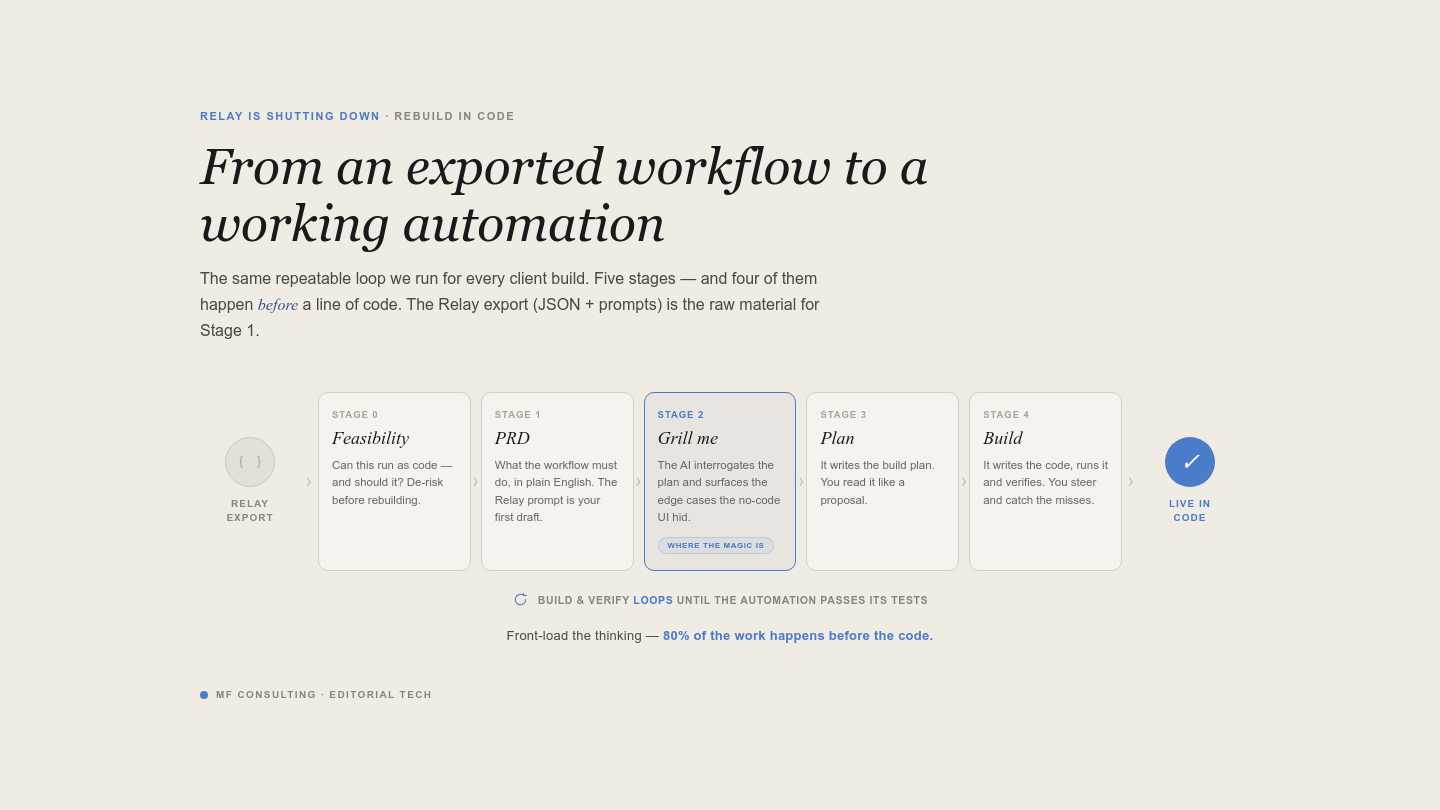
The AI engineering loop: Feasibility → PRD → Grill Me → Plan → Build — four stages happen before any code is written.
The biggest mistake is dropping a Relay export into an AI conversation and saying, “Build this automation.” That usually produces plausible-looking code without enough understanding of the business rules.
1. Check Feasibility
Confirm that every connected service provides the access you need.
A workflow that ran in Relay has already proven that the logic is possible, but direct API access can introduce new constraints. LinkedIn is a classic example: parts of its API are difficult to access without approved organisational permissions.
Ask the AI to research each service, authentication method, trigger and rate limit before implementation.
2. Write A Short PRD
Document what the workflow should do, when it should run and how you will know that it worked.
The Relay export provides a strong starting point. However, migration is also your chance to question old requirements and add missing safeguards.
3. Run A “Grill Me” Session
Ask the AI to interview you until no important ambiguity remains.
This is where your input matters most. The AI might need to know what happens after a customer replies, whether retries should send duplicate messages or how much downtime the cutover can tolerate.
Do not skip this step. Clear answers here prevent hours of troubleshooting later.
4. Create An Implementation Plan
Ask the AI to turn the agreed requirements into a detailed build plan.
The plan should cover the architecture, files, authentication, testing, logging, error handling and deployment. It becomes the handover document for the implementation session.
5. Build In A Fresh Session
Start a clean AI session and give it the approved plan.
Separating discovery from implementation keeps the context focused. The building agent receives the decisions it needs without carrying the entire exploratory conversation.
Test with safe data before switching off Relay. For important workflows, run both systems in parallel and compare the results. For lower-risk flows, a short cutover with close monitoring may be enough.
What Does A Real Relay Migration Look Like?
A CRM follow-up sequence is a useful first migration because it delivers clear business value without requiring AI judgement.
The workflow runs once a day and checks a Notion leads database for people who are due a follow-up. Based on the current stage, it sends the correct email, updates the lead and posts a notification in Slack.
The business logic is straightforward:
- Trigger the workflow at a fixed time
- Find leads whose next follow-up date is overdue
- Exclude leads who have replied or moved to another stage
- Select the correct follow-up email
- Send the message through Google
- Update the lead in Notion
- Notify the team in Slack
- Mark unresponsive leads as ghosted after the final step
This flow should remain deterministic. You do not need to pay for an LLM call to decide whether three days have passed or whether a status matches a fixed value.
That distinction matters. Use AI where the workflow needs interpretation, classification or generation. Use normal code for dates, conditions and predictable transformations.
Pro Tip: Keeping deterministic logic outside an LLM makes your automation cheaper, faster and easier to test.
What Is The Relay Migration Checklist?
A safe Relay migration preserves the current setup, removes obsolete workflows and rebuilds the remaining flows through a documented engineering process.
Use this checklist to track the full migration:
The first migration will feel slower because you are setting up authentication and infrastructure. The second will be faster. Once the base layer exists, improving an automation becomes a conversation with your AI coding agent rather than another afternoon on a visual canvas.
Want to stay ahead of everything happening in Notion and automation? Get 41 free Notion resources and join the weekly newsletter.
💼 Need the support of certified Notion Consultants? My team and I are here to help!
Frequently Asked Questions
When Will Relay.app Shut Down?
Relay.app will shut down for free users after 15 August 2026 and for paying customers after 14 September 2026. Export your workflows and data before the relevant deadline so you have enough time to inspect and rebuild them.
What Does The Relay Export Include?
Relay’s export can include workflow definitions, prompts, run data and history. The exact files depend on what exists in your workspace, so inspect the archive before designing the migration system.
Should You Migrate From Relay To Make Or n8n?
You can, and it may be the quickest option when your team already knows the platform. But the shutdown is also a good opportunity to compare visual no-code tools with AI-engineered code based on cost, flexibility, maintainability and API access.
Do You Need To Know How To Code To Replace Relay?
You do not need to write every line yourself, but you still need to understand the workflow’s business logic and basic automation principles. AI coding agents can handle much of the implementation, while you define the requirements, answer questions and verify the result.
Can Notion Workers Replace Relay.app?
Notion Workers can replace many Relay workflows that centre on Notion, including scheduled syncs, webhook-driven integrations and custom business logic. They will not automatically fit every use case, so check the required services, authentication and runtime constraints before choosing them.