A self-healing wiki is a knowledge base that gets a little smarter every time someone asks it a question, and in the age of AI it might be the most valuable system you can build in Notion. Instead of a static pile of documents that slowly goes stale, you build a living wiki that listens to the questions your team actually asks, answers them, and quietly flags whatever it could not answer well. Over time it documents exactly the things that matter most, closes its own gaps, and keeps your knowledge fresh — which is the difference between a wiki people trust and one they quietly abandon. The best part is that you can build a working version in Notion in a single afternoon, even starting from a blank page. Here is how the concept works and how to set it up step by step.
What Is A Self-Healing Wiki?
A self-healing wiki is a knowledge base optimised around the questions people actually ask, so it improves with every single query.
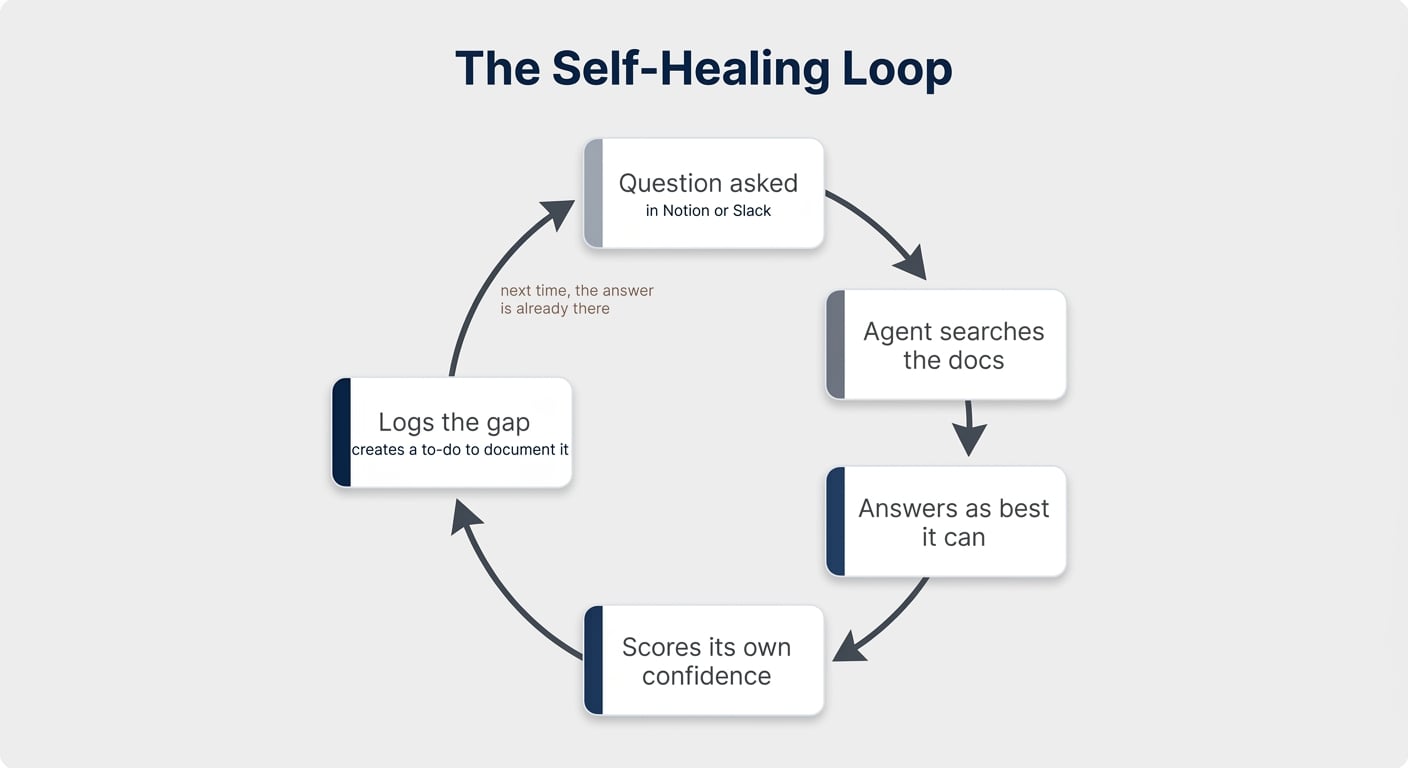
It runs on one simple loop:
- Someone asks a question, in Notion or through Slack.
- An AI agent searches your documentation to see how well it can answer.
- It answers the question as best it can.
- It scores its own confidence and logs any gap it found.
That last step is the magic. When the answer is weak or undocumented, the agent creates a log entry — an instant to-do that says this needs to be written down.
The next time the same question comes in, the answer is already there, and the loop short-circuits.
Why Do Most Knowledge Bots Fall Short?
Most knowledge bots stop at the answer. A self-healing wiki adds a second step that makes the whole system compound.
By logging how well it could answer, your wiki builds a running list of exactly what is missing — ranked by what people keep asking. You are no longer guessing what to document; your team tells you, simply by asking questions.
Here is how the two approaches compare:
| Capability | Standard Knowledge Bot | Self-Healing Wiki |
|---|---|---|
| Answering a question | Answers, then stops | Answers, then scores its own confidence |
| Handling gaps | Ignored | Logged automatically as a to-do |
| What gets documented | Whatever someone remembers to add | The questions people actually ask |
| Over time | Slowly goes stale | Gets better with every question |
| Staleness | Manual cleanup | Agent flags drift (e.g. against Slack) |
This matters more than ever because agents cannot hold context in their heads the way a person can. They need it written down, and a wiki that documents the right things in the right order is what makes your AI genuinely useful.
💡 Pro Tip: The compounding loop is the whole point. Answering questions is table stakes — logging the gaps is what quietly turns your wiki into a system that improves on its own.
What Do You Need To Build One?
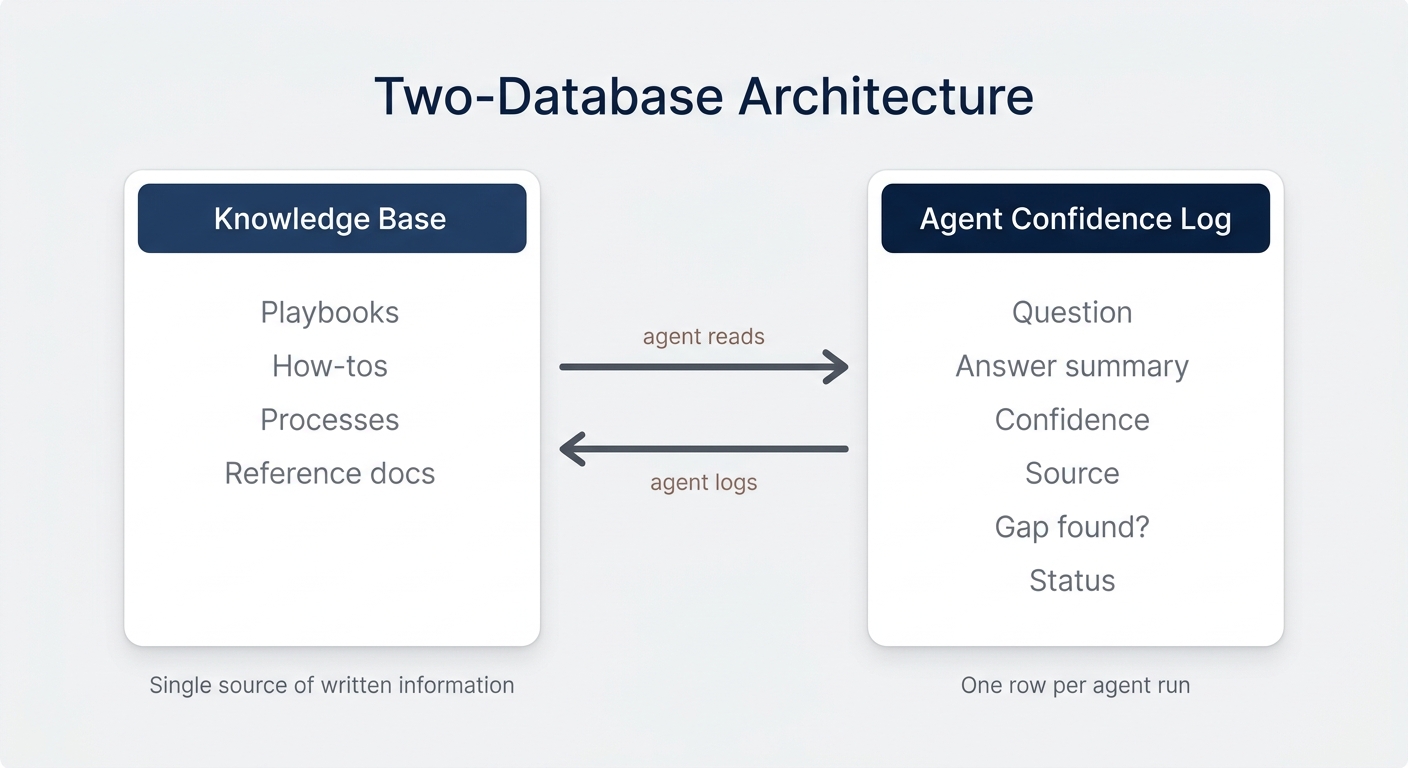
You need just two databases: a Knowledge Base and an Agent Confidence Log.
The Knowledge Base is your single source of written information — playbooks, how-tos, processes, and reference docs. The Agent Confidence Log is where the agent records every run: the question, a summary of its answer, its confidence, the source, whether it found a gap, and the resolution status.
Keep your knowledge in one place. One of the first things we check in a client workspace is whether they have one database per object, or seven different task databases scattered around.
💡 Pro Tip: Resist the urge to split playbooks, processes, and notes into separate databases. If it is written information and does not need its own dedicated properties, it belongs in your knowledge base — so the agent only ever has one place to search.
Anything with a natural home elsewhere (like meeting notes with their own properties) can stay separate. Everything else goes in the one knowledge base.
How Do You Build A Self-Healing Wiki In Notion?
You can build the whole thing with Notion AI in a few minutes, even from a blank page. Here is the process.
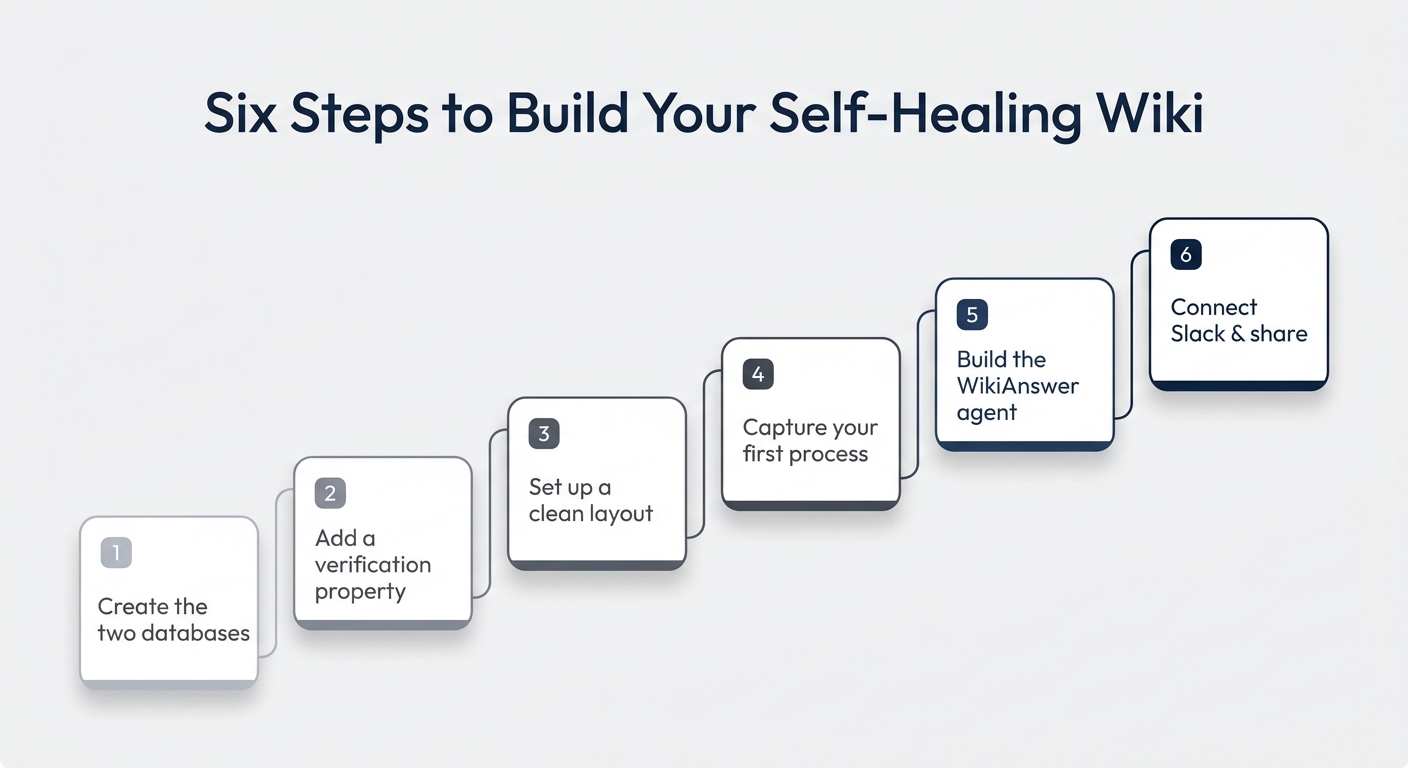
Step 1: Create The Two Databases With AI
Open Notion AI and describe what you want: two linked databases — a knowledge base and a confidence log — with the properties you need and a two-way relation between them. Keep the properties lean; for a first version, fewer is better.
Ideally, create them inside your central backend rather than on a random page, so everything stays organised and scalable.
💡 Pro Tip: Always use a flagship model for build steps like this — never “Auto”. If your smartest model struggles to follow your instructions, that is a signal to simplify, not to switch models.
Step 2: Add A Verification Property
Add a verification property to your knowledge base. A verified page is a strong signal to Notion AI that it should prefer that content when answering.
Make sure you do not already have an owner property before adding verification, as Notion will create one for you.
Step 3: Set Up A Clean Layout
Switch your knowledge base layout to tabbed and add a second tab for your confidence log entries — call it something like “AI Runs”.
Pin the properties that matter (status, owner, verification, category), group the log by whether a gap was identified, and sort by timestamp descending so the newest questions are always on top.
Step 4: Capture Your First Process
Drop a real process into the knowledge base so the agent has something to work with. You can write it directly, or capture it with a screen-recording tool that turns a click-through into a ready-to-paste guide.
Whatever you use, verify the new page for the next 30 days — that freshness signal increases the chance the AI leans on it.
Step 5: Build The WikiAnswer Agent
Create a custom agent and tell it how to behave. The key instructions:
- Answer user questions using the knowledge base, and the web for general questions.
- Never invent internal process details, and always flag when an answer is based on general knowledge rather than your documentation.
- After every run, log the run in the confidence log with a self-assessment: not at all, partially, or great.
Give it view access to the knowledge base, edit access to the confidence log, and set a specific model — again, never “Auto”.
💡 Pro Tip: For a scalable setup, put the answering logic in a skill and keep the agent instructions thin — just a pointer to the skill. Separating instructions from skills is what lets your agents grow without becoming a mess.
Step 6: Connect Slack And Share With Your Team
Add a Slack trigger so the agent replies whenever a question is posted in a channel like your #ask-anything channel. Make sure the channel is added under the agent’s tools with read and reply access.
Then share the agent with your team. Now you have two entry points: people can mention the agent on any Notion page, or just ask in Slack.
How Do You Close The Loop?
Create a view in your confidence log filtered to entries where a gap was identified. That is your live documentation backlog.
From there you can assign each gap to someone, generate tasks, or point the agent back at the gap to draft the missing article. Every closed gap makes the next answer better.
How Can You Take It Further?
Once the basic loop runs, you can layer on more compounding behaviour:
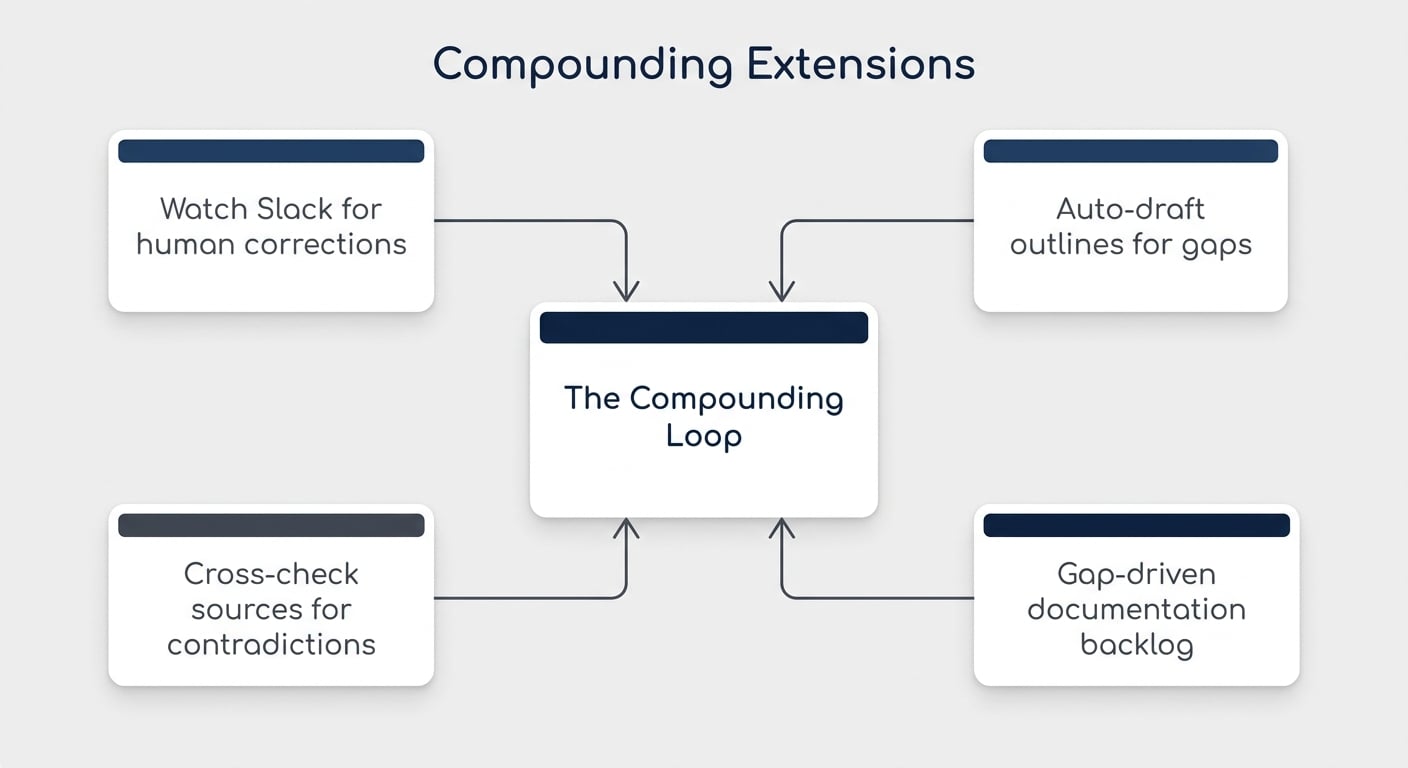
- Have the agent watch Slack and auto-update a doc when a human corrects its answer.
- Ask it to drop a suggested outline in the page body whenever it logs an incomplete entry, so the documentation is easier to finish later.
- Let it cross-check sources and surface contradictions or stale content.
Each of these is another small loop that makes the system stronger. The more of them you find, the more your knowledge base compounds — and that is where AI-enabled workflows get genuinely powerful.
💼 Need the support of certified Notion Consultants? My team and I are here to help! → matthiasfrank.de/en/notion-consulting
Want a proven framework for rolling Notion out across your whole team? The free Notion for Teams course walks you through seven essential Notion frameworks — including knowledge management — in five minutes each.
Frequently Asked Questions
What Is A Self-Healing Wiki In Notion?
It is a knowledge base paired with an AI agent that answers questions and logs how well it could answer each one. When the agent finds a gap, it records it — creating a running list of exactly what your team needs documented next.
How Many Databases Do I Need For A Self-Healing Wiki?
Just two: a Knowledge Base for your written documentation, and an Agent Confidence Log where the agent records each question, its answer, its confidence, and any gaps. You can expand later, but two is enough to start.
Do I Need To Code To Build This?
No. You can build the entire system with Notion AI by describing what you want in plain language, then create a custom agent to run the loop. No external tools or code required.
How Does The Wiki Stay Up To Date?
The agent flags low-confidence answers and documentation gaps after every run, which becomes your backlog. You can also have it scan Slack to spot where your documented process has drifted from how the team actually works.
Why Add A Confidence Score At All?
Because the score is what makes the system compound. Without it, you have a bot that answers questions; with it, you have a wiki that tells you what to document next and gets measurably better with every question asked.