A Notion knowledge agent should do more than answer questions. The best setup turns every question into a chance to improve your documentation — finding gaps, routing fixes and keeping your company wiki useful as your team grows.
That is the idea behind Nimbus, the knowledge agent I built for this workflow.
On the surface, it looks like a simple ask-anything bot. Underneath, it combines a custom agent, reusable skills and four connected databases to create a compounding knowledge loop.
Here is how the system works, why I built it this way and what you should consider when creating your own.
Why Is A Basic Ask-Anything Bot Not Enough?
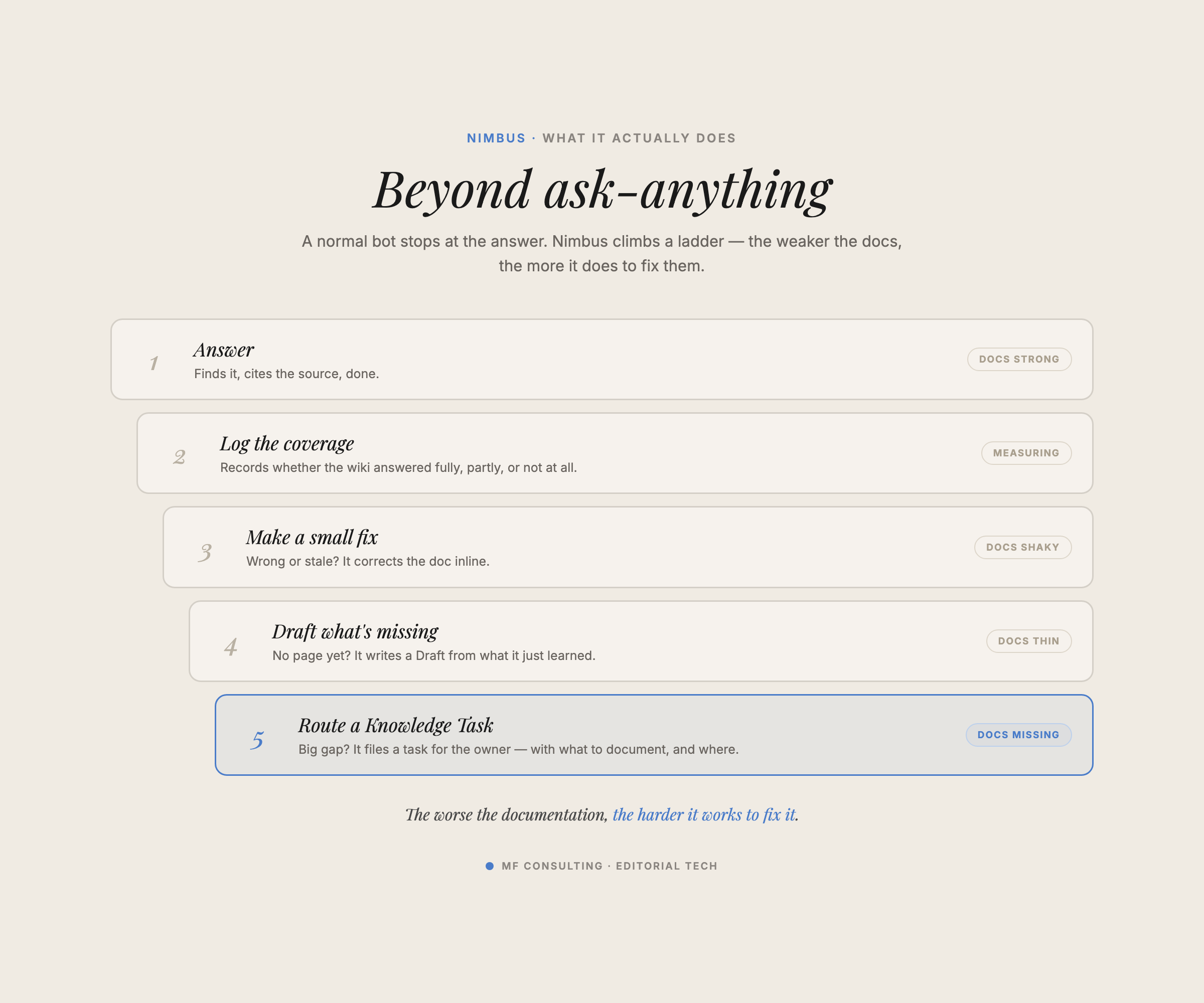
A basic ask-anything bot retrieves information and gives you an answer. A proper knowledge agent also notices when the answer is missing, uncertain or outdated — and starts the process of fixing it.
That distinction matters because most company wikis are incomplete.
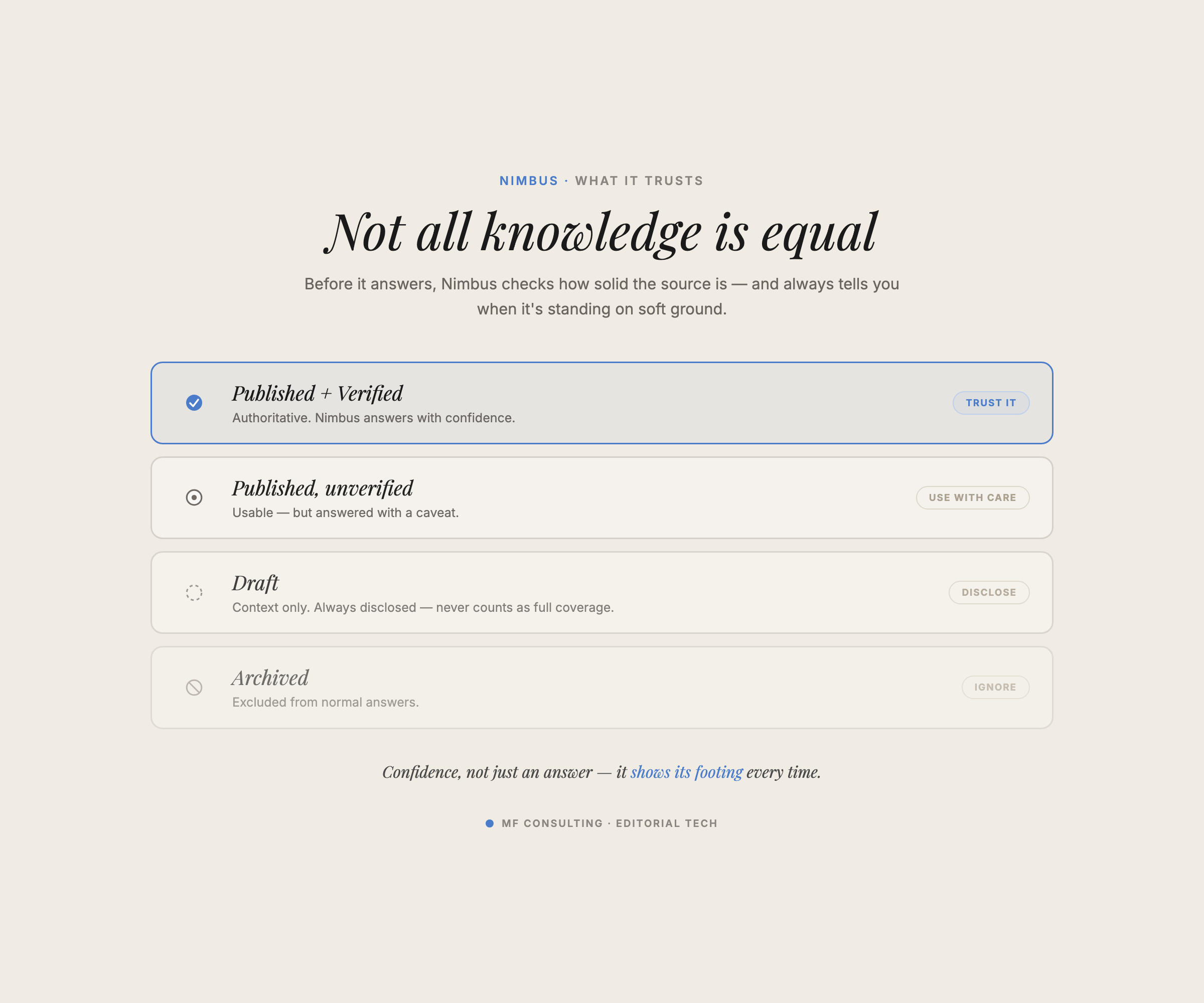
Some information is published and verified. Some lives in an unfinished draft. Some exists only in a product system, a Slack conversation or a team member’s head.
Your agent needs to recognise those differences instead of presenting every source with the same confidence.
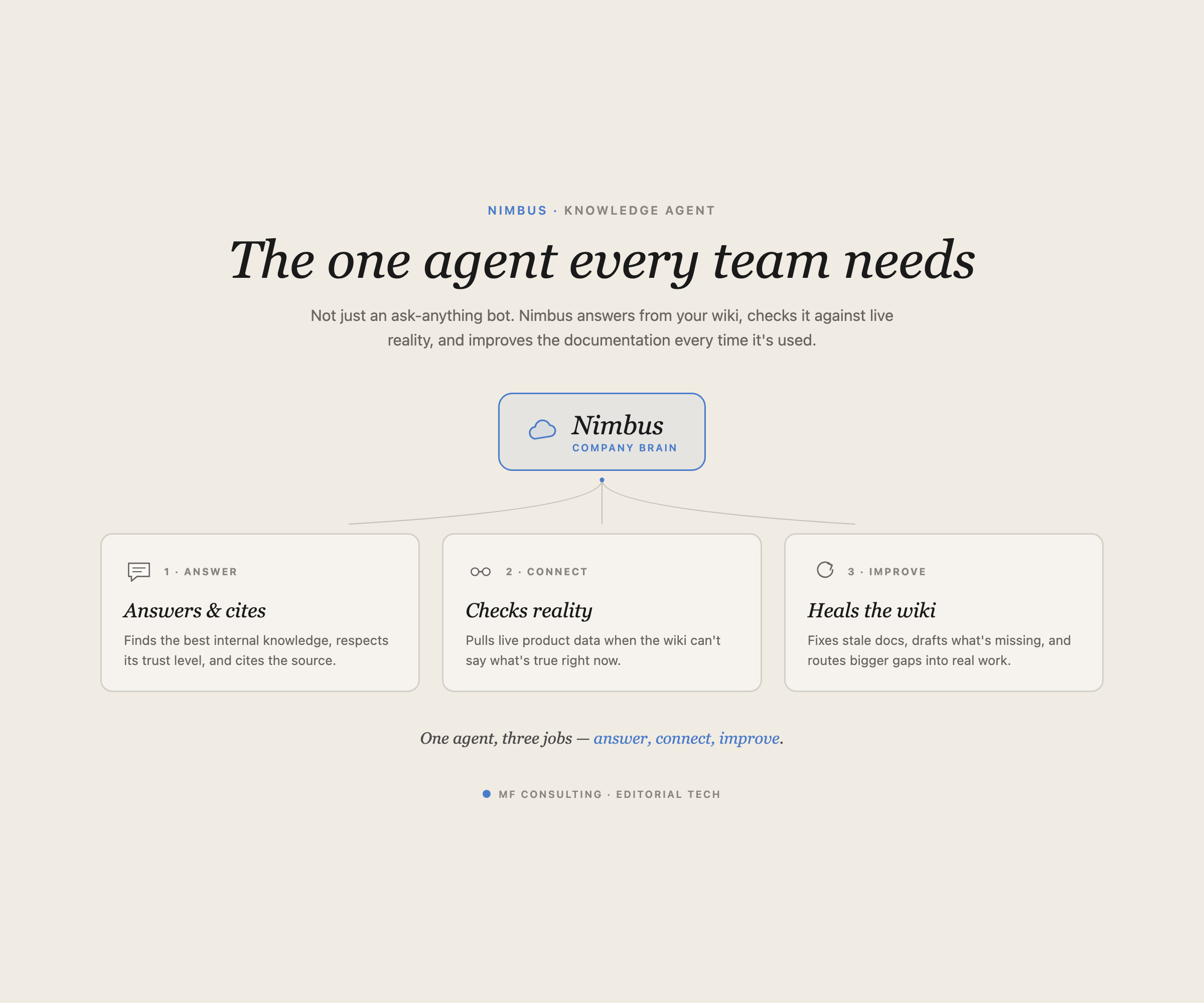
Nimbus therefore handles three jobs:
- Answer and cite knowledge from the company wiki.
- Check operational systems when the wiki cannot provide a current answer.
- Improve the wiki by making safe corrections or creating tasks for missing documentation.
The goal is not merely faster search. It is a system in which every real question helps the knowledge base get better.
What Should A Notion Knowledge Agent Actually Do?
A Notion knowledge agent should answer the question, explain the quality of its evidence and give the user a clear next step when coverage is incomplete.
For example, imagine someone asks whether sales can promise a two-hour response time.
If the agent finds a published, verified policy, it can answer confidently and cite that source. If it only finds an unverified draft, it should still help — but clearly warn the user that the guidance has not been approved.
If no useful answer exists, the agent should say so and suggest creating a knowledge task.
That gives every response a simple contract:
- Answer: What does the available evidence say?
- Coverage: How complete and trustworthy is that evidence?
- Sources: Which documents or systems support the answer?
- Next step: Does anything need to be corrected, researched or documented?
I also log every question. This creates a useful dataset for analysing where the wiki works and where your team repeatedly gets stuck.
Over time, you should see fewer unanswered questions and fewer follow-up tasks. An 80–90% clean coverage rate is a useful ambition once the system has been used and maintained consistently — not a guaranteed benchmark on day one.
Should You Use One Agent Or Several Agents?
Use one agent when your team benefits from a single, obvious entry point. Split the work across several agents when the jobs require different ownership, permissions or triggers.
Nimbus handles several jobs because one knowledge agent is easier to roll out than asking everyone to choose between separate search, product and documentation agents.
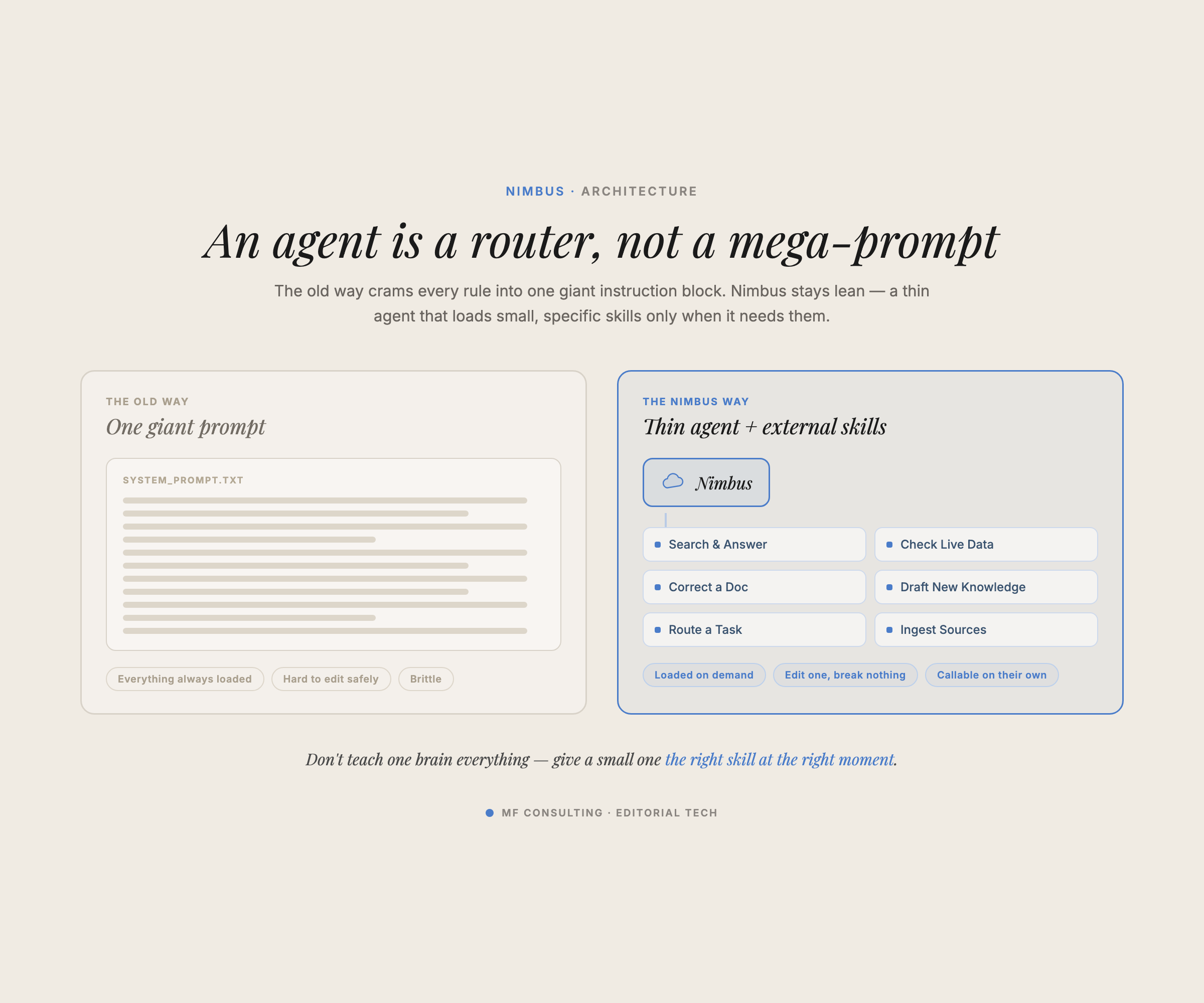
But there is a trap: one agent can quickly become one enormous prompt.
The longer that prompt gets, the harder it becomes for the model to follow every instruction reliably. I call this the curse of instructions: adding more rules can make the agent worse at following any single rule.
The solution is to treat the agent as a coordinator rather than an encyclopaedia.
Its core instructions stay lightweight. They help it decide which job applies:
- Search the wiki and answer a question
- Check an external product system
- Correct existing information
- Log a documentation gap
- Ingest newly approved knowledge
Once the agent understands the job, it loads the relevant skill and context.
This is progressive context disclosure: give the agent only the instructions it needs for the current step instead of loading every possible instruction upfront.
How Do Skills Improve The Agent Architecture?
Skills turn repeatable workflows into reusable instruction pages. Both Custom Agents and your personal Notion Agent can use them, so you do not need to duplicate the same process in several prompts.
Notion’s official Skills documentation confirms that skills are regular pages marked for AI use. You can share them with your team, mention them in Agent chat and grant Custom Agents access to them.
For this system, useful skills include:
- Answer a knowledge question — search, evaluate and cite the available evidence
- Log a knowledge task — capture the gap, context, priority and responsible owner
- Apply a small correction — update a safe, clearly identified piece of documentation
- Ingest new knowledge — create or update the canonical documentation and clean up old references
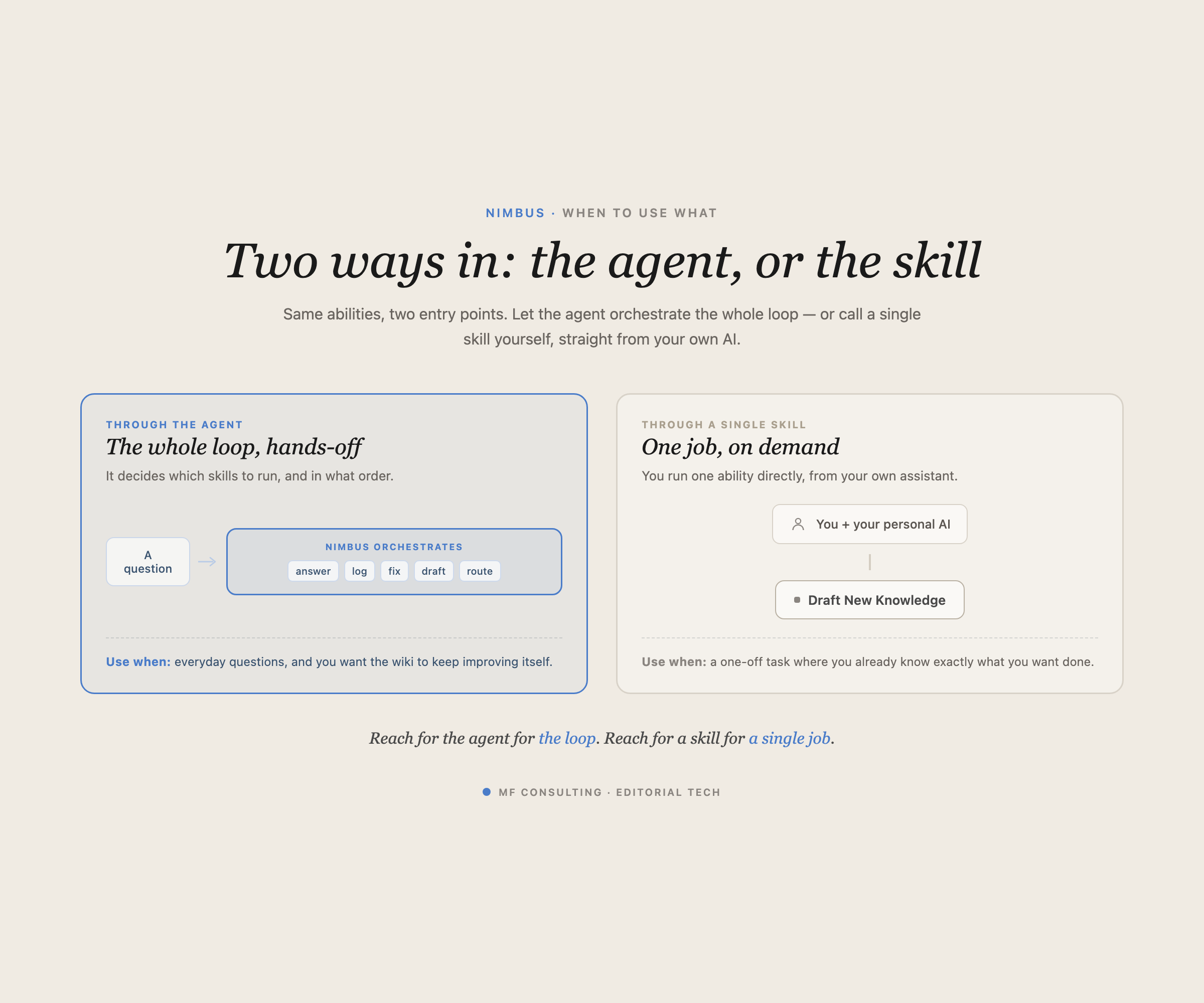
The agent can choose a skill automatically, but a person can also invoke the same skill while already working with Notion Agent.
That second route is important.
Sometimes you want AI to operate like a colleague: give it a question and let it drive the complete loop. At other times, you are already solving the problem and simply want your personal AI to document the result without explaining everything again.
One shared skill library supports both modes.
Pro Tip: Keep agent access separate from skill ownership. The knowledge agent usually needs permission to read the skill instructions, not rewrite them.
How Does The Compounding Knowledge Loop Work?
The compounding loop turns a question into an answer, an evidence check and — when needed — a documented improvement.
A typical run looks like this:
- A user asks Nimbus a question in Notion or Slack.
- Nimbus searches the approved knowledge sources.
- It assesses whether coverage is complete, partial or missing.
- It returns an answer with sources and a confidence warning where needed.
- It logs the question and its coverage rating.
- If knowledge is missing, it proposes a task or correction.
- A human approves any write action.
- The task is completed by a person, a personal AI workflow or another agent.
- The new knowledge is added, linked and checked against existing pages.
The human approval step is deliberate.
Particularly during rollout, you do not want an enthusiastic agent spawning hundreds of low-quality tasks or rewriting documentation without review. Start with confirmation gates and relax them only for narrow, proven actions.
That matches Notion’s current security model: write tools connected through MCP require confirmation by default, while read-only tools can be allowed to run automatically.
Which Databases Power A Notion Knowledge Agent?
A practical knowledge agent needs four databases: documents, questions, skills and tasks. Each database stores a different object and creates a clear handoff between humans and agents.
1. Docs
This is the canonical company wiki.
Keep one global database for company documentation rather than creating a separate wiki for every department. Use properties and relations to show the topic, owner, status and responsible team.
2. Question Log
Store every question sent to the agent, along with its coverage rating and any sources used.
This turns scattered conversations into measurable demand. You can see which topics cause repeated confusion and whether the wiki improves over time.
3. Skills
Store reusable AI workflows in one central library.
A shared skills database prevents each agent from carrying a slightly different copy of the same instructions. It also lets several agents and humans reuse the same ingestion or documentation workflow.
4. Tasks
Create a task when the system needs research, a correction, a new article or a larger restructure.
If you already have a company-wide task database, use it. You do not need a special task tracker for every AI workflow.
The important part is the context attached to the task: the original question, the evidence already found, the target documentation and the recommended next skill.
That way, the next person does not start from a blank page.
Where Should The Agent Get Its Information?
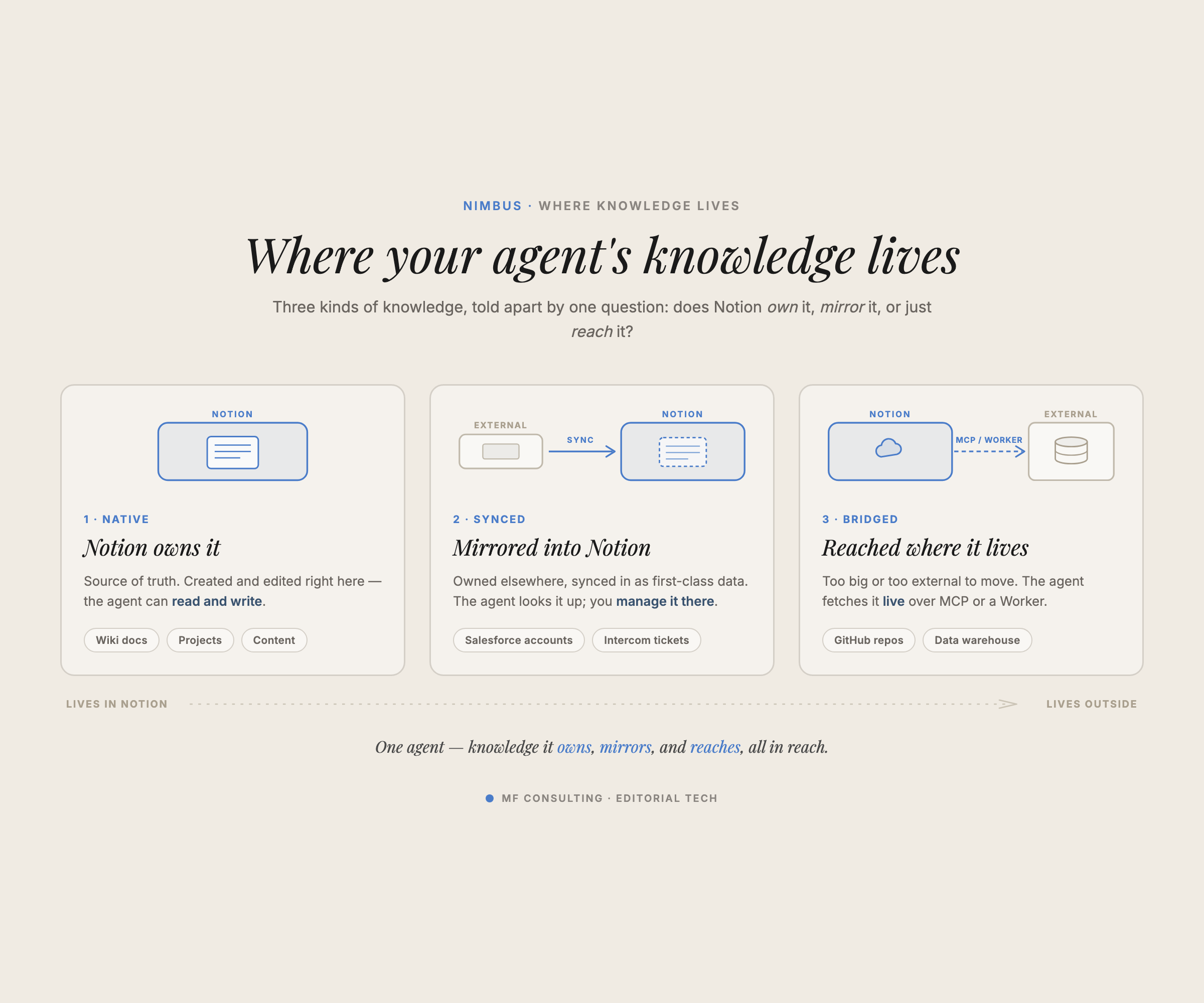
Company information usually lives in one of three places: natively in Notion, mirrored from another system or kept in an external tool and queried when needed.
This distinction helps you decide where the source of truth should live and how the agent should reach it.
| Data Pattern | Best For | How The Agent Uses It | Example |
|---|---|---|---|
| Native In Notion | Documentation and structured workflows owned by Notion | Reads or updates pages and databases directly | Policies, project data, campaign plans |
| Mirrored Into Notion | External records that benefit from first-class Notion access | Queries a one-way synced Notion database while the original system remains authoritative | Salesforce accounts, Intercom tickets |
| Queried Externally | Specialised or high-volume systems that should stay outside Notion | Uses an MCP connection or Notion Worker to retrieve live information | GitHub repositories, Snowflake tables |
Native Notion Data
Use native Notion pages and databases when Notion owns the workflow or the documentation.
Policies, operating procedures, projects and meeting knowledge are natural examples. The agent gets first-class access without maintaining another integration.
External Data Mirrored Into Notion
Mirror external records when the operational workflow stays elsewhere but the data is simple enough to represent in a Notion database.
A one-way sync can bring Salesforce accounts or Intercom tickets into Notion while those tools remain the source of truth. Your agent can then query the mirrored data alongside the rest of your workspace.
External Data Queried Live
Keep specialised data in its original system when duplication would create more problems than it solves.
GitHub repositories belong in GitHub. Large analytical datasets belong in tools built for millions of records. Your knowledge agent can still use them through MCP connections or Workers.
Notion currently supports Custom Agent connections to tools including GitHub, Figma and other services, while custom MCP servers can expose additional read and write tools. The official Custom Agents guide also makes an important security point: an agent only accesses the pages, databases and external apps explicitly granted to it.
How Should New Knowledge Be Added To The Wiki?
Adding new knowledge should update the wider information graph, not create another isolated page.
The ingestion skill follows an approach similar to Andrej Karpathy’s LLM Wiki pattern: turn new source material into structured, interlinked documentation that an agent can navigate.
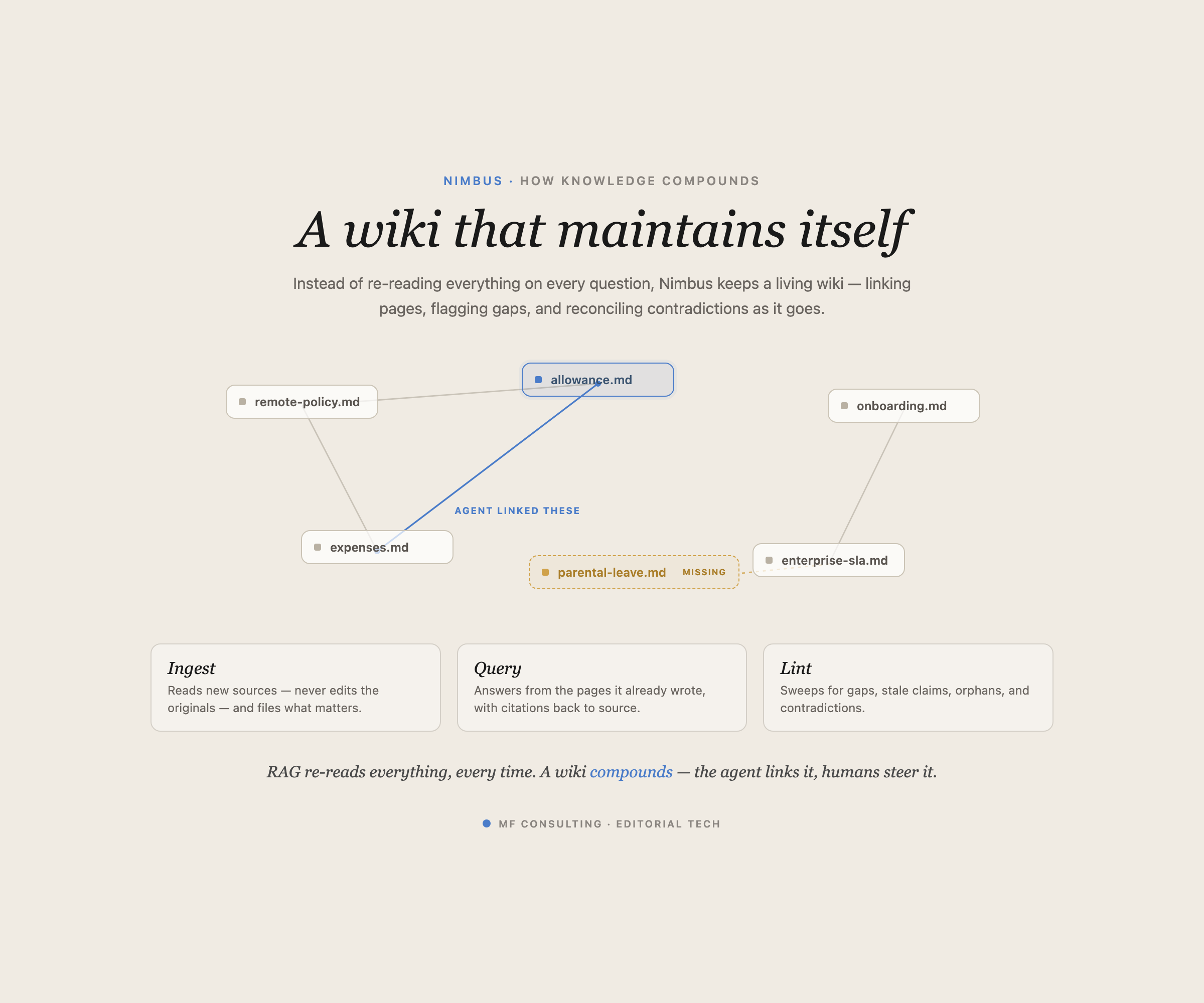
When new information arrives, the skill should:
- Read the approved source material.
- Identify the canonical page that should contain the information.
- Create or update that documentation.
- Add links to related concepts, teams and processes.
- Check existing pages for outdated or contradictory statements.
- Update the original knowledge task and preserve the evidence trail.
That fifth step is easy to miss.
If an old page says “we have not defined the equipment allowance yet”, creating a new allowance policy is not enough. The old statement must also be removed or corrected.
Humans often skip that sweep because they are in a hurry. A dedicated skill can perform it consistently every time.
Why Do Human Review And Ownership Still Matter?
AI can execute and route knowledge work, but every important document should still have a human owner.
Set an Owner property on documents and tasks, ideally with the creator as the default. Then the agent always knows who can verify a claim, approve a change or take responsibility for a gap.
Human review is particularly important for:
- Policies and contractual commitments
- Unverified drafts
- Changes based on ambiguous evidence
- Write actions in external systems
- Documentation owned by another team
You can automate more once the workflow is stable. Do not remove accountability simply because the agent is capable of taking action.
How Can You Build Your Own Notion Knowledge Agent?
Start with one narrow question-answering loop, then add improvement workflows after you can trust the answers and evidence handling.
A practical rollout looks like this:
- Define the jobs to be done. Decide what the agent should answer, check and improve.
- Create the four core databases. Docs, Questions, Skills and Tasks.
- Write the answer contract. Require an answer, coverage assessment, sources and next step.
- Create separate skills. Keep search, correction, task creation and ingestion modular.
- Set a trust hierarchy. Published and verified sources should outrank drafts and informal notes.
- Grant minimum required access. Add only the pages, databases and connections needed for the workflow.
- Add human approval gates. Require confirmation for tasks, corrections and external write actions.
- Test real questions. Include cases with complete, partial, missing and contradictory information.
- Measure coverage over time. Use the question log to decide what to improve next.
Do not optimise for the most impressive demo. Optimise for a loop your team will trust and use repeatedly.
You can see the complete Nimbus workflow in the video walkthrough. The downloadable setup, including its databases and skills, is linked in the video description.
Get 41 free Notion resources and the MF Consulting newsletter →
💼 Need the support of certified Notion Consultants? My team and I are here to help!
Frequently Asked Questions
What Is A Notion Knowledge Agent?
A Notion knowledge agent is a Custom Agent that answers questions using your company’s approved information and helps maintain that information over time. A complete setup can also log questions, identify missing documentation and route improvements to people or other agents.
Can A Notion Custom Agent Use Skills?
Yes. Skills are Notion pages marked for AI use, and a Custom Agent can run them when it has access to those pages. This lets several agents and humans share the same repeatable workflow without copying instructions between prompts.
Should A Knowledge Agent Be Allowed To Edit Documentation Automatically?
Start with human confirmation for edits and task creation. Once a narrow action has proved safe and consistent, you can let it run automatically while keeping approval gates for higher-risk changes.
Can A Notion Agent Search External Tools?
Yes. Custom Agents can use supported connections and MCP servers to read from or act in external systems, and Notion Agent can now connect an MCP server straight from chat (beta, Business and Enterprise, web and desktop). You can also use Notion Workers to sync external records into Notion or expose specialised tools to an agent.
Which Databases Does A Knowledge Agent Need?
A strong foundation uses four databases: Docs, Questions, Skills and Tasks. Together, they store the source knowledge, track demand, define reusable workflows and manage the work required to close gaps.