Notion external agents let you run Claude’s and Cursor’s hosted AI agents directly inside your Notion workspace, turning Notion into a single surface where humans and AI work together. Instead of bouncing between a coding tool, a chat app, and your docs, you can now pick the right AI “suit” for the job and trigger it straight from a Notion page. This guide unpacks what external agents actually are, how to set up both Claude and Cursor agents, how they differ, what they cost, and who should care — so you can work out exactly where they fit in your stack.
What Are Notion External Agents?
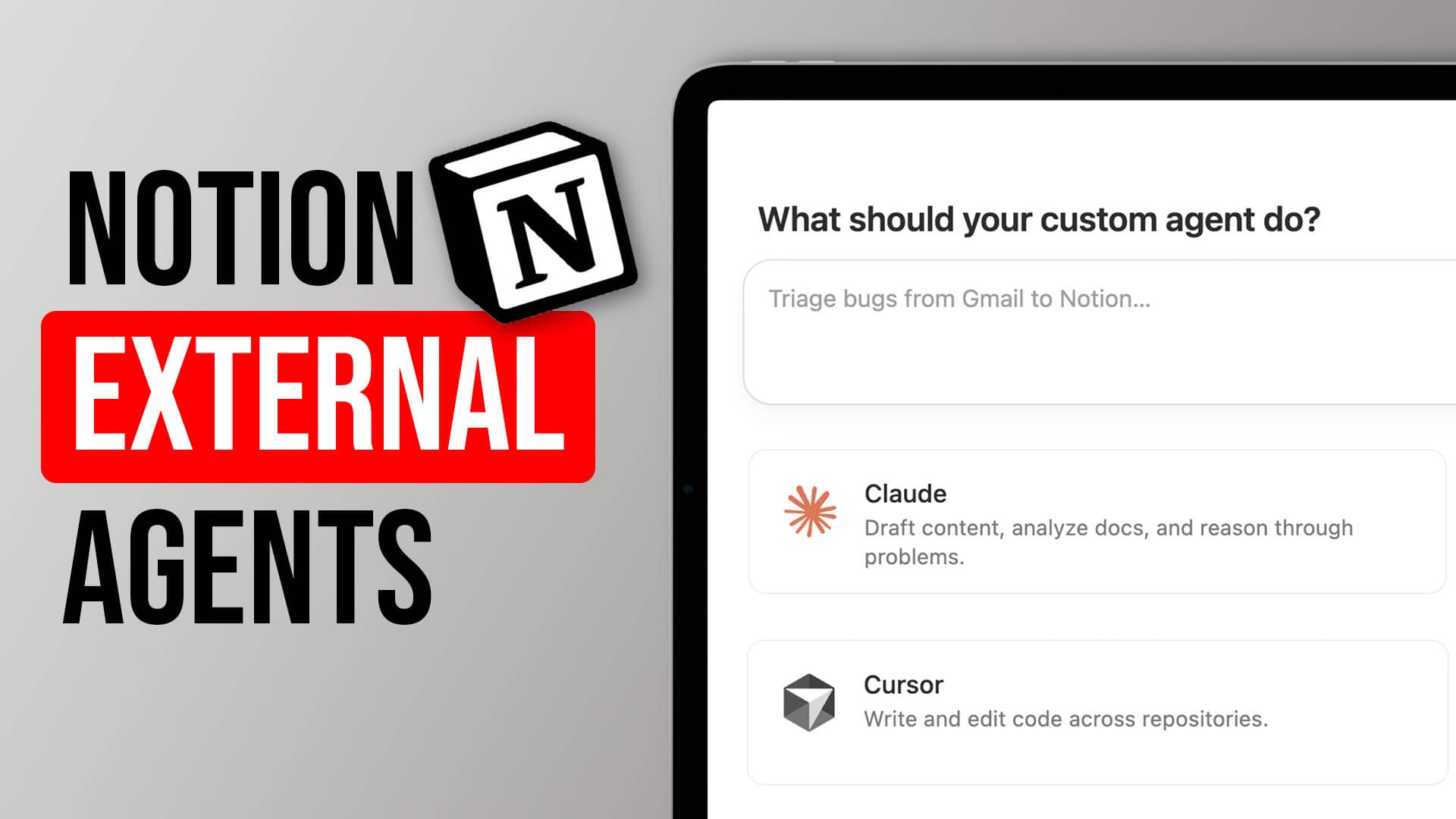
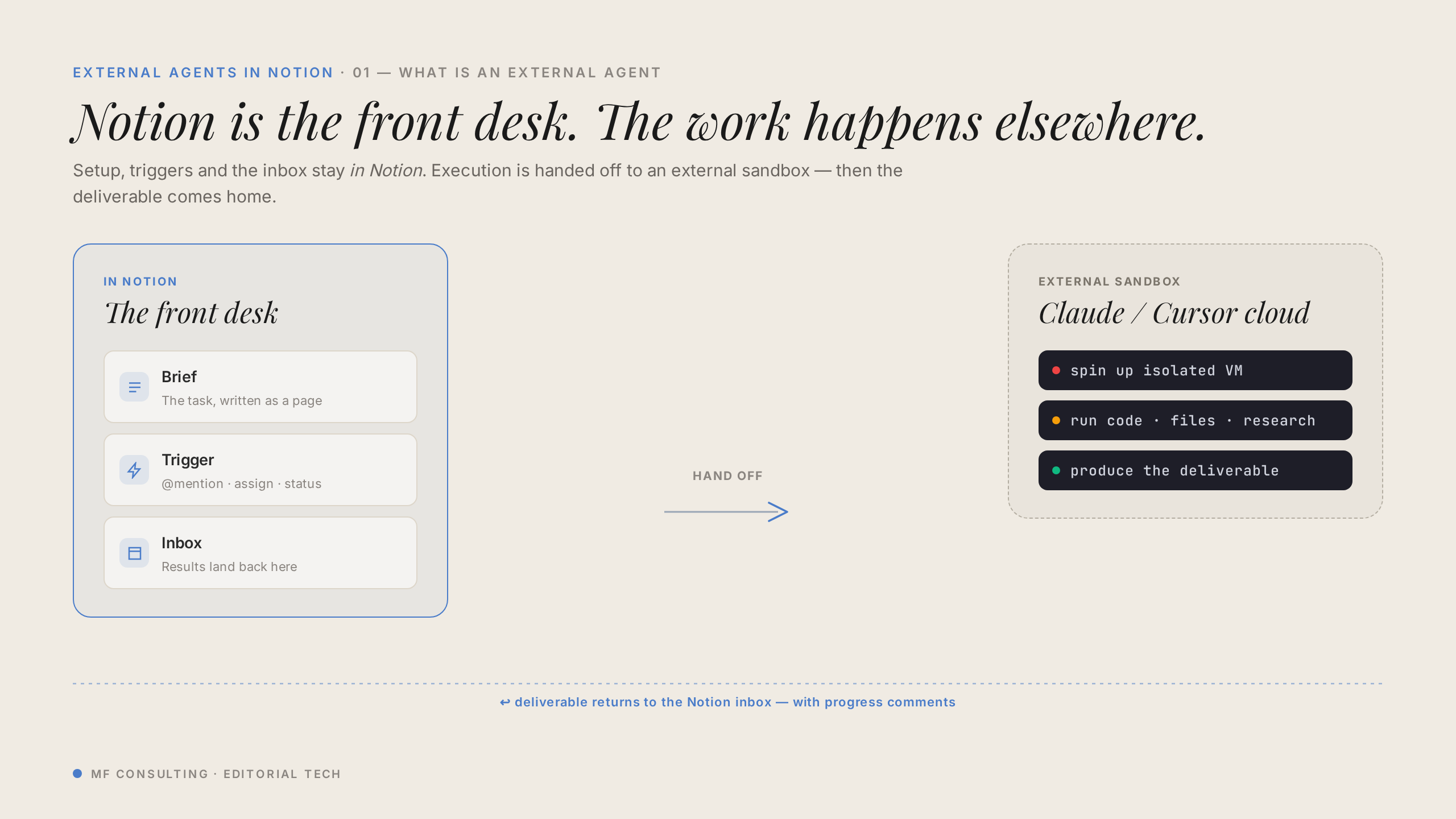
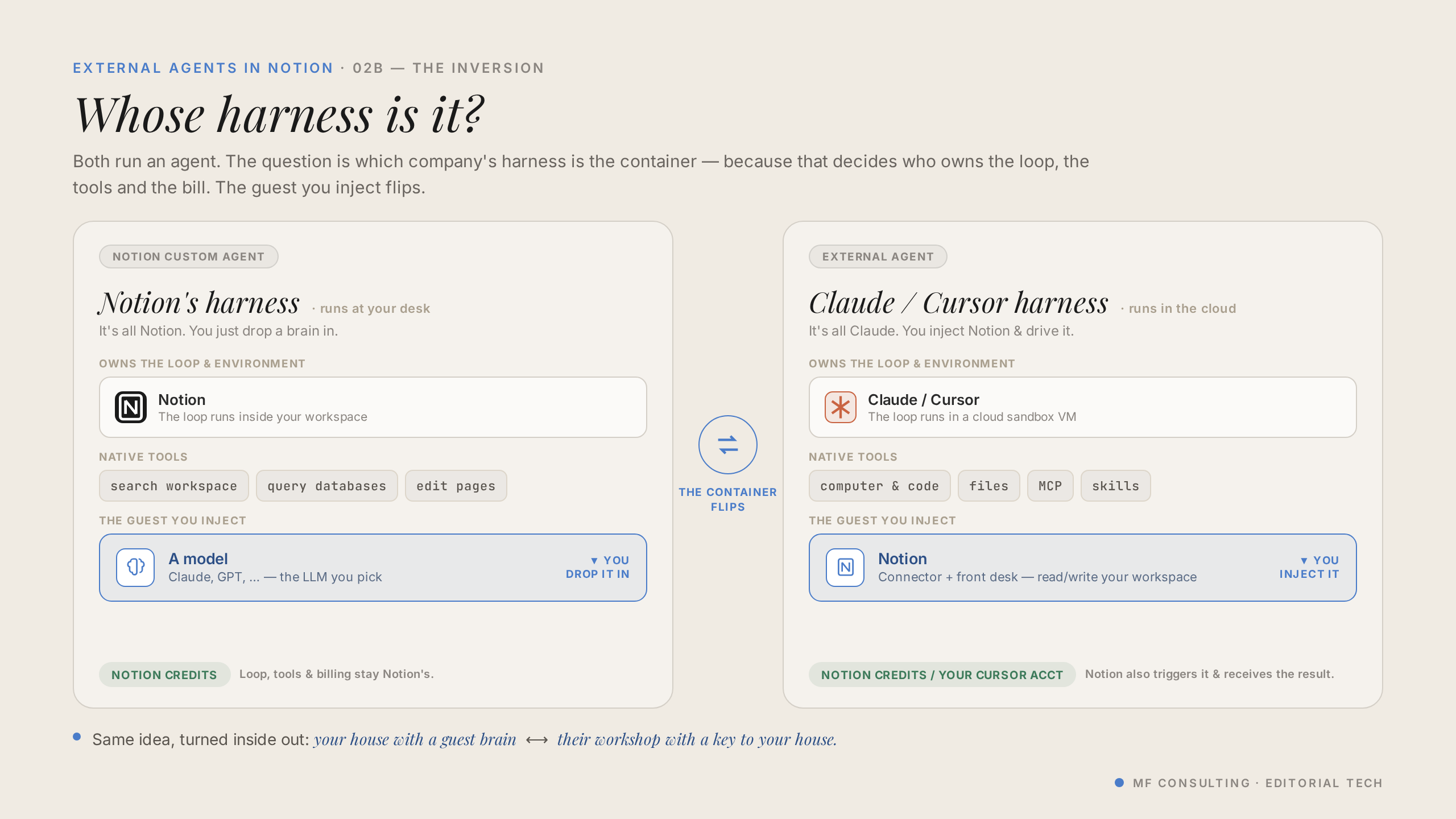
Notion external agents are externally-hosted AI agents — currently from Claude and Cursor — that you create and run inside Notion’s interface. The agent itself runs on Anthropic’s or Cursor’s managed platform, not on Notion.
They sit right alongside Notion’s own personal and custom agents, so you get the same familiar chat experience. The core use case today is engineering and coding-adjacent work, but that’s not the only thing they can do.
💡 Think of external agents as Notion opening its doors to AI “suits” built by other providers — with more likely to follow Anthropic and Cursor over time.
The Harness Mental Model: Brain Vs. Body
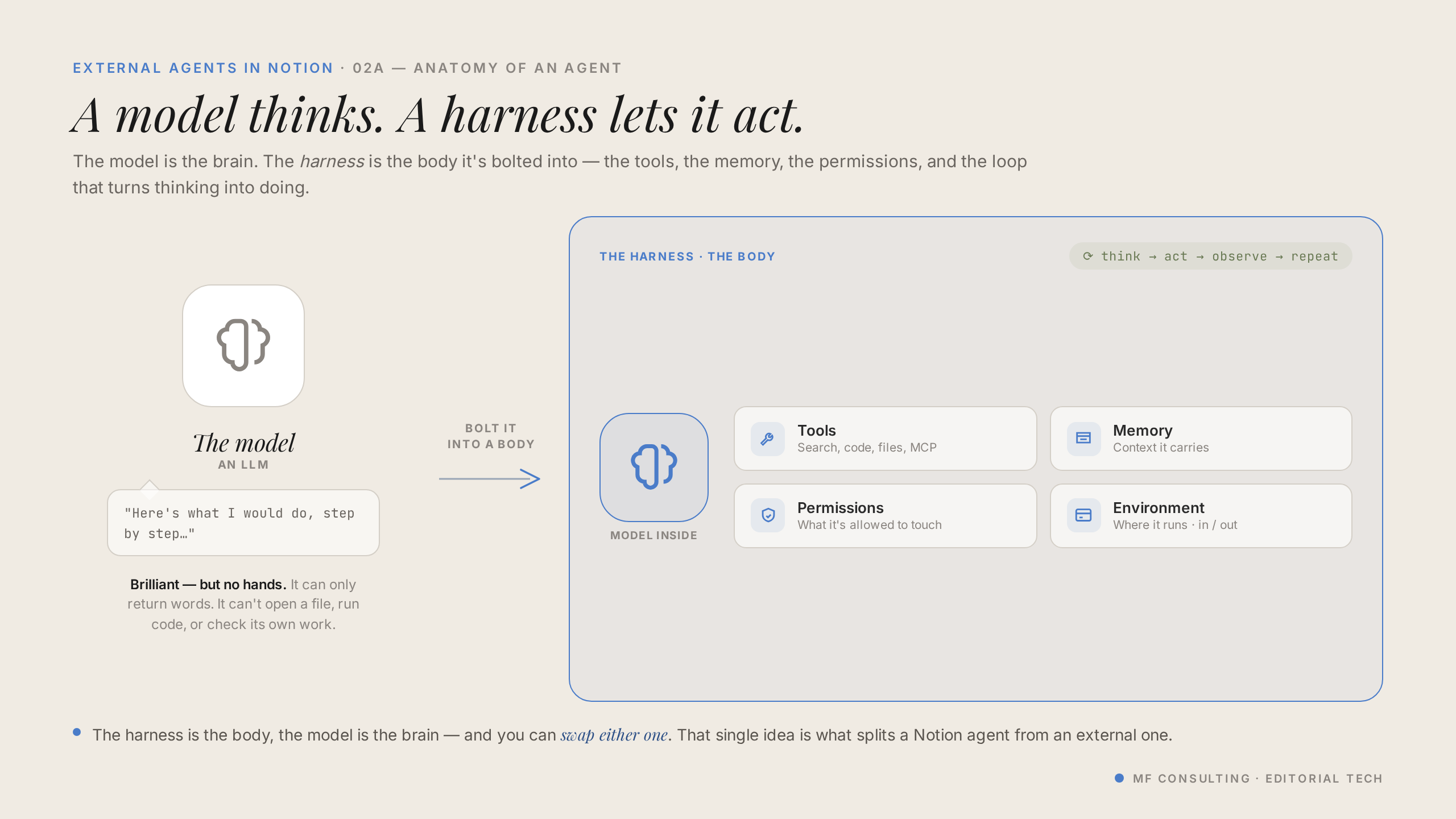
The easiest way to understand external agents is the harness model: the AI model is the brain, and the harness is the body that lets it act. The brain is always a top-tier frontier model — the harness is what changes.
Notion AI, Notion custom agents, and external agents are all different harnesses wrapped around the same kind of model. Picture them as different suits or robots: they look similar, but each is optimised for slightly different jobs.
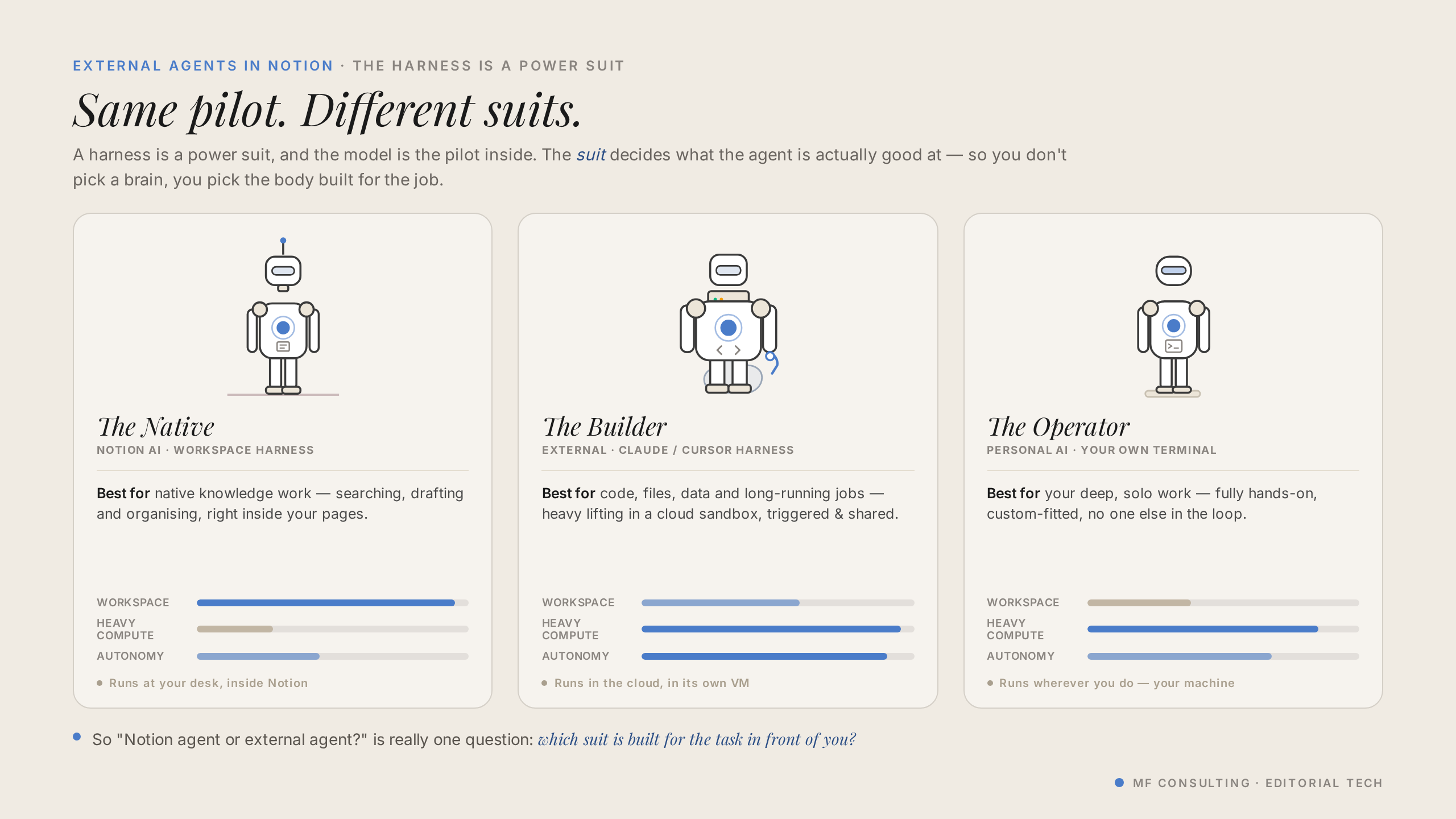
This reframes the whole decision. Instead of asking “which AI is best?”, you ask “which suit is best for this task?” — and you pick accordingly.
💡 If two suits can do the job equally well, it genuinely doesn’t matter which you choose. The mental model only matters where the suits actually differ.
What Are Notion’s Three Roles In AI?
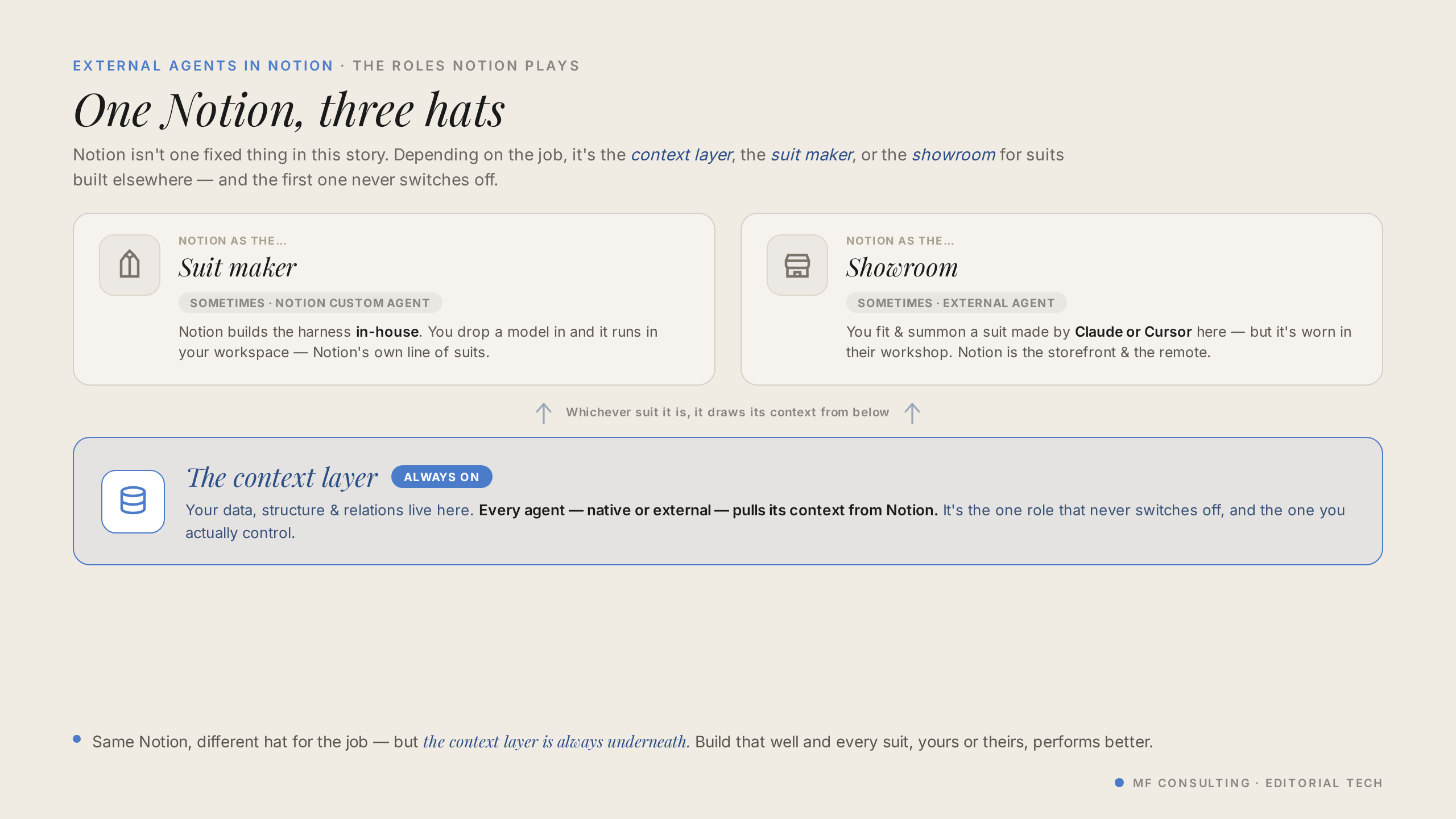
Notion plays three distinct roles in the AI world, and external agents unlock the third one. Understanding all three explains why this update matters.
- The context layer — the most important role. No matter what AI tools you use, you need one place where humans and AI collaborate. Notion is built for this.
- The suitmaker — with Notion AI and custom agents, Notion builds the harness so you can act on your context.
- The showroom — external agents turn Notion into a storefront where you browse and pick suits from other providers like Anthropic and Cursor.
Everything still revolves around that central context layer. The showroom just gives you more suits to choose from.
How Do You Set Up A Claude Agent In Notion?
You set up a Claude agent the same way you create any Notion agent, but you have to choose the external type up front. You can’t create a blank agent and convert it later.
Here’s the flow:
- Click New agent in your library, or open the agent area in your sidebar
- Select Claude as the agent type (don’t start with a blank Notion agent)
- Choose a blank Claude agent rather than the mini-template
- Under Advanced, you’ll see the model picker (limited to Anthropic models) and a built-in GitHub connection
- Add your personal access token to connect a repository, then give the agent access to the Notion databases it needs
Pro Tip: Skip the mini-templates. They spin up their own dedicated task database, which clutters a well-designed workspace. In a clean Notion setup you want one central database, so start blank and point Claude at the database you already have.
How Do You Set Up A Cursor Agent In Notion?
Setting up a Cursor agent looks almost identical to Claude, with one key twist: you can choose your model. The setup runs through an API key instead of a personal access token.
- Click New agent and select Cursor as the type
- Create a blank Cursor agent
- Paste your Cursor API key when prompted and connect it
- Choose the GitHub repositories you want the agent to work with
- Pick your model — Cursor supports a whole range, not just Claude
The big difference is that the Cursor harness isn’t locked to one brain. You can run Anthropic models, GPT, and others — handy if your organisation already standardises on a specific model.
Claude Vs. Cursor Agents: What’s The Difference?
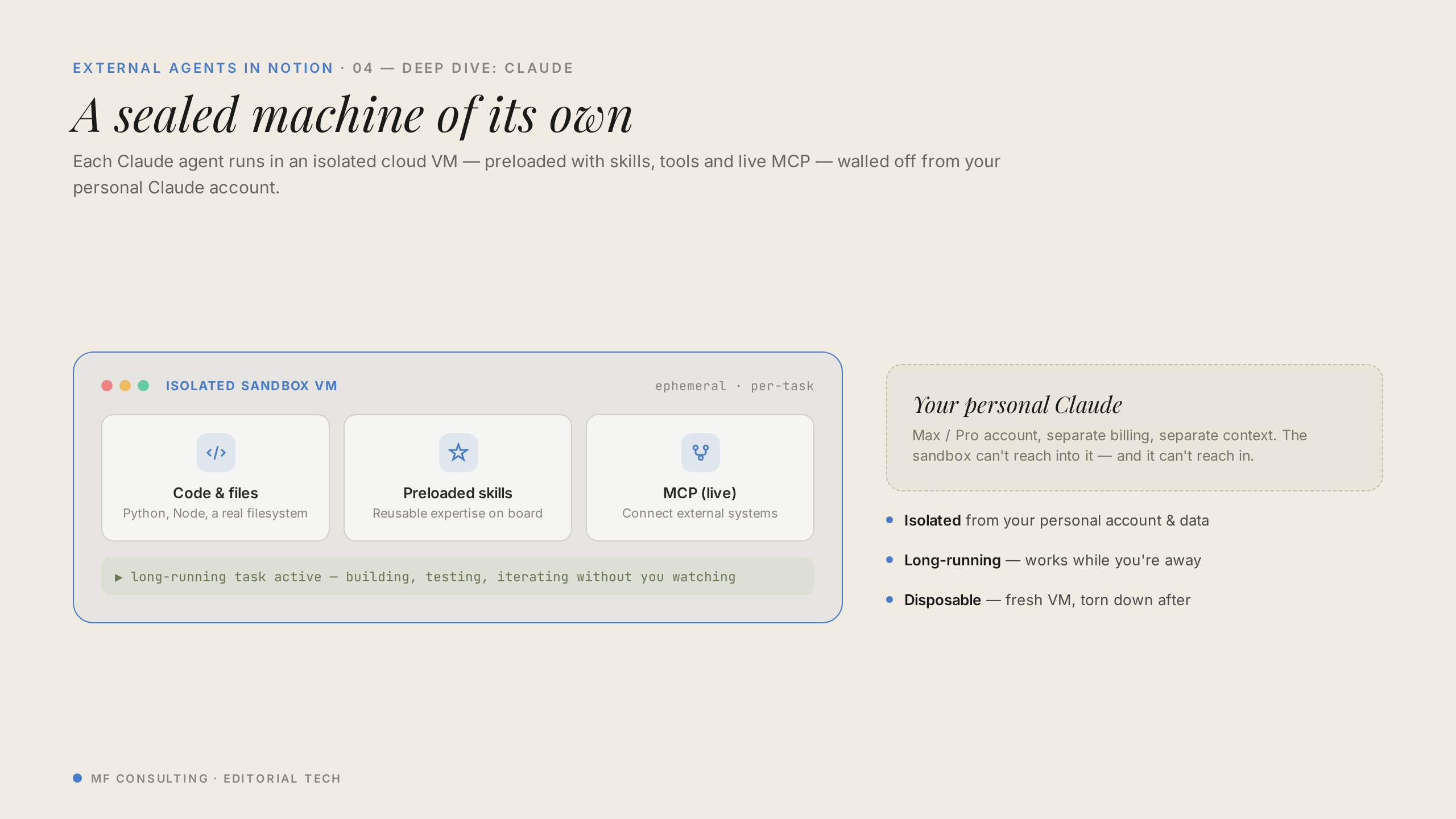
The main difference is isolation and visibility: Claude agents run in a completely isolated sandbox, while Cursor agents stay connected to your wider Cursor setup. That shapes how each one fits into your workflow.
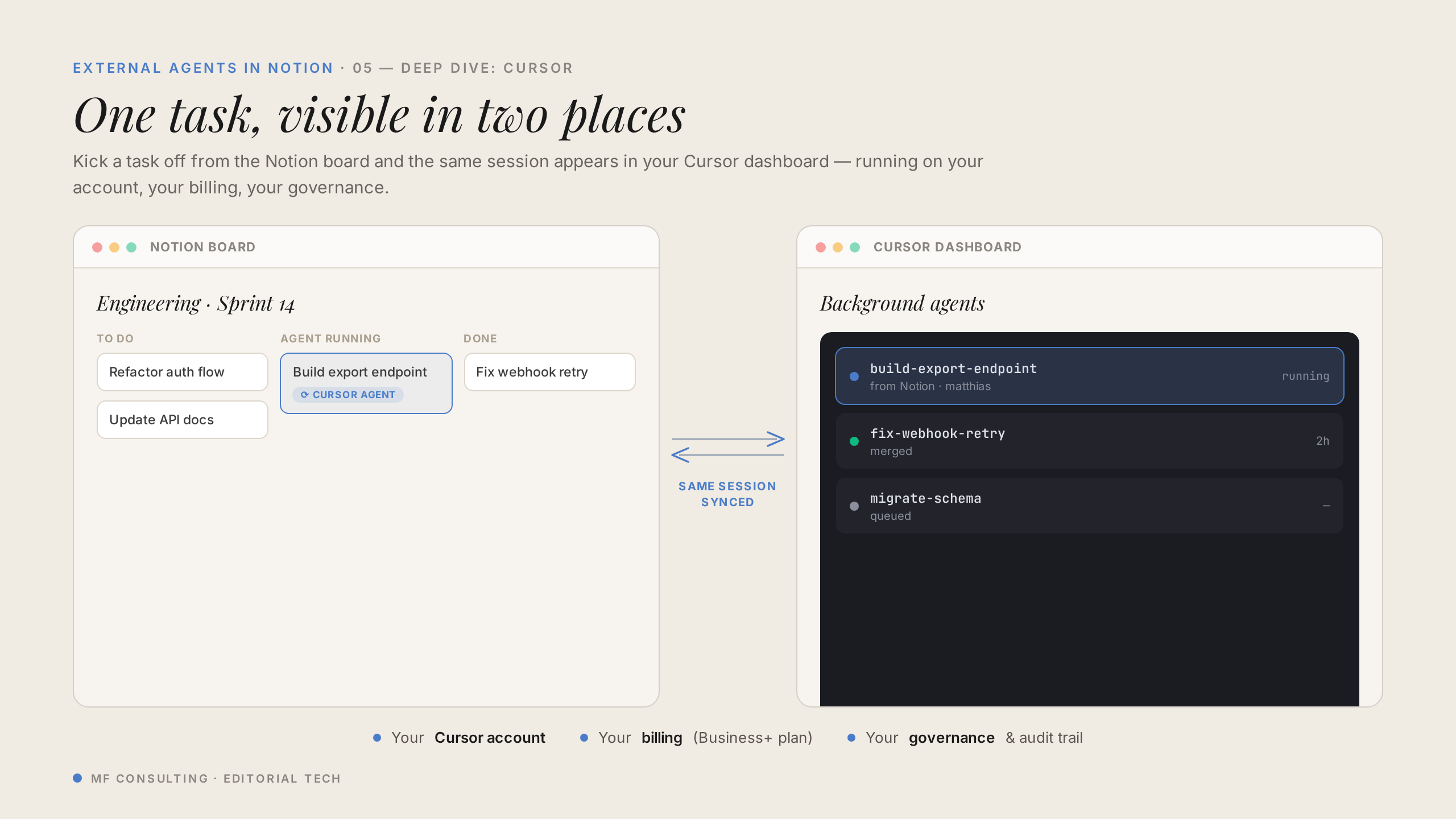
Claude’s hosted agent has no access to your personal skills, files, or projects — it’s a blank slate every time. To give it your skill library, you inject it through a GitHub repo or share it as Notion pages. Cursor, by contrast, lets you see every agent run inside the Cursor app, so it’s better integrated end to end.
Here’s a side-by-side comparison, ready to drop into WordPress:
| Feature | Claude Agents | Cursor Agents |
|---|---|---|
| Model choice | Anthropic (Claude) models only | Multiple models — Claude, GPT and more |
| Environment | Fully isolated sandbox | Connected to your Cursor setup |
| Run visibility | Only inside Notion | Visible in Notion and the Cursor app |
| Personal skills & files | None — inject via GitHub or Notion pages | Tied to your Cursor environment |
| Billing | Notion credits (bring-your-own-key coming) | Your Cursor plan |
| Best for | Notion-native teams wanting Claude on the go | Teams already living in Cursor |
Pro Tip: Whichever you choose, don’t keep your skills locked away on a single machine. Back them up to GitHub and Notion so any agent — external or not — can pick them up.
How Do You Build Multi-Agent Workflows In Notion?
You build multi-agent workflows by chaining agents together and handing work off between them. A typical loop is planner → builder → reviewer, all triggered from Notion.
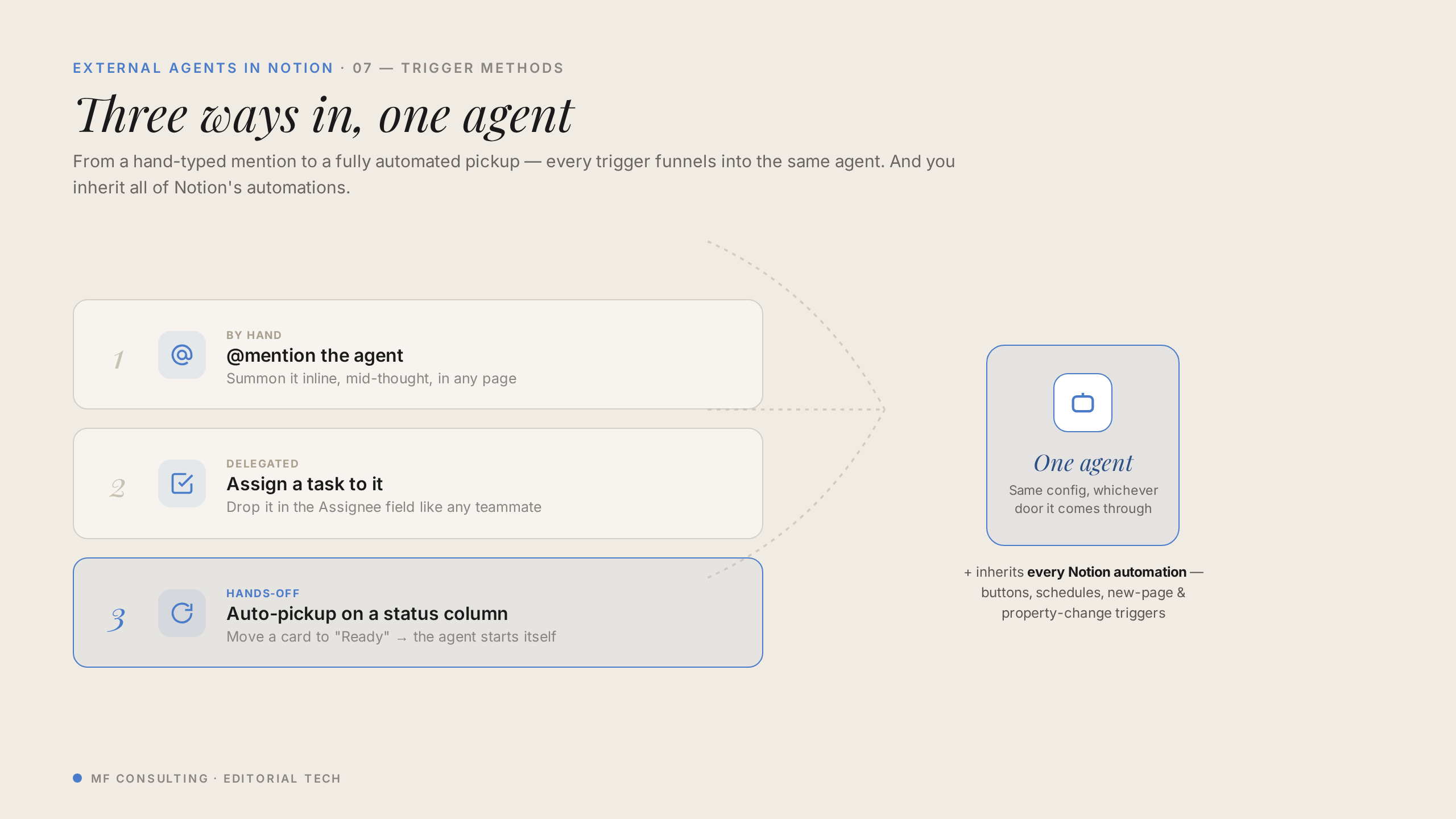
Because these agents live in Notion, you can trigger them in two ways:
- @mention an agent on a page to kick it off manually
- Status changes — for example, when an issue moves to “Ready for Pickup”, the agent automatically picks it up
This is where it gets powerful for teams. A planner agent picks up a clearly-defined issue, plans it, sets the status to ready for execution, and hands off to a builder agent — which then hands off to a reviewer. The whole loop flows from Notion pages, and non-technical teammates can follow along right where the feedback appears.
💡 The real unlock is access. A product manager checking a feature’s status or a salesperson confirming something is live can interact with engineering flows without ever opening a coding tool.
How Much Do Notion External Agents Cost?
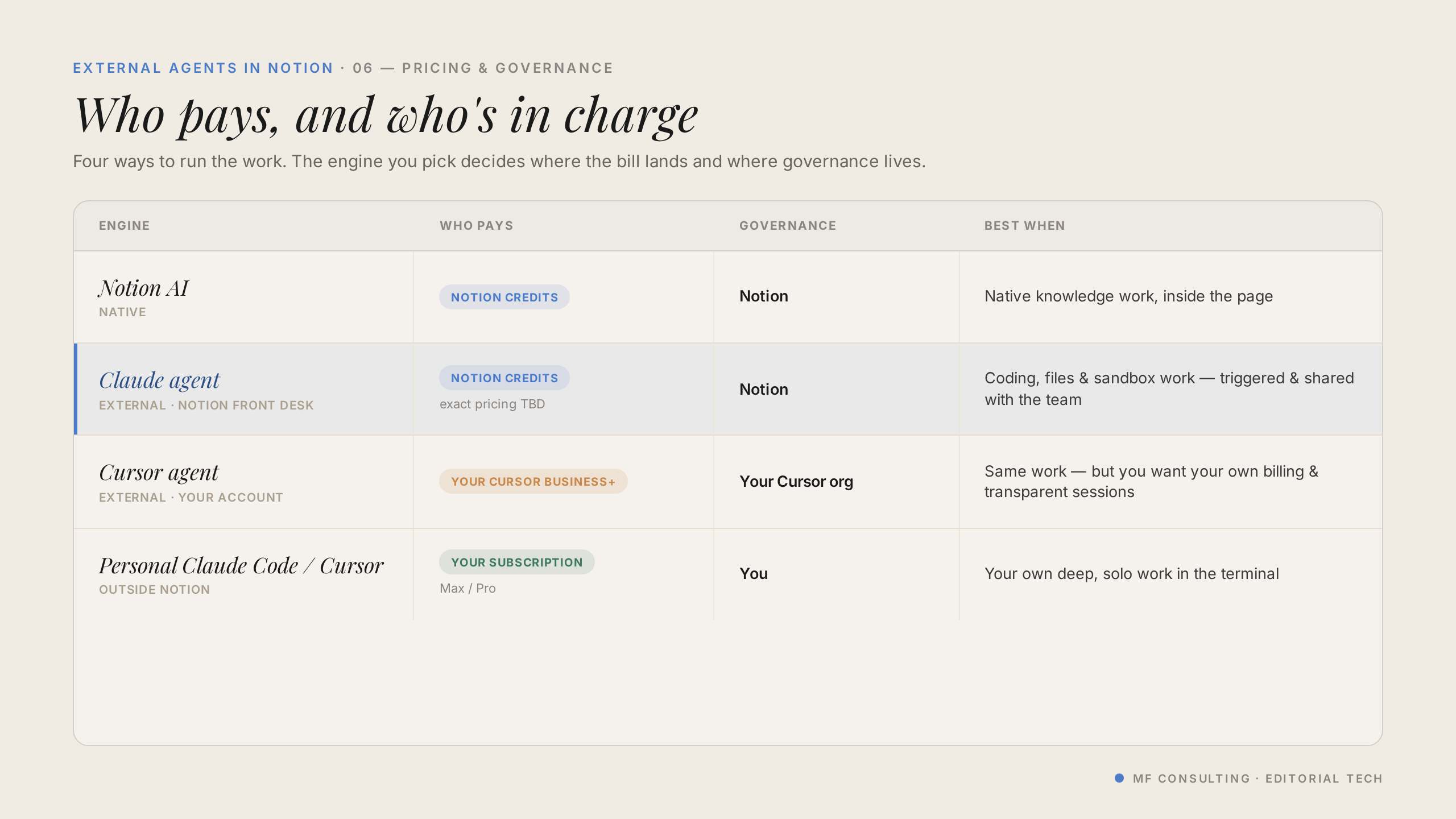
Pricing depends on which suit you use, and there are four distinct levels to keep straight:
- Notion AI and custom agents — run on Notion credits, or simply against your subscription for the personal agent
- Claude external agents — billed through Notion credits (Notion is reportedly working on a bring-your-own-key option)
- Cursor agents — billed directly to your Cursor plan, not Notion credits, with cost depending on the models you run
- Personal Claude Code — part of your own subscription, or API credits if you use it directly
That Cursor detail is genuinely interesting. If your organisation already pays for Cursor and wants to avoid heavy Notion credit usage, Cursor lets you bring agents into Notion natively while billing stays on your existing plan.
Who Are Notion External Agents For?
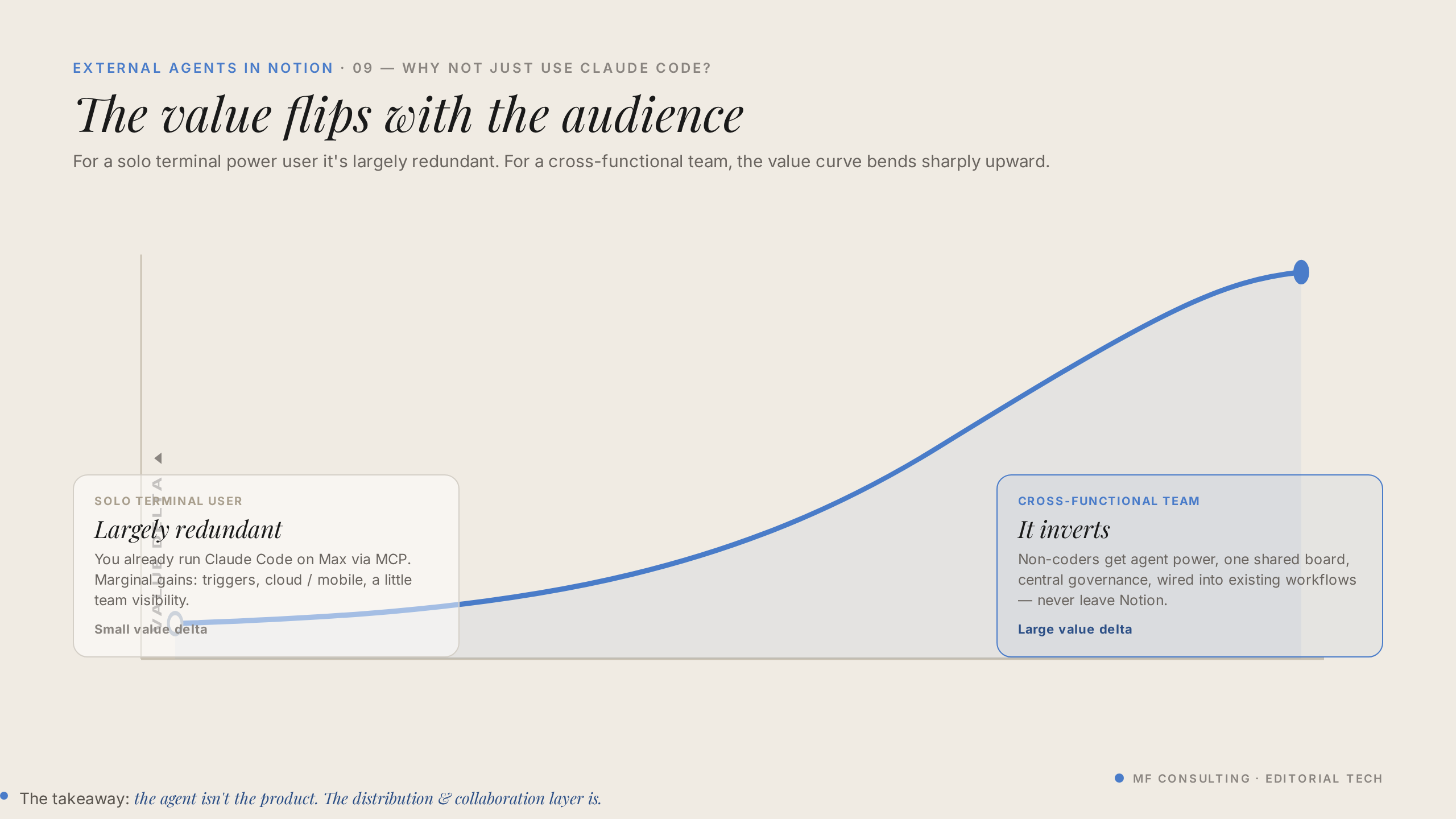
External agents are mostly for teams, not individuals. If you’re solo, you’ll already get most of this value from Claude Code plugged into Notion, or from Notion AI for Notion-first tasks.
The shift happens the moment you add a team — especially one where not everyone wants to live in a coding environment. Giving a designer, a product manager, or someone in sales an easy way to spin something up or ask a question is where external agents earn their keep.
A simple rule still holds: choose your tool based on where your inputs and outputs live. Code-native work belongs in Claude Code, Codex, or Cursor; work that touches your Notion artifacts is usually smoother in Notion AI.
Be aware of the current limitations, too. Claude’s sandbox is fully isolated, and you can’t yet start a Claude flow in Notion and pick it up later in Claude Code on your own machine — Cursor handles that handoff better today.
💼 Need the support of certified Notion Consultants? My team and I are here to help! → https://matthiasfrank.de/en/notion-consulting/
Frequently Asked Questions
What’s The Difference Between An External Agent And A Notion Custom Agent?
A Notion custom agent runs on Notion’s own harness, while an external agent runs on Claude’s or Cursor’s managed platform from inside Notion. The underlying model can be the same — what differs is the harness and what it’s optimised for. Pick the suit that best fits the task at hand.
Can I Use External Agents For Non-Coding Work?
Yes, but it takes a few extra setup steps. Engineering is the core use case, so for general knowledge work it’s often more straightforward to use Notion AI, a Notion custom agent, or a tool like Claude Code or Codex.
Can I Pick Up A Claude Agent Run On My Own Machine?
Not yet. A Claude external agent runs in a fully isolated sandbox with no link to your personal Claude setup, so you can start a flow in Notion but can’t continue it in local Claude Code. Cursor currently handles this handoff much better, with runs visible in the Cursor app.
Do External Agents Use My Notion AI Credits?
Claude external agents are billed through Notion credits, with a bring-your-own-key option reportedly on the way. Cursor agents are billed to your Cursor plan instead, which can be a big advantage if you want to keep Notion credit usage down.
Are External Agents Worth It For Solo Users?
For individuals, external agents aren’t a major unlock — you’ll get similar value from Claude Code plus Notion, or Notion AI for Notion-native tasks. The real payoff shows up with teams, especially when non-technical members need to interact with AI-driven workflows.