Notion agent pricing is live as of May 4, 2026 — the free exploration period for custom agents is officially over, and every run now costs real credits. If you have been building agents during the trial window, today is the day to open your dashboard, understand what you are spending, and make a few smart decisions that could cut your bill by 80% or more. This guide walks you through exactly what to do: how to read your credit consumption, how to optimise cost without losing quality, and how to decide which agents are worth paying for in the first place.
How Do You Check Your Notion Credit Consumption?
You can see exactly how many credits your workspace is using by going to Settings → Access & billing → Notion credits.
This dashboard shows your total credit usage for the current billing period. At the time of writing, 1,000 Notion credits cost $10 — so dividing your total by 100 gives you your dollar spend. Simple maths.
In our case, we burned 33,700 credits last month across all agents. That is $337. Totally fine for us — the return on investment is there. But the number itself is less important than knowing where the money goes.
How Do You See Which Agents Cost The Most?
Scroll down on the credits dashboard and you will find a per-agent breakdown. Every agent that ran during the selected billing period shows up with its credit consumption.
A few things to know:
- Workspace owners see all agents — even private ones they do not have access to. You cannot dive into the instructions of a private agent, but you can see its credit usage.
- Non-owners only see the agents they created.
- Only agents that ran during the selected period appear. If you are looking at the current month and only see three agents, switch to the previous full billing period for the complete picture.
The pattern you will likely notice: a handful of agents at the top consume the vast majority of credits. Everything on page two and beyond probably costs a few dollars total. Those are not the ones to worry about.
Pro Tip: Start from the top of the list and work down. For each expensive agent, ask yourself three questions: Is this delivering clear value? Can I optimise it? Should it even be an agent?
How Do You Buy And Manage Credits?
Notion credits are purchased on a monthly subscription basis. They reset every billing cycle and unused credits do not roll over.
To purchase credits:
- Go to Settings → Access & billing → Notion credits
- Select Add Notion credits
- Choose your monthly amount — starting in the hundreds, scaling into the thousands
You can adjust your subscription up or down each month. If you run out mid-cycle, you can top up immediately. But if credits hit zero before the reset, your agents stop running — so keep an eye on pacing, especially with a conservative limit.
Can You Set Spending Limits On Individual Agents?
Yes. You can cap any agent’s monthly credit usage from two places:
- The credits dashboard — click into any agent and set a limit
- The agent builder — look for the credit icon at the top of the settings
Once an agent reaches its limit, it pauses for the rest of the billing period. This is a useful guardrail for agents you want to keep running but do not want spiralling out of control.
What If You Are Not Sure How Many Credits You Need?
Notion has built a credit calculator that gives rough estimates based on common use cases. It is a reasonable starting point, but real usage is always the better guide.
If you are starting from scratch, add a small development budget — a few thousand credits depending on your organisation size — and let people start building. After one full billing cycle, you will have real data to work with.
How Can You Reduce Your Notion Agent Costs?
The full deep dive on cost optimisation is covered in our separate guide, but here are the four levers that matter most — and one bonus strategy that changes the game entirely. For a comprehensive overview of how agents fit into your broader automation strategy, see our guide on custom agents vs. automations.
Does Switching The Model Actually Save That Much?
Yes. Model choice and the Effort setting below are the two fastest levers you have — both are one setting on one screen.
Haiku costs roughly one-fifth of what Opus costs per run. For tasks like routing, extracting, classifying, and summarising, it produces the same results. That is an 80% reduction just by changing one setting.
Here is the decision framework:
- Heavy reasoning, creative complexity, advanced analysis → Opus. Pay the premium. It is worth it here.
- Mid-range reasoning, structured execution → Sonnet or GPT 5.5. Notably, GPT 5.5 shows as “cost: high” but is still significantly cheaper than Opus while being excellent at following instructions.
- Simple operations → Haiku, Gemini Flash, or Minimax. Perfect for formatting, classification, extraction, and summarisation.
The practical test: could a human do this task hungover? If yes, that is a Haiku job. Maybe even a smaller model.
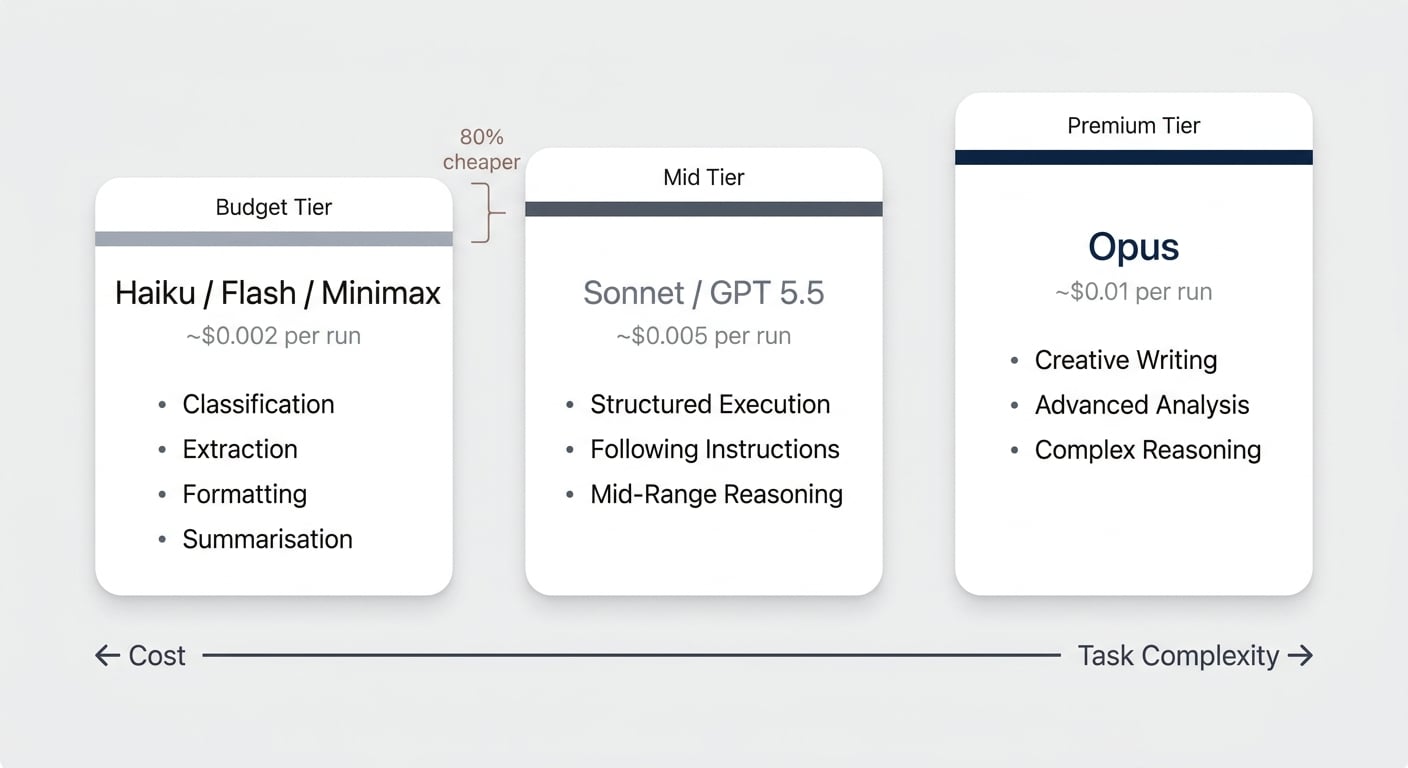
One thing to do today: open every single one of your agents and check the model setting. None should be set to Auto. When credits were free, Auto was fine. Now that you are paying, you should make an explicit call on every agent — Auto makes that call for you. Either the task warrants Opus-level reasoning, or it does not. The Effort setting next to it can stay on its default; it is the second dial, not a second decision you owe every agent. If you need hands-on help evaluating your model choices and agent architecture, our Notion consulting services can accelerate the process.
Is The Effort Level Higher Than The Job Needs?
Alongside the model picker, agents expose an Effort setting — how much reasoning the model spends on a single run. The levels depend on the model you pick rather than being one fixed ladder, and the default is a reasonable starting point for most agents. Where it earns its keep is the high-frequency agent doing simple work: an agent that fires on every database write and only has to classify a row does not need to think hard about it. Model choice sets the price per unit of thinking; Effort sets how much thinking you buy.
Why Is Splitting Agents Cheaper Than Running One Big One?
It seems counterintuitive, but running multiple small agents is often significantly cheaper than one large agent.
The reason is simple: if your big agent does one complex thing among many simple things, the entire agent needs to run on Opus — the model choice is dictated by the most demanding task. That means you are throwing the most expensive intelligence at tiny problems.
By splitting into a pipeline, you run most steps on cheap models and reserve Opus only for the step that genuinely needs it.
In our blog post production pipeline, for example, only the first step — the actual writing — runs on Opus. Everything after that runs on Sonnet or Haiku. The total chain cost is a fraction of what a single monolithic agent would burn.
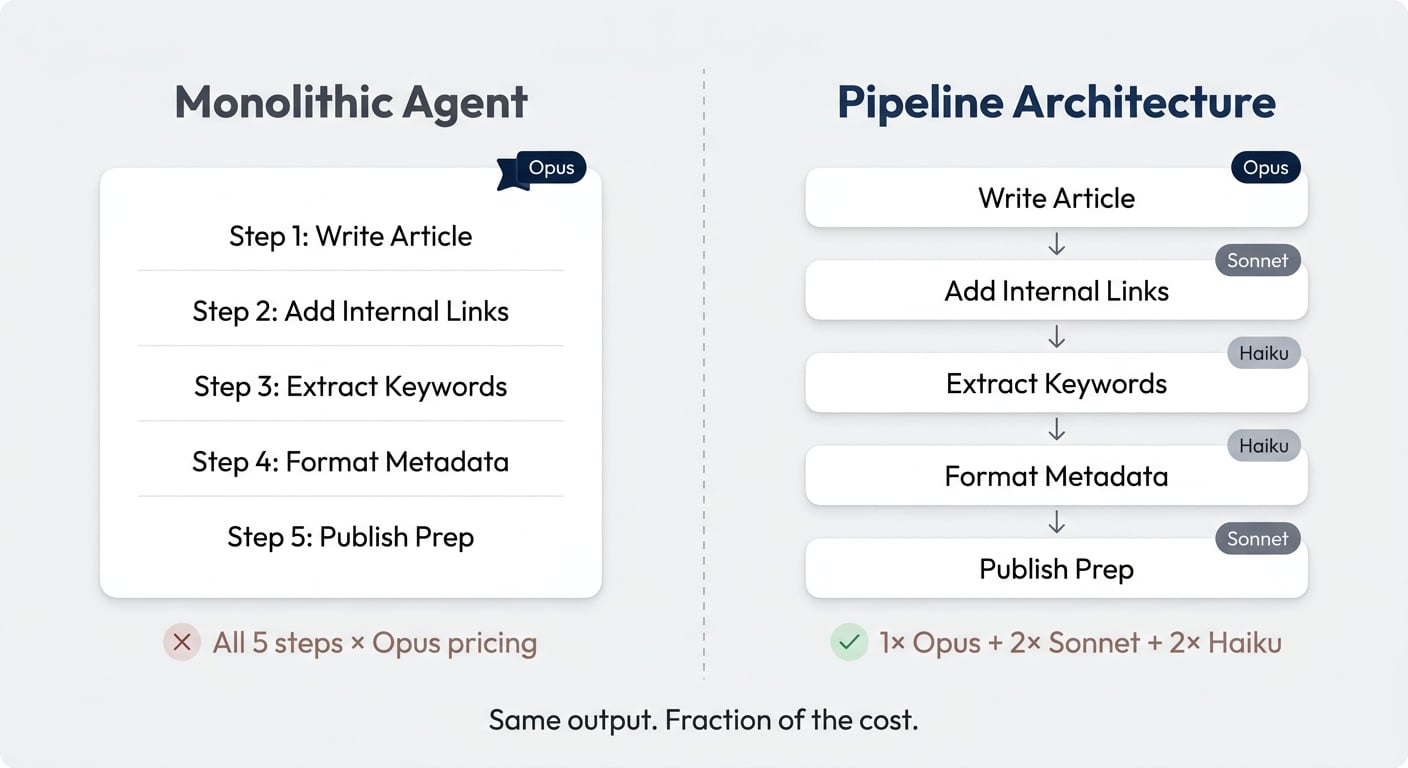
We have a full walkthrough on how to create complex, multi-agent orchestration in Notion.
What Is Progressive Context Disclosure?
Progressive context disclosure means your agent does not read all of its instructions upfront. It only loads context when and if it needs it.
This is particularly powerful for longer processes with conditional branches. If your agent handles five different scenarios but only encounters one per run, the other four sets of instructions are pure waste — tokens processed for nothing.
The fix: structure your instructions so that detailed guidance for each scenario lives on a separate page. The agent reads the relevant page only when it reaches that step and only if the condition is met.
Our blog post link optimiser is a good example. Affiliate link placement instructions are only loaded if the article mentions external tools. No external tools mentioned? No tokens burned on affiliate logic.
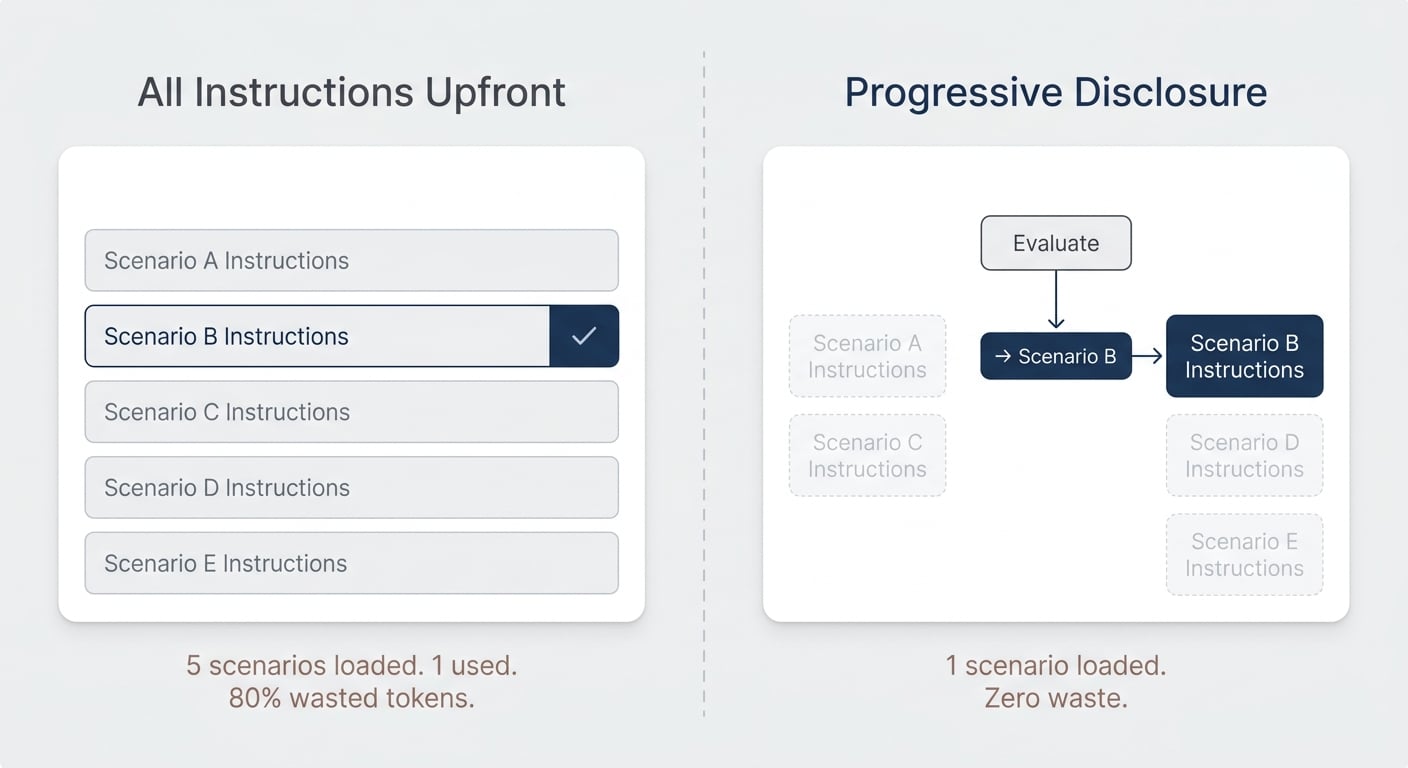
Pro Tip: Look through your agent instructions. If you see five different “if this, then that” scenarios with all instructions loaded upfront, that is room for token optimisation.
Should This Even Be An Agent?
This is the biggest cost reduction lever of all — because the cheapest agent is the one that does not exist.
Here is a decision framework we use to evaluate every agent in our system. Walk through these four questions in order.
| Question | If Yes | If No |
|---|---|---|
| 1. Is this deterministic (if/then)? | → Use an automation or code. Not an agent. | → Continue to question 2. |
| 2. Do you run this in chat? | → Run it as a skill via your personal agent instead. It is free. | → Continue to question 3. |
| 3. Does it run on a trigger (autonomous)? | → Continue to question 4. | → Reconsider. If you still trigger it manually, a skill might suffice. |
| 4. Does it eliminate your attention entirely? | → ✅ Worth paying for. This is a true agent use case. | → Evaluate: is the cost worth saving 2 minutes of manual triggering? |
Let us walk through each question.
Is This Actually A Deterministic Flow?
If what you are building can be expressed as hard rules — “if domain matches, link to company” or “after three days, send follow-up template one” — it is not an agent. It is an automation.
Agents exist for tasks that require reasoning. Categorising sentiment, extracting meaning from unstructured text, deciding what to do based on ambiguous input — those need AI. Everything else is cheaper as a rule-based flow.
The difference matters because deterministic flows cost virtually nothing to run. An automation fires instantly and reliably. An agent processes tokens, reasons through instructions, and burns credits on every execution — even when the answer is obvious.
In the age of AI, building automations is easier than ever. Tools like Notion’s built-in automations or natural language automation builders let you describe what you want in plain English and get a working flow. If you still need one small AI step within that flow, you only pay tokens for that single reasoning step — not for all the deterministic ones surrounding it.
Are You Running Custom Agents In Chat Mode?
This might be the most common mistake right now. So many custom agents are used exclusively in chat — meaning the user opens the agent, types a prompt, and waits for a response.
Here is the thing: your personal Notion AI agent does this for free. It is included in your subscription.
The entire point of custom agents is that they run autonomously on triggers — every time a database entry changes, every time a Slack message arrives, on a schedule. If you are not using triggers, you are paying for something your personal agent already does.
The bridge between the two? Skills. If you write your instructions as reusable skill pages rather than embedding them in agent instructions, switching between “I run this manually via my personal agent” and “this runs on autopilot via a custom agent” becomes trivial.
There are a few legitimate exceptions to this rule:
- Custom agents have features your personal agent does not — for example, executing Notion’s built-in code workers or running SQL queries against data warehouses.
- Adoption — you might deliberately set up chat-based agents to lower the barrier for team members who are not yet comfortable with skills.
- Permissions — custom agents offer more granular access control than your personal agent.
But for most people, most of the time, running a custom agent in chat is paying for something that is already free.
Does It Actually Eliminate Your Attention?
This is the final and most important question. An agent that runs on a trigger but still requires you to review the output before acting on it has not eliminated your attention — it has just moved it. Notion’s AI Hub covers this decision-making framework in depth.
Consider a Monday morning briefing agent. It gathers your emails, checks your calendar, reviews open tasks, and prepares a summary. Sounds useful. But you still need to:
- Notice it has finished
- Read the briefing
- Decide what to do with the information
Compare that to simply asking your personal agent: “Run my Monday morning briefing.” You do something else for ten minutes, come back, review the report. The time difference? Maybe two minutes.
Now compare that to an agent that takes your LinkedIn posts from the week, reformats them, and publishes them to your company page and Medium — fully autonomously. No review needed. No attention required. A task that just happens in the background.
For the first scenario, the cost of the custom agent probably is not worth it. For the second, you would gladly pay $5 per run because a task has been permanently removed from your plate.
Pro Tip: Audit your triggered agents with this lens. How many are truly fire-and-forget? Those are the ones worth spending on. The rest might be better as skills you trigger manually — at least until you have enough confidence to let them run unsupervised.
Should You Over-Optimise Right Now?
Honestly? Probably not.
The strategies above are important — you should not waste money doing things the wrong way. But there is a real risk of spending more time optimising than the optimisation is worth.
If you are running an organisation with 50, 100, or 500 people, your token spend is likely a rounding error compared to your payroll. And right now, you are in the learning period. This is an investment into making sure people actually get used to working with AI.
We are leaning into this ourselves. We are not going to scrutinise every agent for a 10% efficiency gain. We would rather build three more agents that consume another $100 in credits — to understand what works, what delivers real value, and what does not.
That does not mean throwing money away. It means being intentional:
- Cut the obvious waste — switch models, replace deterministic agents with automations, move chat-only agents to skills.
- Keep investing in exploration — let your team build, test, and iterate.
- Use the dashboard — review your top spenders monthly and make deliberate keep/optimise/kill decisions.
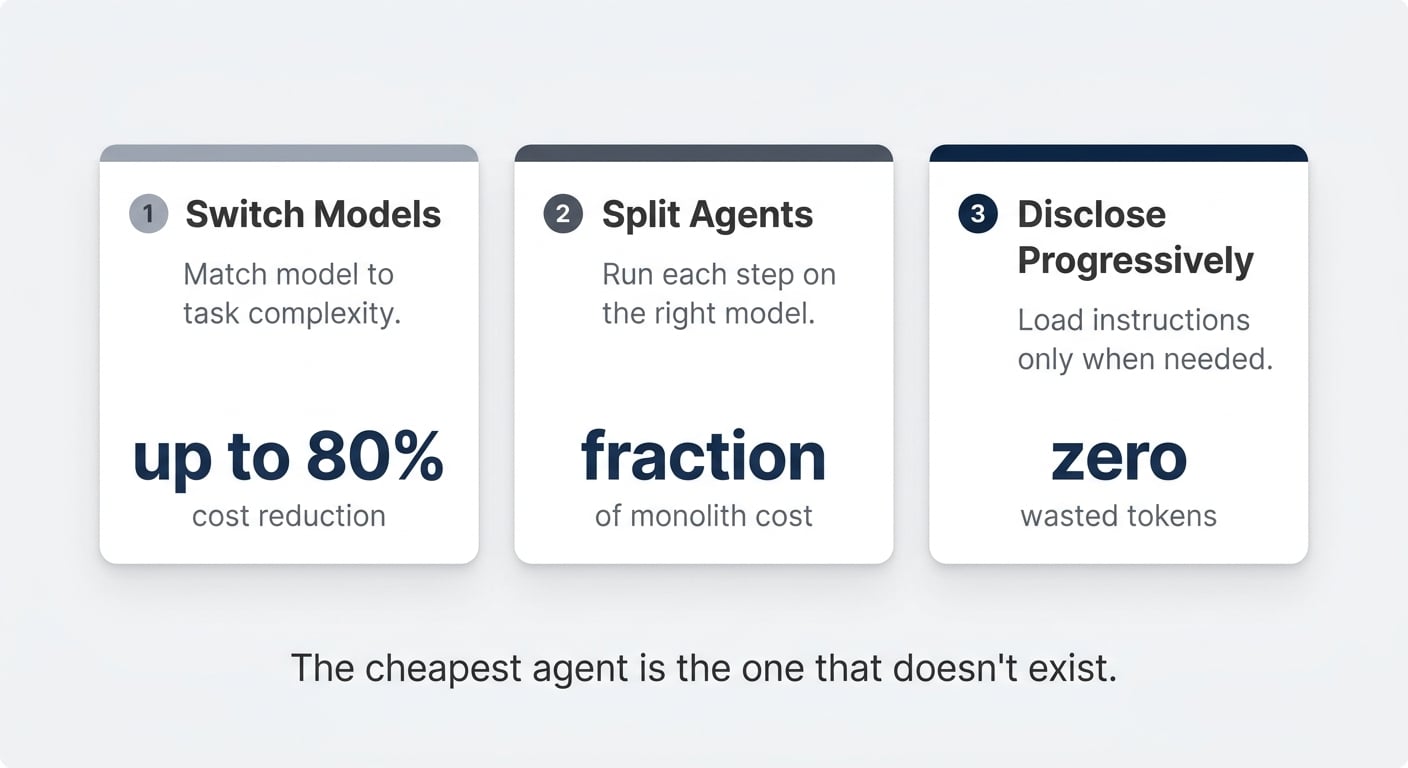
The organisations that figure out AI agents now will have an enormous advantage in twelve months. The ones that freeze up over a few hundred dollars in credits will fall behind.
Frequently Asked Questions
How Much Do Notion Credits Cost?
Notion credits cost $10 per 1,000 credits, billed monthly alongside your Business or Enterprise subscription. Credits are shared across the workspace, reset every month, and do not roll over. You can adjust your purchased amount each billing cycle and top up mid-month if needed.
What Happens When You Run Out Of Notion Credits?
Your custom agents stop running. Any triggered automations that depend on agents will pause until an admin adds more credits. This is why it is important to monitor pacing — especially if you have a conservative limit set. Notion sends alerts when your workspace hits 80% and 100% of its credit allocation.
Can You Still Use Notion AI For Free?
Yes. Your personal Notion AI agent — the one in the sidebar — is included in your Business or Enterprise subscription at no extra cost. AI Meeting Notes, Enterprise Search, and all existing AI features remain free. Custom Agents always run on Notion credits. Your personal agent only draws credits once you pass your AI usage allowance and your admin has allowed continuing with credits.
What Is The Best Model To Use For Notion Agents?
It depends on the task. Opus delivers the highest quality reasoning but costs significantly more. Haiku costs roughly one-fifth of Opus and handles simple tasks like classification, extraction, and formatting just as well. GPT 5.5 is a strong mid-tier option for logic-heavy work at a lower cost than Opus. The key principle: match the model to the complexity of the job, and never leave it set to Auto — Auto makes that match for you. The separate Effort setting then controls how hard the chosen model thinks; its default is fine to leave alone.
How Can You Reduce Notion Agent Costs By 80%?
Four proven levers: switch expensive models to cheaper ones that match the task complexity (Haiku instead of Opus for simple work), lower the Effort level on high-frequency agents doing simple work, split monolithic agents into multi-agent pipelines so each step runs on the right model, and use progressive context disclosure so agents only load instructions they actually need. Beyond that, replace deterministic workflows with automations and move chat-only agents to free skills via your personal agent.