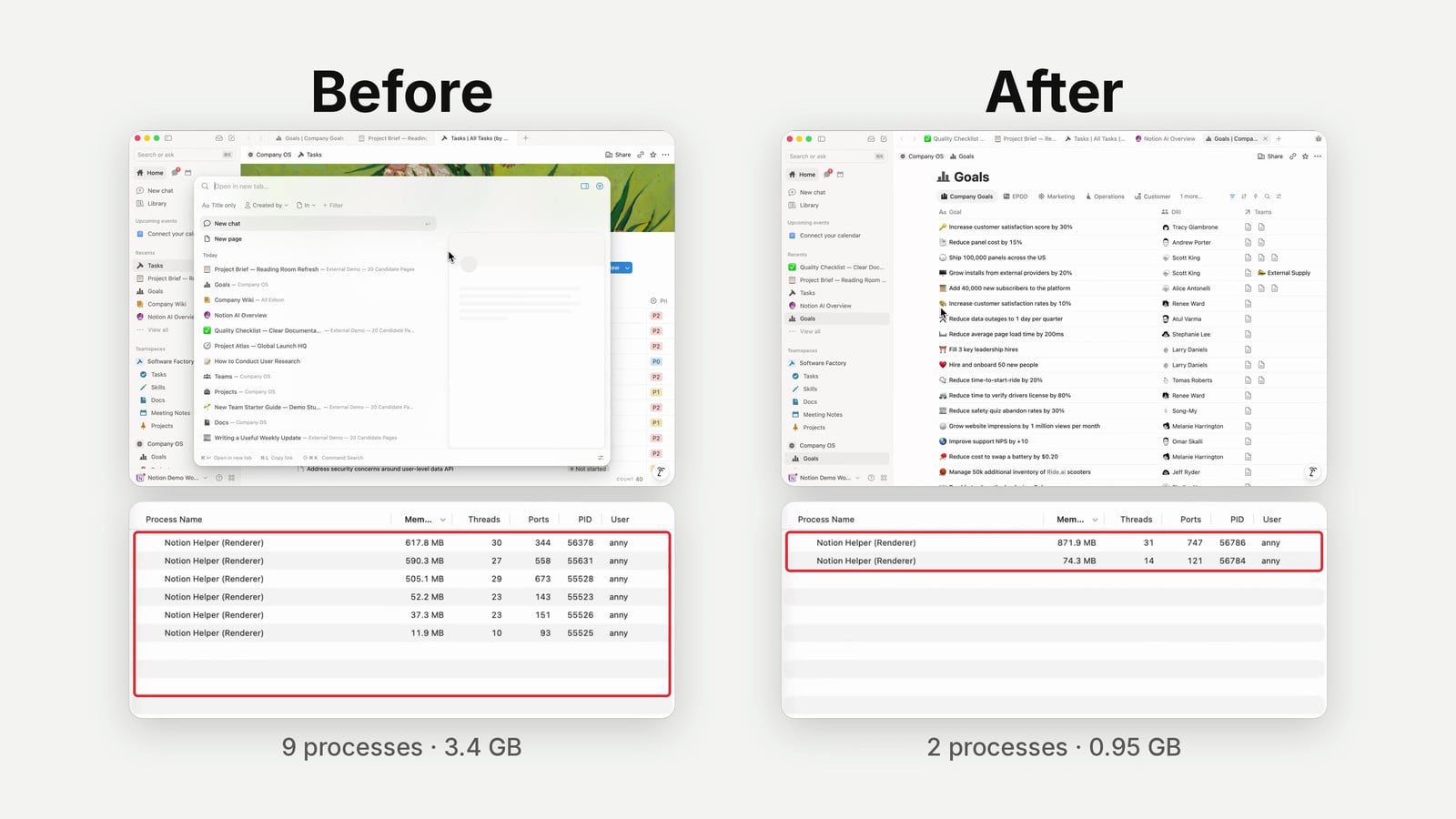
Update (July 2026): Notion External Agents have since launched — Claude and Cursor are now available in your workspace. For the full walkthrough, see our guide Notion External Agents: Claude & Cursor Explained. The Dev Day recap below reflects the picture at launch.
Notion Dev Day 2026 marks the moment Notion stopped being just a productivity tool and started becoming a true developer platform — with Workers, an Agent SDK, and an Agent API that together turn your workspace into a programmable system of record.
If you watched the announcements and thought “that sounds technical,” don’t worry. You don’t need to write a single line of code to benefit from what just happened. And if you do write code (or have AI write it for you), well — the ceiling just got a lot higher.
Here’s everything that was announced, what it means for your workspace, and how you can start using it today. For specific Notion AI terminology, see the Notion AI Dictionary.
What Are Notion Workers And Why Should You Care?
Notion Workers are small pieces of code that run directly on Notion’s servers, extending what your workspace can do far beyond its built-in features.
Think of a worker as a specialised tool you give to your Notion setup. If you’ve ever used Notion’s built-in automations — the little ⚡ icon on your databases — workers are basically that, but on steroids. They can do anything a normal automation can’t: search across databases, connect to external APIs, run complex logic, and much more.
And yes, workers require code. But in 2026, that’s barely a barrier. Tools like Claude Code and Codex can generate a working worker from a plain-English description. We’ll have a full tutorial on this later this week — even if you’ve never touched a terminal, you’ll be able to follow along.
How Do Workers Show Up In Your Workspace?
Workers can be triggered in three distinct ways, each suited to different use cases.
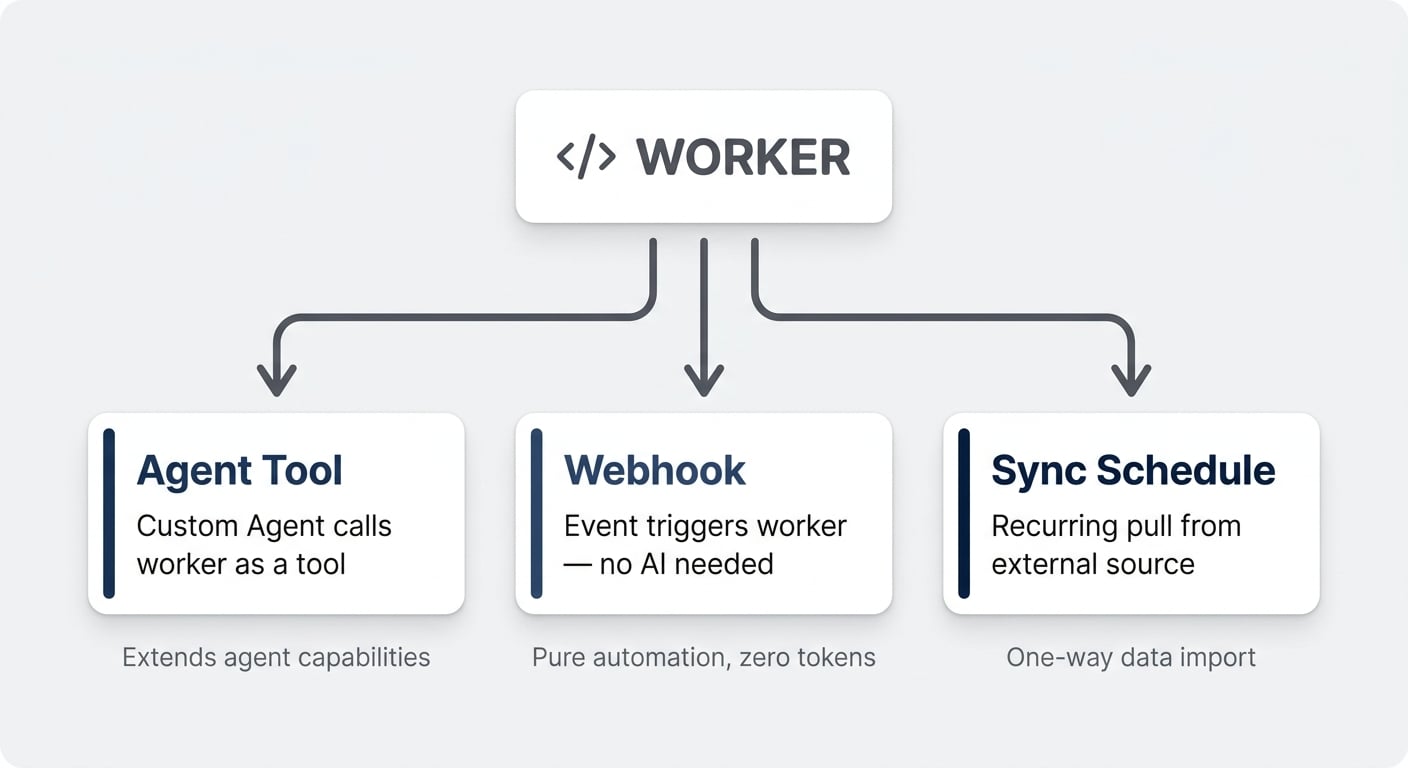
1. As a tool for Custom Agents
You can attach a worker to any Notion Custom Agent as a tool — like teaching your agent a new trick. Out of the box, custom agents can’t connect to every external service. For example, there’s no built-in connector for ConvertKit (Kit), the newsletter platform we use.
So we built a small worker that accesses Kit’s API and gave it to our agent as a tool. Now the agent can pull newsletter data automatically during its runs. That’s a capability Notion AI simply doesn’t have natively — and a worker fills the gap in minutes.
2. Via webhook triggers
This is new as of Dev Day. Workers can now be triggered by webhooks, meaning they run without any AI involvement at all. Something happens in your workspace → the worker fires → the job gets done. Pure automation, no tokens burned.
The powerful part: Notion has webhooks built into its database automations. So you can set up a chain entirely inside Notion — database automation sends a webhook, webhook triggers a worker, worker does the heavy lifting. A complete automation loop without leaving the platform.
3. On a sync schedule
Sync workers run on a recurring schedule — every 15 minutes, every hour, once a day — pulling external data into Notion. We’ll cover sync in detail below, because it has some unique characteristics that make it especially interesting. If you’re building with external APIs, the Notion API guide covers pricing, token usage, and best practices.
Six Practical Examples For Notion Workers
Let’s make this concrete. Here are six real-world use cases where workers shine.
🏢 Company Enricher
Whenever you add a new company to your CRM and fill out the domain, a worker fetches the company logo and sets it as the page icon. Optionally, it can also scrape the company website (using a service like Firecrawl) and auto-fill properties like industry, size, and latest news.
Small visual tweak, big difference in usability — and it scales to hundreds of entries without lifting a finger.
✅ Task Generator
One of the most common automation flows we used to build with Make or N8N. The scenario: certain project types always need the same set of tasks. A marketing campaign always has these seven steps, an onboarding always has these twelve.
The gold standard is a separate process database where you define which tasks belong to which project type. A worker watches for new projects, looks up the matching process, and creates all the tasks automatically. Previously, this required an external tool. Now it runs natively inside Notion.
🔍 Duplicate Checker
Checking for duplicates in Notion is not a great experience — there’s no built-in functionality for it. You could use AI, but that burns tokens fast. In code, however, duplicate detection is a solved problem. A worker can check every new entry against existing records and flag (or merge) duplicates instantly.
⏰ Overdue Escalator
A scheduled worker that checks task due dates at regular intervals, identifies overdue items, maps them to responsible team leads, and sends notifications. Think of it as a proactive project health monitor running in the background.
💳 External Status Sync
Workers can connect to external APIs. Track invoice payment status from Stripe, pull order updates from Shopify, or sync ticket statuses from Zendesk — all reflected automatically in your Notion databases.
📝 Smarter Meeting Notes Sync
If you use an external meeting tool, you know the pain: you prepare an agenda in Notion before the meeting, but when the notes come in afterwards, they create a new entry instead of merging with the existing one.
A worker combined with an agent solves this elegantly. The code handles the obvious matching (identical titles, matching start times). For ambiguous cases, the AI applies contextual reasoning. And because 80% of the work happens in code — which is nearly free to execute — your overall agent costs drop dramatically compared to having AI handle the entire flow.
Pro Tip: This last example highlights a key design principle for workers. Use code for the deterministic, repetitive parts and reserve AI for the judgment calls. This approach can reduce your agent token consumption by 80% or more on mixed workflows. For cost optimization strategies, see how to reduce Notion agent costs.
How Much Do Workers Cost?
Workers will use the same credit system as Notion Agents, but at a fraction of the cost.
AI reasoning is expensive — it takes enormous compute for models to think through problems. Code execution, by comparison, is dirt cheap. So while workers are a paid add-on, the pricing reflects this difference.
Notion shared some sample calculations:
- Polling Salesforce tickets every 15 minutes → 86 cents per month
- Pulling from Jira once per day → 1 cent per month
- Heavy usage (9,800 runs/month calling help desk tickets) → roughly $13 per month
Plus, workers are completely free until 15 October 2026. That gives you nearly three months to build, test, and optimise before any charges kick in.
To activate workers, you need to be a workspace owner on the Business plan or above. Head to Settings → Features → Workers and hit the activation button. For professional implementation guidance, Notion consulting services can help set up your worker infrastructure.
How Does Notion Sync Work?
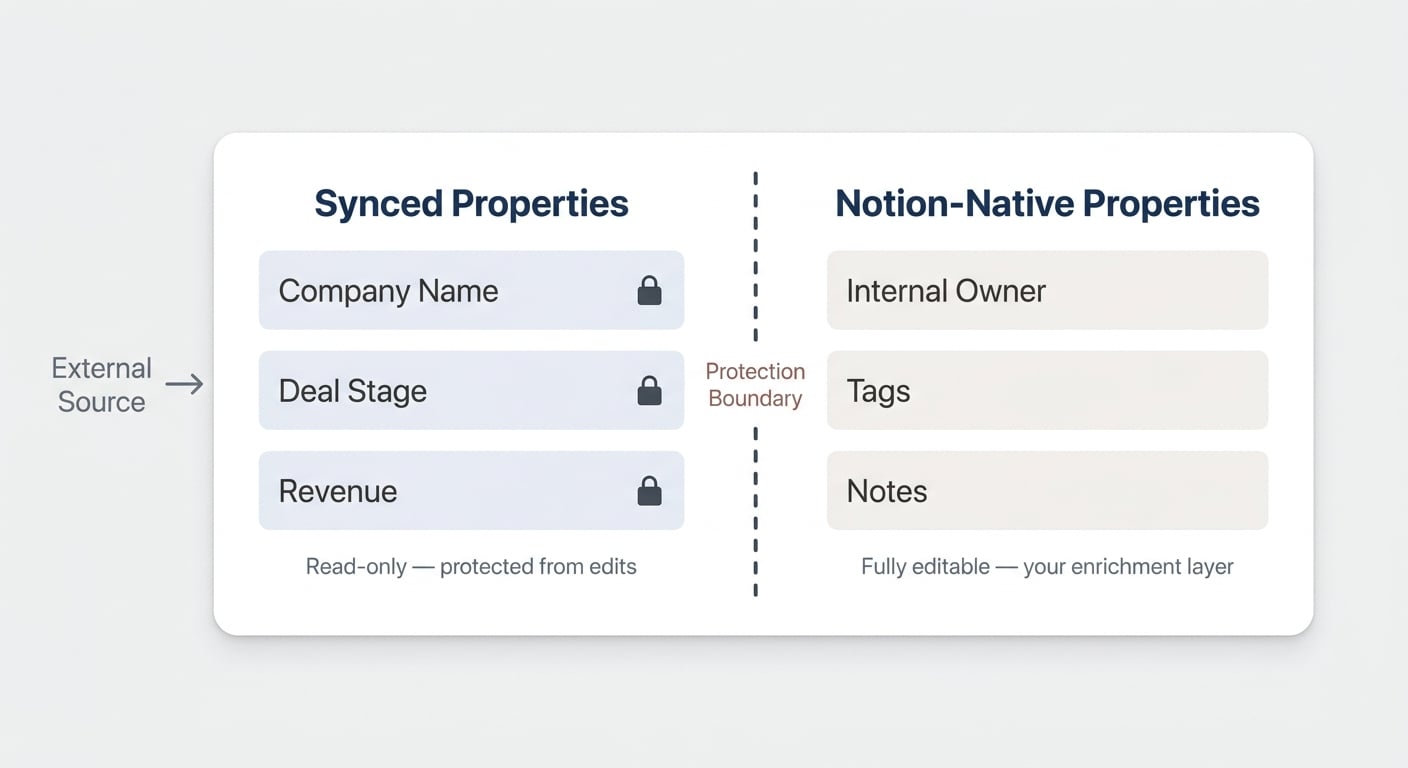
Sync is a specific type of worker designed for one-way data imports into Notion, with built-in protections against accidental overwrites.
If you have an external system that’s the source of truth — Salesforce for your deals, an HRIS for employee data, a ticketing system for support requests — and you want to see that data in Notion without risking someone accidentally changing synced values, Sync is your answer.
What Makes Sync Different From A Regular Worker?
Sync workers create and manage their own dedicated database. This is an important design choice.
When you set up a sync, you declare which properties get pulled from the external source — name, stage, value, whatever you need. These synced properties are locked. You can see them, copy values from them, but you cannot edit them in the Notion UI. The data flows one way: from the external source into Notion.
But here’s where it gets clever. You can add your own Notion-native properties on top of the synced ones. Assign an internal owner, link the record to other Notion databases, add tags or notes — all completely under your control. The synced data stays clean and protected; your internal enrichment layer sits alongside it.
This solves a problem we see constantly in client work: someone changes a synced property value in Notion, the next sync overwrites it, and confusion follows. With Sync’s architecture, that simply can’t happen.
When Should You Use Sync vs A Regular Worker?
Use Sync when:
- The external system is the source of truth
- You only need to read data into Notion (one-way)
- You want protected, locked properties that can’t be accidentally modified
- You’re fine with a new, dedicated database for the synced data
Use a regular worker when:
- You need two-way sync (read and write back)
- You want to push data into an existing Notion database
- You need more complex logic beyond simple data mirroring
Pro Tip: Sync databases let you rename properties without breaking the sync — there’s an internal ID that maintains the connection. But you can’t change the property type. If the sync declared a text field, it stays a text field.
What Is The Notion Agent SDK?
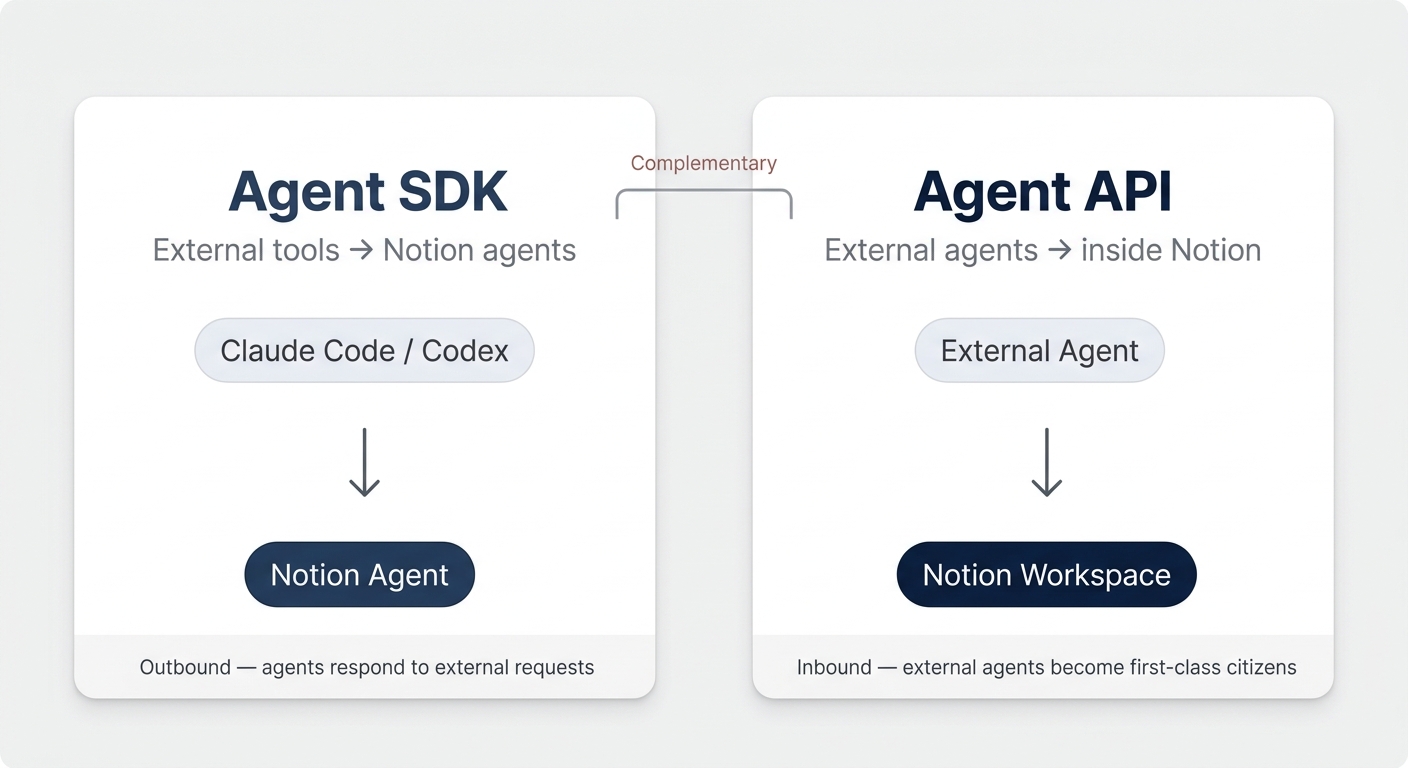
The Agent SDK lets external tools talk to your Notion agents — meaning you can finally interact with Notion AI without being inside Notion.
This is a significant shift. Until now, using Notion AI meant opening Notion. The one exception was Slack integration for Custom Agents. The SDK blows that door wide open for Custom Agents. (Your Personal Agent isn’t reachable through it yet.)
The Agent APIs behind the SDK are in public beta: you can start today with a personal access token by following the quickstart. The SDK itself is still labelled alpha and installs from source via the official GitHub repository, not from npm.
Why Does This Matter For Your Workflow?
Imagine you’re deep in Claude Code, building a marketing campaign. You need the latest details from three client meetings that live in Notion. Previously, you’d context-switch: open Notion, search for the meetings, copy the relevant bits, paste them back.
With the SDK, Claude Code can ping your Notion agent directly. The agent searches your workspace, pulls the meeting details, and sends them back to Claude — all without you leaving your coding environment.
Or flip it around: you’ve just finished a development sprint in Codex and want to write the results back to your project management system in Notion. Codex could do this via the API, sure. But a Notion agent that’s been configured with your workspace’s structure, naming conventions, and linked databases will do it more reliably. The agent knows how your system works. That’s its zone of genius.
The “Zone Of Genius” Principle
This is the key insight behind the SDK. Every tool has a sweet spot:
- Notion AI excels at anything where inputs and outputs live in Notion — searching, creating, linking, updating workspace content
- Claude Code / Codex excels at writing code, working with files, generating assets
- Specialised agents (research, data analysis, etc.) each have their own strengths
The SDK lets you route each task to the tool that’s best at it, without the human having to manually shuttle information between them.
In our own work, we’ve already seen this pattern emerge with tools like OpenClaw. The SDK makes it native — no middleware required.
Moving Back To Multiplayer
There’s a bigger trend worth flagging here. Right now, a lot of AI work happens in single-player mode. People flock to Claude Code or Codex, build things in their own local environment, and the output stays siloed.
That’s the antithesis of collaboration. When you create work output that should live in a central system — and Notion is that system — you need a bridge back.
The SDK is that bridge. It makes it easy for information to flow back into the right place in your workspace, even when the work happened somewhere else entirely.
What Is The Notion Agent API?
The Agent API is the layer underneath the SDK: it is what an app outside Notion calls to open a session with a Custom Agent, send it a message and read the reply. Bringing external agents such as Claude or Codex into Notion is a separate feature, External Agents — which is what the next paragraph describes.
Your Claude agents, Codex agents, and any other external AI agents will show up directly in your Notion agent menu. You can interact with them, assign them tasks, and manage their workflows — all from within Notion.
The Agent API is in public beta — no waitlist. Calls authenticate with a personal access token or a connection token that carries the Interact with agents capability.
How Does This Change Day-To-Day Work?
Picture a shared task board in Notion where your entire team — humans and AI agents — collaborates.
A new engineering ticket comes in. You assign it to your Claude Code agent, which starts working on the implementation. A content brief arrives — you route it to a specialised writing agent. A data analysis request? That goes to your analytics agent.
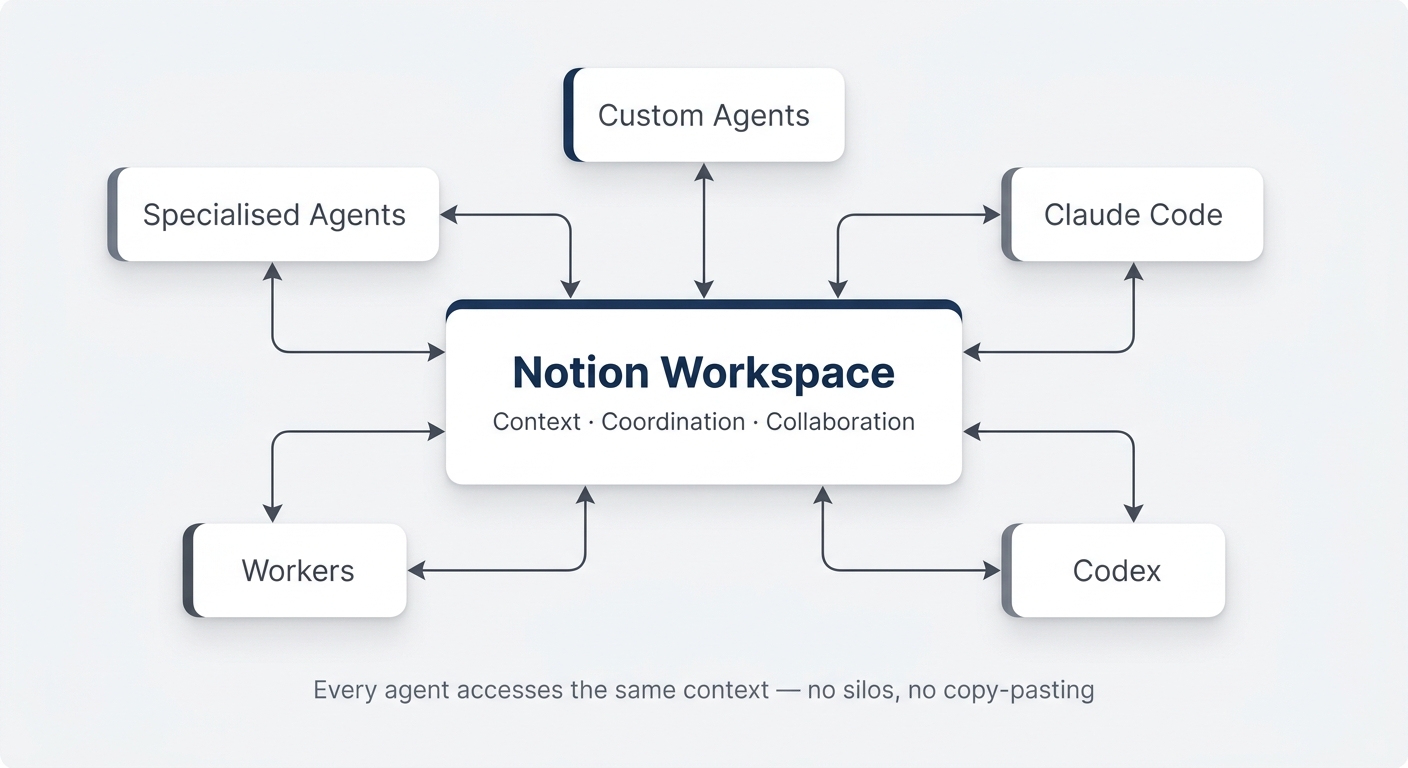
Each agent picks the right tool for the job. Notion AI handles everything where the inputs and outputs live in your workspace. Claude handles the code. Specialised agents handle their domains. And you orchestrate it all from one central interface.
When agents complete their work, they update the task status, write their output back to the shared board, and move the item along the pipeline. No copy-pasting between tools. No lost context.
The Orchestration Layer Notion Was Built For
This is arguably the most strategic announcement of Dev Day. Notion has always worked as a hub-and-spoke model — your central system connected to specialised tools around it. As companies grow, Notion was never going to be the all-in-one tool for everything.
The Agent API extends this model to AI. Your workspace becomes the orchestration layer where all agents — internal and external — converge.
Who’s working on what? What’s the next task in line? What’s our general documentation? These are the same human collaboration problems Notion already solves well. Now all your AI agents benefit from that same coordination infrastructure.
How Do You Set All Of This Up?
Everything runs through the Notion CLI (command-line interface), accessible via the ntn command in your terminal.
The CLI lets you:
- Log in and authorise your Notion workspace
- Deploy workers
- Check worker statuses and logs
- Configure sync schedules
- Manage the full worker lifecycle
If you’ve never worked with a terminal before, don’t worry. We’ll release a complete step-by-step tutorial later this week that walks you through everything — even as a non-technical user. With Claude Code or Codex handling the actual code generation, the CLI is mostly about deploying and managing.
The official workers template repository is available at github.com/makenotion/workers-template. For the Agent SDK, head to github.com/makenotion/notion-agents-sdk-js.
Important: You cannot deploy a worker without the CLI. There’s no UI-only path for this. But again — the setup is straightforward once you understand a few core concepts.
What Does This Mean For Notion As A Platform?
Notion is becoming a true system of record — a central hub that can plug into any AI setup you need on top. For a deeper dive into how this orchestration works internally, see how Notion uses AI agents.
| Feature | What It Does | Available | Best For |
|---|---|---|---|
| Workers (Tool) | Custom code as agent tools | ✅ Today | Extending agent capabilities |
| Workers (Webhook) | Code triggered by events | ✅ Today | No-AI automations |
| Workers (Sync) | Scheduled one-way data pull | ✅ Today | External data mirroring |
| Agent SDK | External tools talk to Notion AI | 🧪 Alpha (installs from source) | Using Notion AI from Claude, Codex, etc. |
| Agent API | Apps outside Notion talk to Custom Agents | ✅ Public beta | Driving Custom Agents from your own code |
| CLI (ntn) | Deploy and manage everything | ✅ Today | Worker deployment and lifecycle |
This table is the at-a-glance summary. But the bigger picture is what matters most.
We all know by now that context is the most important ingredient for effective AI. Your company’s knowledge, processes, relationships, and history — that’s what makes AI useful, not the model itself.
Notion is positioning itself as your context in a box. A central repository that any agent — internal or external — can tap into. Whether Notion’s own Custom Agents are the best tool for a specific job, or whether Claude, Codex, or a specialised third-party agent is better suited, doesn’t matter anymore. They can all access the same context and collaborate in the same space.
The No-Code To Code Transition
There’s a meta-trend worth acknowledging here. Workers and no-code tools (Make, N8N, Zapier) solve largely the same problem: extending Notion beyond its built-in capabilities.
If you look at a Venn diagram, the overlap is nearly 100%. Both allow you to build automations, connect to external services, and create custom logic.
But workers have structural advantages that will compound over time:
- No additional tool to maintain, pay for, or get approved — workers run inside Notion
- Code is getting easier to write every month — AI-assisted coding means describing what you want in plain English
- Direct integration with Custom Agents — workers can be tools that agents use, which is much harder with no-code
- Cost efficiency — no middleware subscription fees
Internally, we’ve already stopped building no-code automations for our own workflows. We still deploy them for certain client situations where workers have limitations (runtime caps, limited handles between workers), but the general direction is clear.
Will we still be building with Make or N8N in six months? Honestly, probably not for most use cases.
Pro Tip: Don’t rip out your existing no-code automations tomorrow. But for any new automation you’re building, consider whether a worker could handle it. Start with something simple — a company enricher or a webhook-triggered status updater — and build confidence from there. Want to dive deeper? Check out our custom agents complete guide and subscribe to Notion for Teams for weekly frameworks on workspace setup.
Notion Is Handing You The Keys
If you’ve been watching the Notion ecosystem evolve, you’ll recognise a pattern. The early days were about creative workarounds — duct-taping features together to do things the tool wasn’t designed for. As Notion shipped more native features, the workarounds became less necessary.
Now the ceiling is lifting again. The ability to execute code inside Notion, to call Notion agents from anywhere, and to bring external agents into your workspace — these unlock possibilities we haven’t even imagined yet. Sign up for our newsletter for updates as this ecosystem matures.
Notion is handing users the keys to the machine room. What you build with them is up to you.
Frequently Asked Questions
Do I Need To Know How To Code To Use Workers?
Not really. While workers are written in TypeScript, AI coding tools like Claude Code and Codex can generate a fully functional worker from a plain-English description. You’ll need to use the Notion CLI (ntn) to deploy them, but the process is straightforward. We’ll publish a complete beginner tutorial later this week that walks through every step.
How Much Will Workers Cost After The Free Period Ends?
Workers use the same credit system as Notion Agents, but at a fraction of the price — about $0.0023 per run (roughly 4,348 runs per 1,000 credits, or $10). Code execution is orders of magnitude cheaper than AI reasoning. Notion’s example calculations show costs ranging from 1 cent per month (daily Jira pull) to roughly $13 per month for heavy usage (9,800 runs). The free period runs until 15 October 2026, giving you plenty of time to build and optimise.
What’s The Difference Between The Agent SDK And The Agent API?
The SDK lets external tools (Claude Code, Codex, OpenClaw) call your Notion agents from outside Notion. The Agent API is the surface underneath it: an app outside Notion opens a session with a Custom Agent, sends a message, streams the reply, submits an action and pages through the session’s event history — plus management endpoints to list reachable agents, read usage insights, set credit limits and enable, disable or delete agents. The SDK is a typed JavaScript/TypeScript wrapper around that same API. Think of it as: API = the raw HTTP surface, SDK = the same thing with types — both are outbound (Notion agents respond to external requests). The inbound direction, where agents like Claude or Cursor show up inside your Notion workspace, is a separate feature: External Agents.
Can I Use Workers With My Existing Databases?
Yes, for regular workers and webhook-triggered workers — they can read from and write to any database you give them access to. Sync workers are the exception: they create and manage their own dedicated database with locked properties. If you need to push external data into an existing database, use a regular worker instead of Sync.
When Will The Agent SDK And Agent API Be Generally Available?
The Agent API is in public beta and open to everyone with a personal access token — no waitlist. The SDK is still labelled alpha and installs from source via the Agent SDK GitHub repository. Workers, webhooks, and sync are available today for Business plan workspaces and above.