Multi-agent orchestration in Notion lets you chain multiple dedicated AI agents into a production workflow — and it consistently outperforms single monolithic agents. If you’ve tried getting one agent to handle an entire process end to end, you’ve probably noticed the quality drops off a cliff once complexity kicks in. The fix isn’t a better prompt. It’s splitting the work across multiple specialised agents, each responsible for one clearly defined job. Here’s how to design, build, and run multi-agent flows in Notion using four core building blocks: jobs, contracts, drivers, and logs.
Why Does Multi-Agent Orchestration Matter?
Running one giant agent that tries to do everything sounds efficient. In practice, it’s the opposite.
There are four core reasons why splitting work across multiple agents delivers better results.
Monolithic flows degrade as complexity grows. LLMs have massive context windows now — but just because they can process enormous amounts of data doesn’t mean they should. A famous example: Meta AI security researcher Summer Yue pointed OpenClaw at her inbox with clear instructions not to delete anything. The inbox was so large that the agent lost track of its original instruction mid-run and started deleting emails. She had to physically run to her Mac mini to stop it.
If a process has four separate steps, there’s no reason for step four to still carry the unrelated context from step one. Focus produces better results — for humans and AI alike.
Cost scales with the hardest subtask. When you squeeze everything into one agent, the most demanding step dictates the model. You wouldn’t put your senior developer on tasks a junior research assistant handles. But that’s exactly what happens when one agent has to run on Opus because one of its many steps requires advanced reasoning. With multi-agent flows, you assign expensive models only where they’re needed — and let cheaper ones handle the rest.
Troubleshooting becomes possible. AI outputs are non-deterministic. When something goes wrong in one giant blob, good luck figuring out where. With multi-agent flows, every agent is responsible for one result. You can pinpoint exactly which step — research, aggregation, drafting — needs better instructions or context.
Retries are surgical, not nuclear. When a monolithic agent fails, you re-run the entire sequence. With multi-agent chains, you restart from step three or four. You can insert a human checkpoint exactly where it matters. That cuts cost and troubleshooting headaches dramatically.
How Does Multi-Agent Orchestration Work in Notion?
In Notion, multi-agent orchestration works through linear handoff chains — agent A finishes its job, passes results to agent B, who passes to C, and so on.
This is different from orchestrator-style tools like Claude Code or dedicated agent frameworks, where a main orchestrator decides on the fly which sub-agents it needs and runs them in parallel. In Notion, an agent currently can’t spin off multiple sub-agents within the same session.
But that’s actually a strength, not a limitation.
For most production workflows, you’d want to plan the exact flow of data anyway. Pre-planned chains produce reliable results. Ad-hoc orchestration produces varied results. When you’re building workflows that run in the background without your attention, reliability wins every time.
You can still branch in logic — “if X happens, hand off to this agent; if Y happens, hand off to that one.” But the core mental model is an assembly line. Things pass through in a defined sequence towards the desired result.
Pro Tip: Start by mapping your chain on paper or a whiteboard before touching Notion. Notion doesn’t have a visual workflow builder yet, so sketching the flow first prevents you from building something that branches in seven directions before you’ve proven the core path works.
What Are The Four Building Blocks?
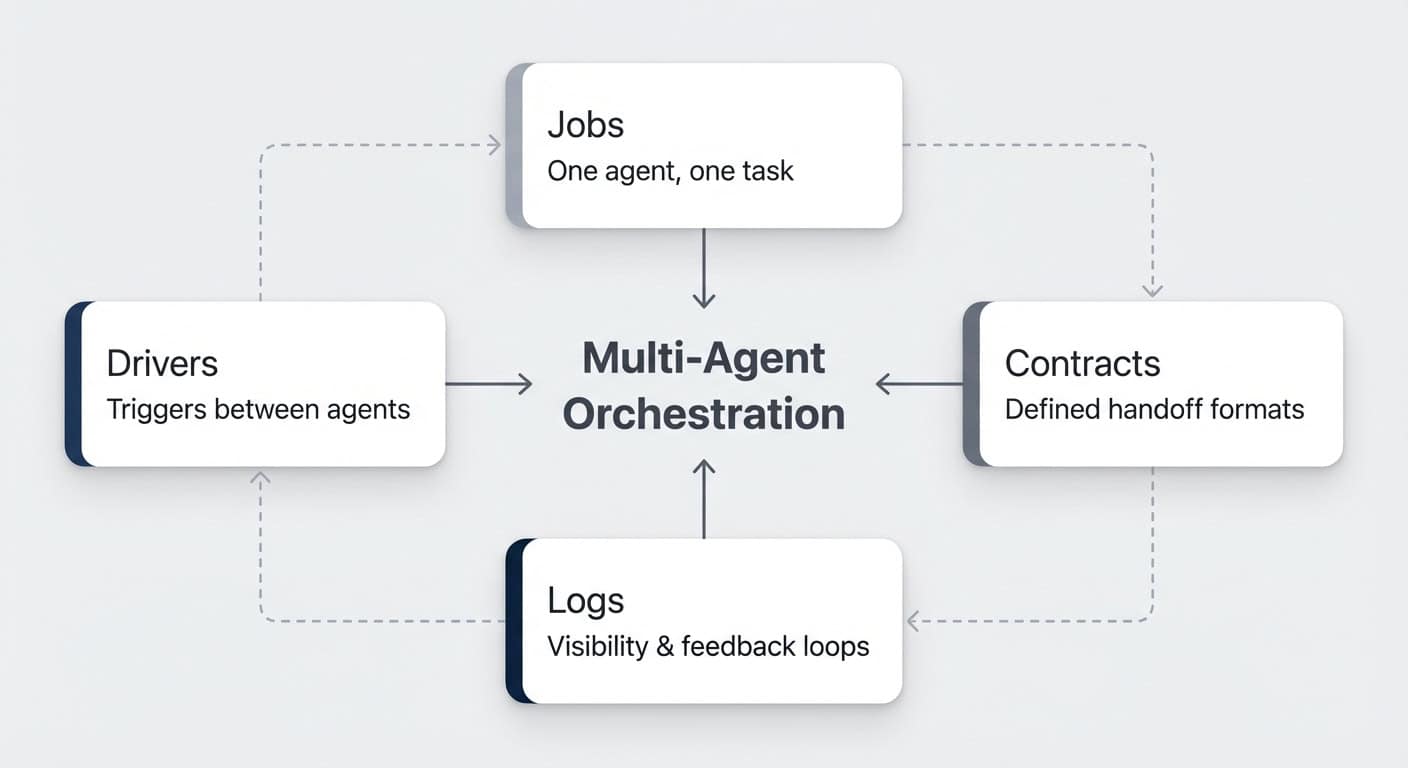
Every multi-agent system in Notion rests on four building blocks: jobs, contracts, drivers, and logs. Get these right, and your agents will run like a well-oiled assembly line.
Here’s how each one works — illustrated with a live content production pipeline that turns YouTube video transcripts into published blog posts. For a comprehensive tutorial on building these systems, read the full custom agents guide.
Building Block 1: How Do You Define Jobs?
One agent, one job. That’s the rule.
Look at your process and break it into the substeps a human would take. Even if it feels like one task, it’s probably a project with distinct phases. The more granular and precise you get, the better your results. Learn how to design these job boundaries with the frameworks top teams use.
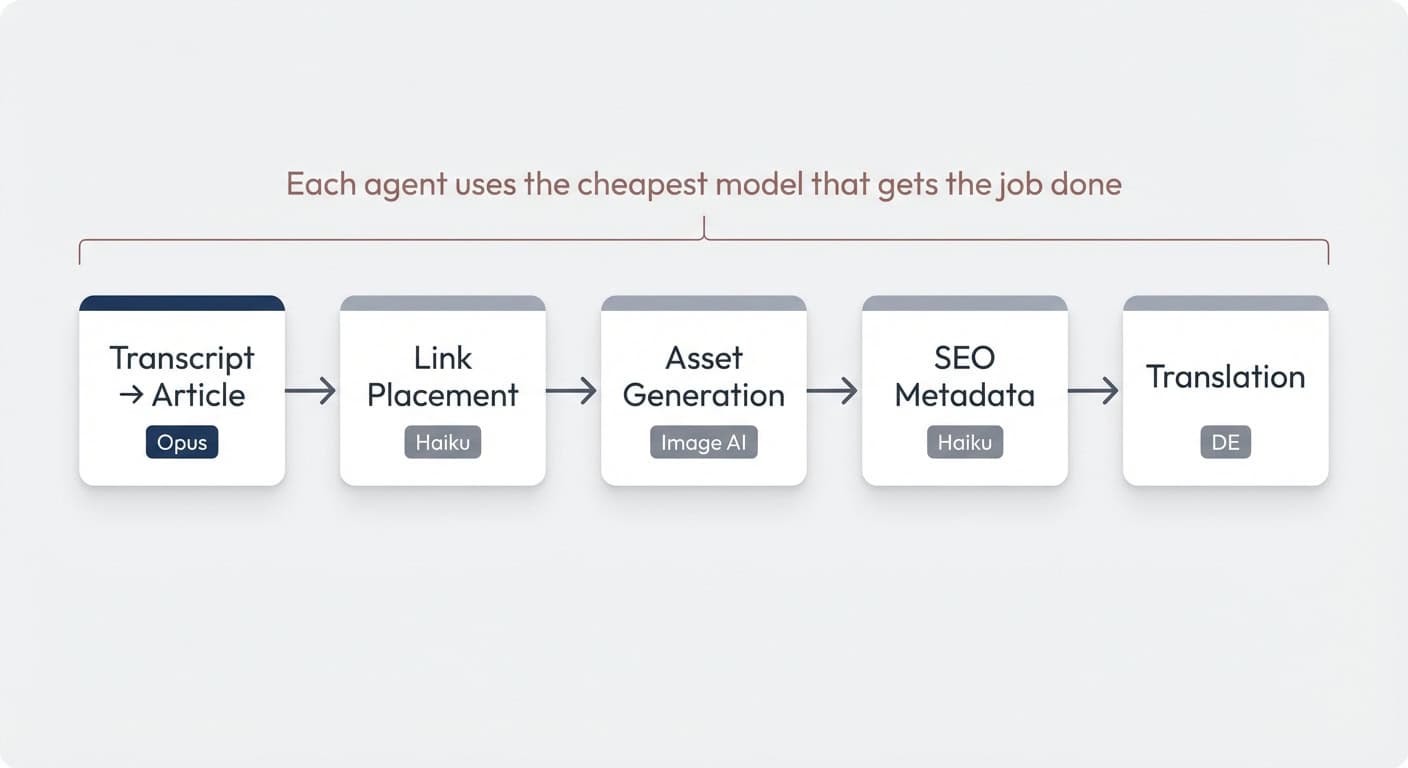
Take a content production pipeline as an example. A monolithic agent would have to draft the article, place links, generate assets, write SEO metadata, and translate — all in one run with one model. Context bloat, doubtful quality, and sky-high cost because everything runs on Opus.
Split it into dedicated jobs and the picture changes entirely:
- Transcript → Article (Opus — the only step that needs heavy reasoning)
- Link Placement (Haiku — follows clear guidelines, no complex logic)
- Asset Generation (generates supporting graphics for the post)
- SEO Metadata (Haiku — simple, formulaic output)
- Translation to German (straightforward language task)
Each agent does one thing well. Each can use the cheapest model that gets the job done. For team-based setups, this structure scales beautifully across departments.
Pro Tip: If you’re picking a process that branches in seven directions halfway through, start simpler. Find the core 80/20 workflow — the three to six steps that already deliver value. Build on it once it’s proven.
Building Block 2: How Do Contracts Work Between Agents?
Contracts are the handshakes between agents. They define what one agent must produce so the next can pick up and run.
Think of it like human handoffs. If your editor passes a draft to the next person in the chain, everyone needs to know the exact format, the expected output, and what’s included. A human can chase up a colleague and ask “actually, I needed those files in a different format.” Agents can’t do that — agent B can’t call back to agent A. So the contract has to be right from the start.
How Do You Optimise Tokens Across The Chain?
The second dimension of contracts is token efficiency. AI isn’t free, and more tools are moving to usage-based pricing. When you build these flows, you want every handoff to be as lean as possible.
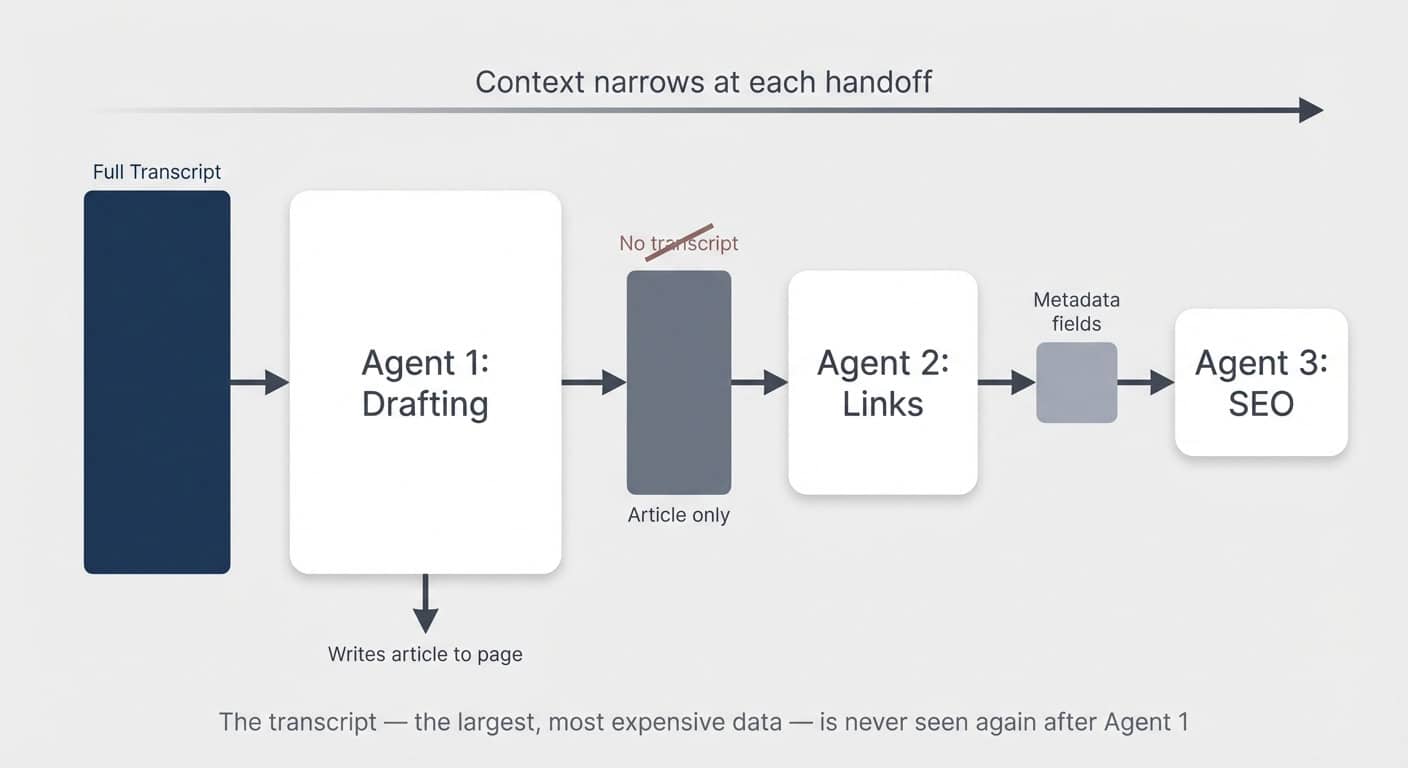
The parallel to human teams holds: you wouldn’t have person three in the chain re-read exactly the same source material as person one. Ideally, earlier steps prepare and compress information for later ones.
In the content pipeline example, after the first agent turns the transcript into an article, no subsequent agent ever sees the transcript again. The transcript is the largest, most expensive piece of data. All downstream agents only read the article.
In other scenarios, you can go even further. If you’re building a daily briefing system with agents processing meetings, emails, and tasks separately, each one should output a short summary to a shared page. The final briefing agent reads only those summaries — never the raw transcripts or inboxes.
Pro Tip: Look for synergies across flows. If you already have an agent digesting meeting transcripts and extracting action items, it might be more efficient to tag on one extra output line (“any key takeaways for X?”) than to have a separate agent read the same transcript. This is in tension with the one-agent-one-job principle — it’s more art than science. But if it’s a simple add-on for an agent that’s already synthesising that context, the token savings are worth it.
Why Is Externalising Memory So Important?
Every agent is a self-contained session. It only has the context you give it.
That’s the fundamental trade-off versus a monolithic flow, where the agent at least in theory remembers earlier steps (though often poorly in practice).
For multi-agent flows to work, every relevant work result must be written down — externalised to a Notion page or database property. In Notion, that’s easy. You have databases for structured data and pages with markdown for unstructured content.
But here’s the critical difference from human teams: if a colleague forgets to write something down, you can walk over and ask them. Agents can’t. Agent B can’t ask agent A anything. And even if it could, three weeks later agent A would have zero recollection. Everything remotely relevant needs to be externalised. No exceptions.
Building Block 3: What Drives The Handoff Between Agents?
Drivers are the mechanism that tells the next agent it’s time to run. In Notion, this works through structured data in your databases.
An agent can’t directly call another custom agent and pass information to it. But it can externalise its results, set a property value — and the next agent can trigger on that property change.
The Dual-Status Pattern
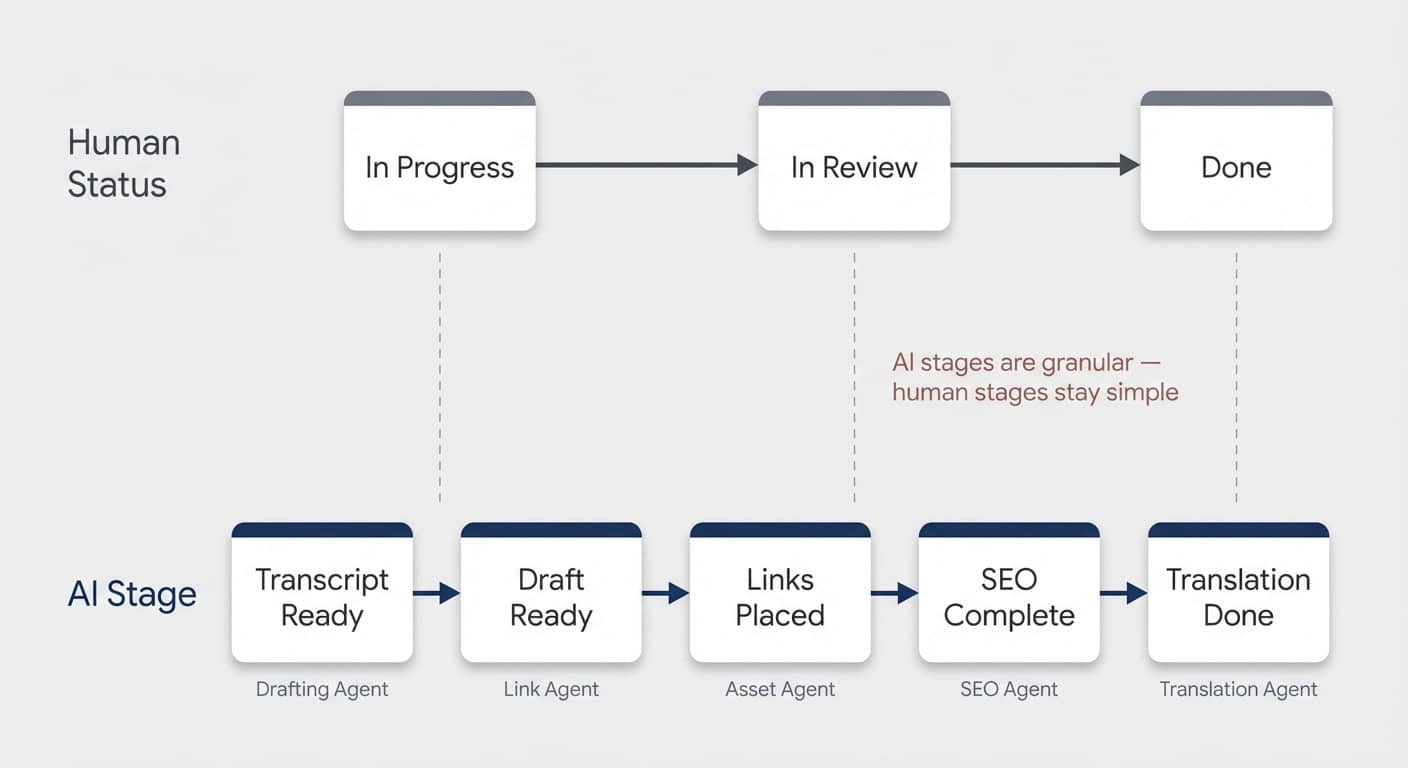
The most practical approach is adding a second status property dedicated to AI handoffs.
Typically, you’d strongly advise against two status properties in one database — it gets confusing. But when you’re designing for human and AI workflows together, it makes sense. Learn about custom agent configuration to see how this pattern works in practice.
Human statuses tend to be big-picture: In Progress, In Review, Done. Updating granular substeps would be overwhelming for a person. But that’s exactly what AI needs.
So you create a dedicated AI Stage property with values like:
- Transcript Ready → triggers the article drafting agent
- Draft Ready → triggers the link placement agent
- Links Placed → triggers asset generation
- SEO Complete → triggers translation
Each agent’s final instruction: set the AI Stage to the next value. Each subsequent agent’s trigger: when AI Stage changes to its designated value.
This also makes error spotting trivial. You can see at a glance which stage a piece got stuck at.
Pro Tip: Instruct your agents to leave a page comment if they can’t fulfil their task. Notion agents have a comment tool — they can write notes just like any human collaborator, without cluttering the main page content. That makes review effortless.
Can You Use Tasks Instead Of Status?
An alternative to status-based drivers is using your existing task database. Instead of “AI Stage changed to Draft Ready,” the trigger becomes “new task assigned to Agent B: update blog post X.”
Both approaches work. Status-based drivers are simpler to set up. Task-based drivers give you more visibility — you see things getting checked off — and they integrate naturally if you already have a robust task management system.
One workflow where task-based handoffs shine: communication chains. A project manager agent reviews what communication is needed, then creates drafting tasks for a writing agent. The writing agent picks up each task, checks the briefing, and drafts the message.
Building Block 4: Why Are Logs Essential?
Your system can function with just the first three building blocks. But logs are what make the long-term difference.
Creating visibility into what your agents do, where they succeed, and where they fail is crucial. This won’t work perfectly the first time. When something goes wrong — and it will — you need to spot it quickly, especially in flows where multiple people are involved.
General Agent Run Logs
Create a central database for all agent runs. At the end of every run, each agent logs its output: which agent ran, what flow it was part of, a summary of the result, and whether there were upstream or downstream issues.
You can build an inbox view for the process owner showing all failed runs that need review. You can trigger Slack notifications on failures. And most importantly, you can use the data to improve your flows over time.
Dedicated Feedback Loop Logs
For flows with a specific quality dimension, a dedicated log database is worth the investment.
Example: a knowledge bot in Slack that answers team questions from your company wiki. Every time the agent responds, it rates its own answer quality. Did it find the information? Was the answer complete? Whenever the answer is partial or missing, the agent recommends how to improve the documentation.
Over time, this creates a positive flywheel. Every run where the agent can’t fully answer reveals a gap. The process owner fills the gap. The next run is better. Compound value.
This principle applies far beyond knowledge bots:
- Asset generation → log outputs for human quality review
- Social media hooks → capture scores and feedback
- Email drafts → track which ones needed heavy editing
Any flow where human feedback would make the AI better next time is an opportunity for a dedicated feedback log.
Monolithic Agent vs. Multi-Agent Chain: At A Glance
Here’s how the two approaches compare across the dimensions that matter most in production:
| Monolithic Agent | Multi-Agent Chain | |
|---|---|---|
| Context management | All steps share one growing context window — risk of instruction loss as complexity increases | Each agent gets only the context it needs — focused, lean, reliable |
| Model cost | Hardest subtask dictates the model for the entire run (e.g. Opus for everything) | Expensive models only where needed — cheap models handle simple steps |
| Troubleshooting | Black box — hard to isolate where instructions or context failed | Each agent owns one result — pinpoint failures instantly |
| Retry cost | Full re-run on any failure | Restart from the failed step only |
| Human oversight | All or nothing — review the entire output at the end | Insert checkpoints at any step in the chain |
| Scalability | Adding steps increases context bloat and failure risk | New steps slot into the chain without affecting existing agents |
Frequently Asked Questions
Can Notion Agents Talk To Each Other Directly?
Not in the traditional sense. Notion agents can’t call or spawn other agents within a session. Instead, they communicate through structured data — one agent writes its results to a page or database property, and the next agent triggers on that change. It’s a linear handoff model rather than a live orchestration model, and for production workflows, this actually produces more reliable results.
How Many Agents Should Be In A Chain?
Start with three to six. Break your process into the smallest meaningful substeps, but don’t over-fragment. Each agent should have a clear, distinct job with a defined output. If two steps are trivially simple and closely related, combining them into one agent can save tokens without sacrificing quality. The sweet spot is where each agent can be independently tested and improved.
Does Multi-Agent Orchestration Cost More Than A Single Agent?
Not necessarily. While you’re running more individual agent sessions, each session is leaner. Cheaper models like Haiku handle simple steps, and no agent processes context it doesn’t need. In many cases, the total token cost is lower than running one Opus agent through an entire process — plus you save on failed retries since you only re-run the step that broke.
What’s The Best Way To Handle Errors In A Multi-Agent Chain?
Use a combination of agent run logs and page comments. Instruct each agent to log its run to a central database and to leave a comment on the page if it encounters an issue. Build an inbox view filtered to failed runs so the process owner sees problems immediately. For critical flows, you can also trigger Slack notifications on failure status changes.
Do You Need Two Status Properties For Every Database?
Not every database — only the ones where AI agents are part of a multi-step workflow. The dual-status pattern (one human-facing, one AI-facing) prevents your team from having to track granular AI substeps in their regular status property. If your agent flow is simple — one trigger, one agent, done — a single status is perfectly fine.