Notion AI skills are the single most powerful lever you have right now to move AI from a novelty to a genuine operational tool — and most people are barely scratching the surface.
If you have been using Notion’s AI features but feel like the output is generic, inconsistent, or just not you, the problem is almost certainly not the AI itself.
It is how you are instructing it.
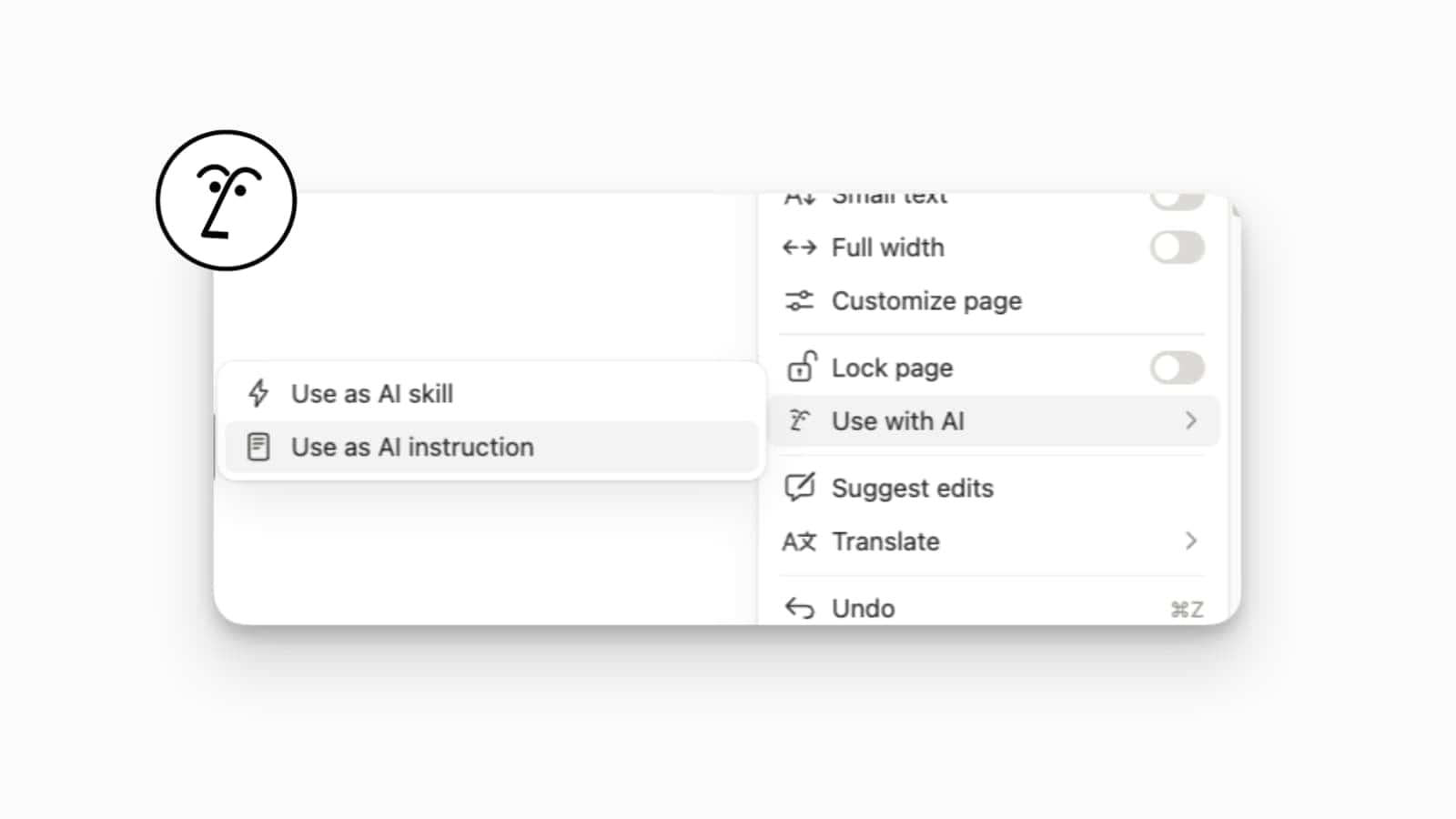
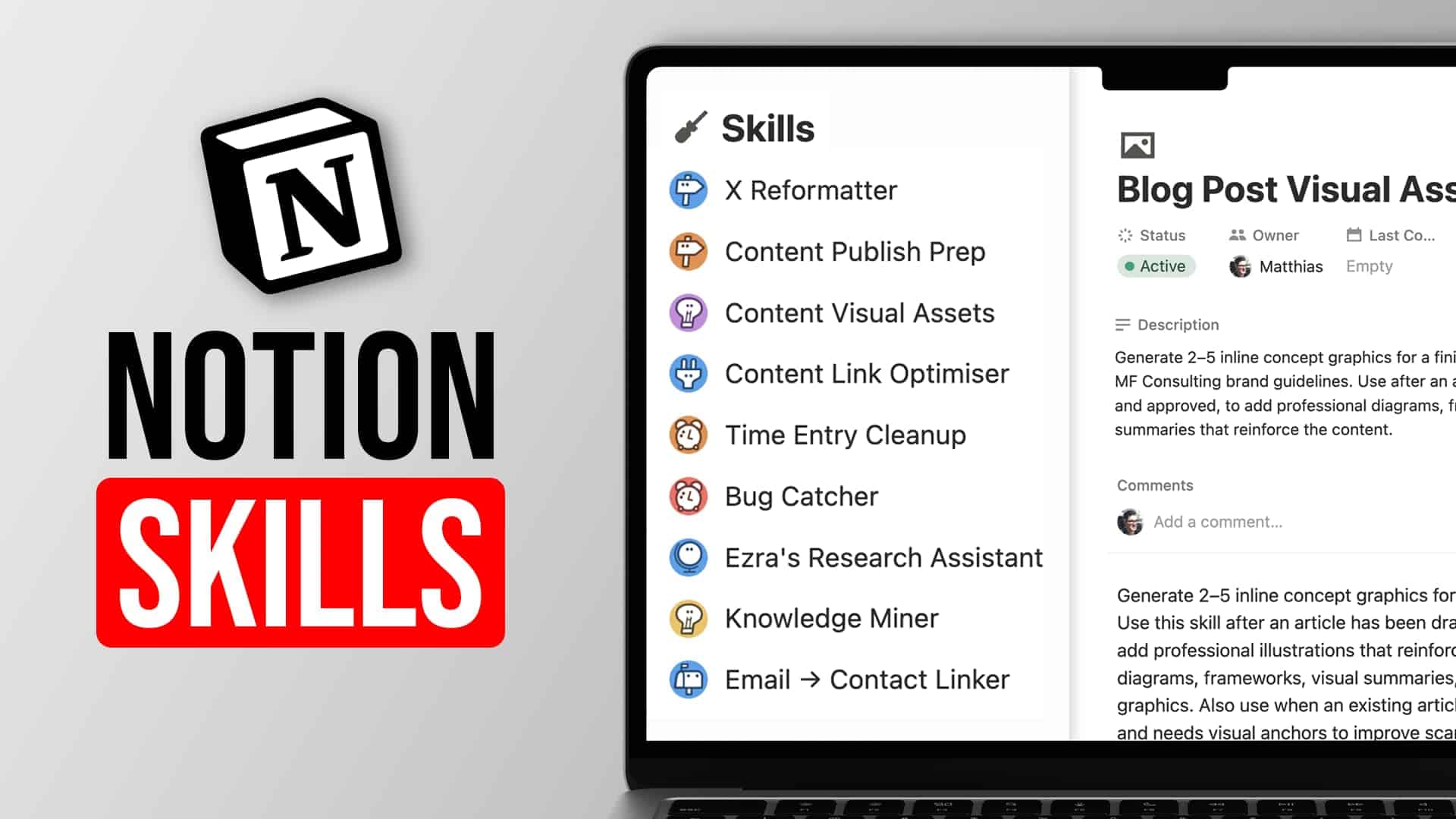
A skill is a simple Notion page that contains reusable instructions for your AI. You @mention it in chat, the AI reads it, and it executes. One page, one skill.
But behind that simplicity sits an entire discipline — what we call skill engineering — that separates people who tinker with AI from people who actually operationalise it.
This guide breaks down everything: what Notion AI skills are, why they matter far more than you think, and how to build, review, and scale them using the frameworks we have developed at our consultancy and presented at the Notion conference in Munich.
What Are Notion AI Skills (And How Do They Work)?
A Notion AI skill is a dedicated Notion page that contains a reusable set of instructions for your AI — and it is the simplest, most effective way to make AI output consistent and reliable.
When you need that skill, you @mention the page in Notion AI chat. The AI reads the page, follows the instructions, and produces the output. No copy-pasting prompts, no explaining yourself from scratch every time.
Think of it this way: every time you type a prompt into AI, you are giving a one-off instruction. A skill turns that instruction into something permanent, repeatable, and shareable.
Here is what that looks like in practice:
- You create a Notion page called, say, Weekly Client Report
- On that page, you write the instructions — what data to pull, how to structure the report, what tone to use, what the output should look like
- Whenever you need that report, you open Notion AI chat, @mention the skill page, and let it run
That is all it takes. One page, one skill. The magic is not in the mechanics — it is in what happens when you start writing those instructions well.
Skills are also a fundamental AI concept – you can find more of those in our unofficial Notion AI Dictionary.
Why Are Notion AI Skills So Important For Teams?
Notion AI skills transform AI from a personal productivity hack into a shared team capability — and there are three specific reasons why they matter far more than most people realise.
They Force You To Uncover Hidden Assumptions
When you tell AI to “create a report,” you already know intuitively what that means. What material to read, what the output format is, what good looks like.
AI does not. AI has to guess. And sometimes those guesses go spectacularly wrong.
This is not just an AI problem — it happens between humans all the time. But humans push back, ask colleagues, draw on experience. AI will silently guess and press on.
The process of writing a skill forces you to confront every assumption you have been making about a task. That alone makes your processes better — even before the AI touches them.
Pro Tip: The more hidden assumptions you can uncover and make explicit, the better your AI output will be. Skills are the best training ground for this muscle.
For structured techniques that amplify this muscle, see our guide on prompting tips that make a difference.
They Solve The Context Overload Problem
You have probably tried creating a giant “master prompt” that crams in every rule, edge case, and preference. It feels thorough. It performs terribly.
AI research confirms this — it is called the curse of instructions. The more parallel rules you force AI to follow, the worse it performs across the board. It is like human multitasking: the more plates you spin, the more you drop.
Skills solve this by letting AI focus on one thing at a time. Instead of loading everything upfront, you load the right skill at the right moment. This is a principle called progressive disclosure, and it is central to everything that follows in this guide.
They Operationalise AI For Your Organisation
Skills are outcome-driven. Each one produces a specific result — a summarised report, a processed meeting, a triaged inbox.
When you build a skill library, you are naturally answering the question: What does our organisation actually use AI for? Not in the abstract. In concrete, repeatable, measurable outcomes.
Because skills are reliable and repeatable, you can slot them into different workflows. The same skill might serve three different processes. You might later hand a skill to an agent that runs it autonomously.
And crucially for teams, skills are shareable. Instead of “everyone figure out your own prompts,” you create a library of shared resources. When someone new joins, you point at the library: This is how we use AI here.
What Is Skill Engineering (And How Is It Different From Prompting)?
Skill engineering is the discipline of designing, testing, and maintaining reusable Notion AI instructions that produce reliable business outcomes — and it is what separates teams who get real value from AI from those who are still experimenting.
“Write good prompts” is advice. Skill engineering is a framework. It adds common language, a structured process, and a system to go from generic prompt writing to specific, repeatable results.
The analogy is apt: prompt writing is to skill engineering what writing code is to software engineering. Same medium, different level of rigour and process.
Here is what skill engineering adds beyond basic prompting:
- Structure — a defined process for creating skills (we use the AC/DC framework, covered below)
- Quality control — dedicated review and compression steps to keep skills sharp
- Scalability — an organisational system (the plugin model) so skills do not become a graveyard of forgotten pages
- Iteration — treating skills as living documents that improve over time, not write-once artefacts
If you are serious about using Notion AI beyond one-off tasks, this is the shift that matters. Understanding real-world use cases helps clarify where skills create the most value.
What Are The 5 Levels Of Notion AI Skill Writing?
Not all Notion AI skills are created equal. We have identified five levels that describe how people typically progress with skill writing — and where most get stuck.
| Level | Name | What It Looks Like | Why It Breaks | How To Move Up |
|---|---|---|---|---|
| 1 | No Skills | You explain everything from scratch every time you use AI | No leverage — every interaction starts at zero | Identify one task you repeat weekly and write it down as a skill page |
| 2 | Blind Delegation | You download a template or ask AI to “write me a skill” with no context | No domain knowledge — AI guesses everything and produces generic output | Stop outsourcing your thinking. Add your own context first |
| 3 | Manual Writing | You write the skill yourself like a traditional SOP | Hidden assumptions slip through — you unknowingly skip what feels obvious to you | Use the AC/DC framework to co-create with AI instead of writing alone |
| 4 | Co-Creation (AC/DC) | You use a structured process to extract domain knowledge and iterate with AI | Strong results, but the skill itself may not follow structural best practices | Teach AI what a well-structured skill looks like before it writes yours |
| 5 | Engineered Skills | Level 4 knowledge combined with structural principles from research and best practices | Requires ongoing maintenance — skills drift without review cycles | Add a skill reviewer and skill compressor to your workflow |
Why Level 2 Is The Most Dangerous Level
Level 2 is a trap. It is the most dangerous level because it feels productive — you have a skill page, it looks right — but the output is mediocre.
This is where most people abandon Notion AI skills entirely and go back to Level 1, concluding that “skills don’t work.”
They work. You just skipped the part where you teach AI what you actually mean.
The two most common Level 2 mistakes:
- Downloading a skill template from the internet. A skill is fundamentally about your specific process. A generic template has none of your context, your edge cases, or your definition of “good.”
- Asking AI to write a skill with no input. “Hey, write me a marketing skill” gives AI nothing to work with. It will produce something that looks plausible and performs terribly.
The 80/20 Jump: Level 3 To Level 4
The jump from Level 3 to Level 4 is where the real transformation happens. It is the 80/20 move.
At Level 3, you are writing the skill yourself — which is better than blind delegation, but you are still limited by your own awareness of what you know. Things that feel obvious to you get left out. AI fills the gaps with guesses.
At Level 4, you use a structured co-creation process (AC/DC, covered next) to systematically surface those hidden assumptions. The result is dramatically better.
Level 5 adds the last 20% — the structural polish that makes skills repeatable, reviewable, and scalable across a team.
What Is The AC/DC Framework For Creating Notion AI Skills?
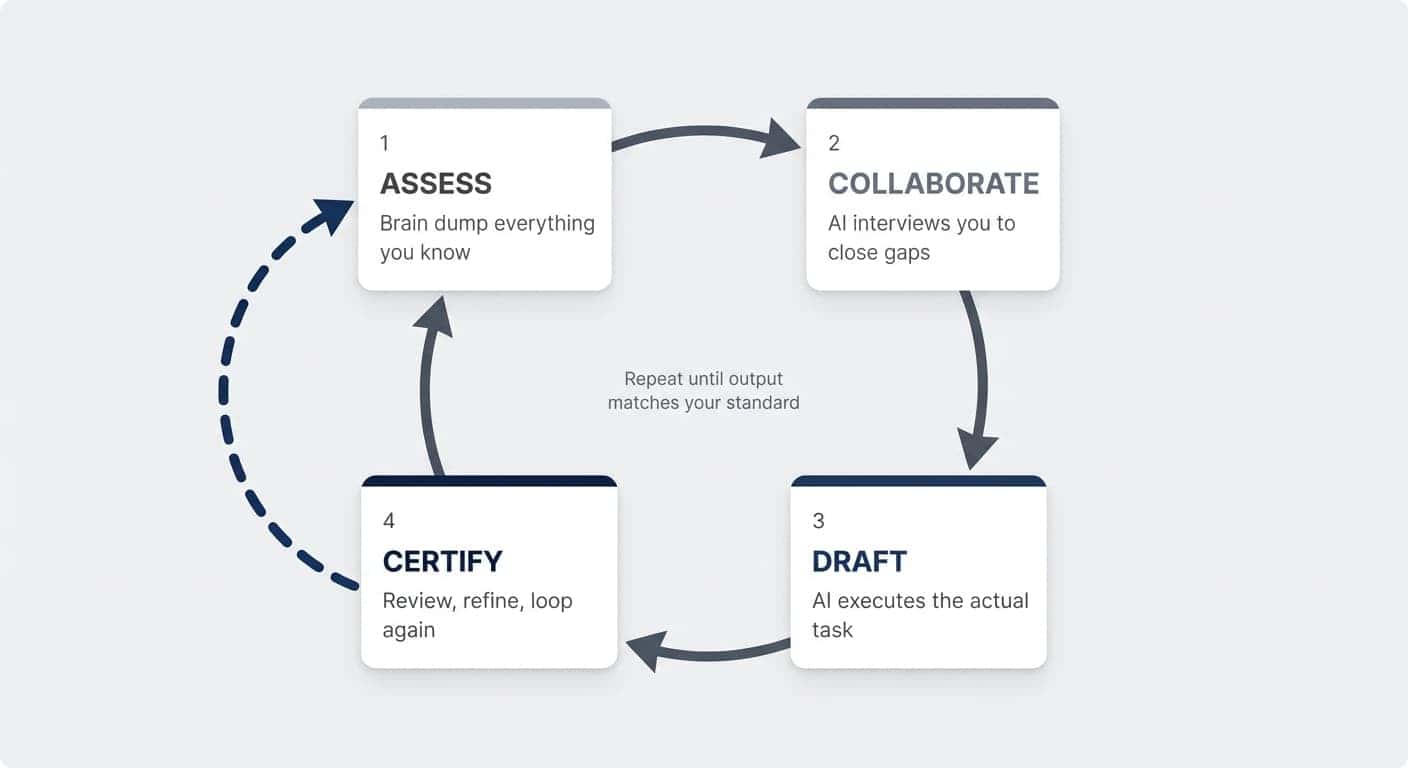
AC/DC is the skill creation framework we developed and presented at the Notion conference in Munich. It stands for Assess, Collaborate, Draft, Certify — and it is designed to systematically surface the hidden assumptions that tank most AI outputs.
Here is how each step works.
Step 1: Assess — Dump Everything You Know
Collect every piece of context you have about the task. Previous examples, meeting transcripts, existing SOPs, screenshots, notes, documents.
Throw it all into one AI chat. Then start talking — dictation tools are brilliant here because you will naturally add more nuance and colour than if you type.
The goal is a stream-of-consciousness brain dump. Structure comes later. You are trying to get everything out of your head, including the things you do not even realise you know.
Pro Tip: Do not filter at this stage. The messier, the better. If you walked a colleague through this process over lunch, what would you say? That is the energy you want.
Step 2: Collaborate — Let AI Interview You
After the brain dump, ask AI to review everything and then ask you questions about what is unclear.
This is where the magic happens. AI is exceptionally good at spotting gaps and inconsistencies. It might notice you said one thing in an old SOP and something contradictory in your brain dump. It will ask about edge cases you forgot.
Take your time here. For a simple skill, this might take five minutes. For a complex reporting workflow, it could take hours. The investment pays off.
Step 3: Draft — Let AI Execute A First Attempt
Once the back-and-forth feels complete, ask AI to actually do the task. Not write the skill — do the actual work.
With all the context from the previous steps, AI now has far more to work with than it would from a cold start. This first execution is your test run.
Step 4: Certify — Review, Refine, Repeat
Look at the output. It will probably be 70–90% right, depending on complexity and how thorough you were in the earlier steps.
Here is the key: do not stop here. Go back to the beginning. Share what is off, what surprised you, what you forgot to mention. Then run another loop.
Each loop gets faster. Each one surfaces assumptions you did not catch before. You keep going until you look at the output and think: Yes, that is what I would produce myself.
| AC/DC Step | What You Do | “Done” Looks Like | Common Mistake |
|---|---|---|---|
| Assess | Brain dump everything — examples, SOPs, notes, dictated stream-of-consciousness | AI has raw material covering the full scope of the task | Filtering too early — leaving out details that feel “obvious” |
| Collaborate | AI asks questions, you answer — multiple rounds until gaps close | Both sides agree: no more open questions about the process | Rushing this step — one round of questions is rarely enough |
| Draft | AI executes the actual task (not writes the skill page — does the real work) | A concrete output you can evaluate against your expectations | Asking AI to write the skill instructions instead of doing the task itself |
| Certify | Review output, identify gaps, feed corrections back into Assess → loop again | Output matches what you would produce yourself | Stopping after one loop — the first draft is never the last |
One Important Caveat About AC/DC
AC/DC works best when you already know what good looks like. You have done the task before, built intuition, figured out the standard.
If you are creating a skill for something entirely new — say, an AI-generated morning briefing you have never had before — the process still works. But you start much lower. Instead of reaching 80% accuracy after the first full loop, you might be at 20–30%.
That is fine. The iterative nature of AC/DC means you will improve with each cycle. Just expect it to take longer and be honest with yourself that you are learning the task and teaching it at the same time.
In our work with clients, we see this most often with AI reporting workflows. Nobody has had a personal AI briefing before, so nobody can articulate what “good” looks like on day one. That is why the iterative loop matters — you discover what you actually need by seeing what AI produces and reacting to it.
The Investment Phase Is Real
One thing worth being honest about: for a while, building skills will take more time than just doing the work manually.
That is the investment phase. You are spending time now to build leverage that pays off later. The break-even point comes faster than you expect — especially for tasks you repeat weekly or daily — but you need to be willing to push through the initial overhead.
The compounding returns after break-even are significant. A well-built skill does not just save you time once. It saves time every single time it runs, for every person on the team who uses it.
How Do You Avoid The “Curse Of Instructions” In Notion AI Skills?
The curse of instructions is simple: the more rules you give AI to follow simultaneously, the worse it performs at all of them. This is the single biggest structural mistake in Notion AI skill writing.
This is backed by AI research and matches what you have probably experienced yourself. That carefully crafted 3,000-word prompt that covers every edge case? It underperforms a focused 500-word skill that does one thing well.
The solution is progressive disclosure — a layered architecture where the AI only loads what it needs, when it needs it.
How Does Progressive Disclosure Work For Notion AI Skills?
Think of your Notion AI setup as a stack with multiple layers:
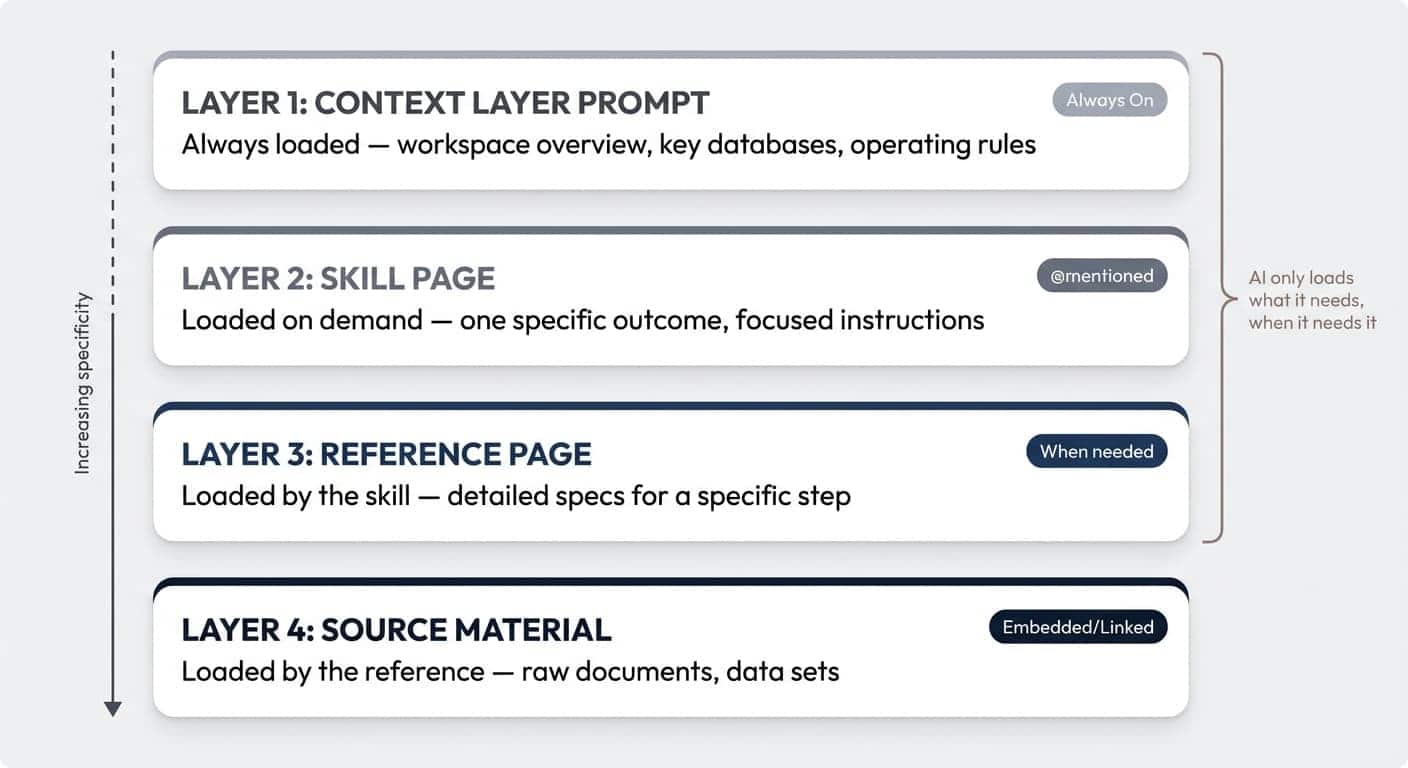
Layer 1: Personal Instructions or Agent Instructions (always loaded)
This is your context layer prompt (CLP). It should be lightweight — just enough to tell AI about the workspace, the key databases, and the general rules of engagement.
If this layer reads like half a book, every single conversation starts with that baggage.
Layer 2: Skill Pages (loaded on demand)
When you @mention a skill, the AI reads that page. The skill covers one specific outcome — how to produce it, what to look for, what the output should look like.
Layer 3: Reference Pages (loaded by the skill when needed)
For complex skills, the detailed instructions for specific steps live on separate pages. The skill tells AI: “When you reach step 4, read this reference page.” Until then, AI stays focused on the current step.
Pro Tip: AI research shows that elements at the beginning and end of a prompt get the most attention — the middle tends to get skimmed. Sound familiar? It is exactly how humans read. Structure your skills so the most critical rules sit at the top or bottom of the page.
| Layer | What It Is | When It Loads | What It Should Contain | Common Failure Mode |
|---|---|---|---|---|
| CLP / Agent Instructions | Persistent context for your AI | Every conversation, automatically | Workspace overview, key databases, interaction style, general operating rules | Cramming task-specific instructions here instead of in dedicated skills |
| Soul.md / Identity Page | Agent identity, personality, and communication style | Every conversation, automatically | Who the agent is, how it communicates, operating principles | Mixing process instructions into the identity layer |
| Skill Page | Reusable instructions for one specific outcome | On demand — when @mentioned in chat | Goal, process steps, output format, rules — all focused on one task | Making it too long — if it exceeds ~1,500 words, consider splitting |
| Reference Page | Detailed context for a specific step within a skill | When the skill explicitly tells AI to read it at a certain step | Style guidelines, output templates, examples, detailed specifications | Loading it too early — AI gets distracted by detail before it is relevant |
| Plugin | A grouped collection of skills working towards a larger outcome | When AI scans for relevant skill groups based on descriptions | Plugin description, related skills, connected agents | No descriptions — AI cannot find or suggest what it cannot read about |
| Agent | Autonomous executor that runs one or more skills on a schedule or trigger | On trigger (schedule, event) or manual invocation | Agent identity, which skills to reference, when to act | Duplicating skill instructions inside the agent config instead of referencing |
How Do You Build The Notion AI Skill Production Pipeline?
Once you understand progressive disclosure, the next question is: how do you create Notion AI skills consistently well?
The answer is to treat skill creation itself as a skill — literally. We use a three-skill pipeline that ensures every skill you build meets a consistent quality bar.
The Skill Creator
A Notion AI skill that takes your AC/DC output — all that context, those Q&A rounds, the draft iterations — and turns it into a properly structured skill page.
It applies the principles from this guide automatically: lean main page, progressive disclosure, answer-first structure, important rules at the top and bottom.
The Skill Reviewer
A separate skill that looks at the finished product with fresh eyes. It does not just check whether the creator followed its own rules — that would be pointless. Instead, it runs different analyses:
- A cold start simulation — could someone with zero context read this skill and understand what it does?
- A failure mode analysis — where might this skill produce bad output, and are those edge cases handled?
- Structural checks — is the skill lean enough? Are reference pages used correctly? Are the most important rules in the right positions?
The Skill Compressor
Over time, skills accumulate edge cases and learnings. They get longer. The compressor periodically reviews a skill and condenses it back to what actually matters — or suggests splitting it into multiple skills if it has outgrown its scope.
Pro Tip: You can attach the compressor to a Notion agent that runs on a schedule — say, monthly. That way your skills stay lean without you having to remember to review them manually.
All three skills — the creator, reviewer, and compressor — are available for free to subscribers of our newsletter. You can grab them along with 41+ other Notion resources → matthiasfrank.de/special
How Do You Build A Scalable Notion AI Skill Library?
Individual Notion AI skills are powerful. A system of skills is transformational. But without organisation, your skill library becomes a graveyard of forgotten pages.
The solution is what we call the Notion plugin system — a framework borrowed from the concept of plugins in Claude, adapted for Notion’s native strengths as a knowledge organiser.
What Is The Plugin System Architecture?
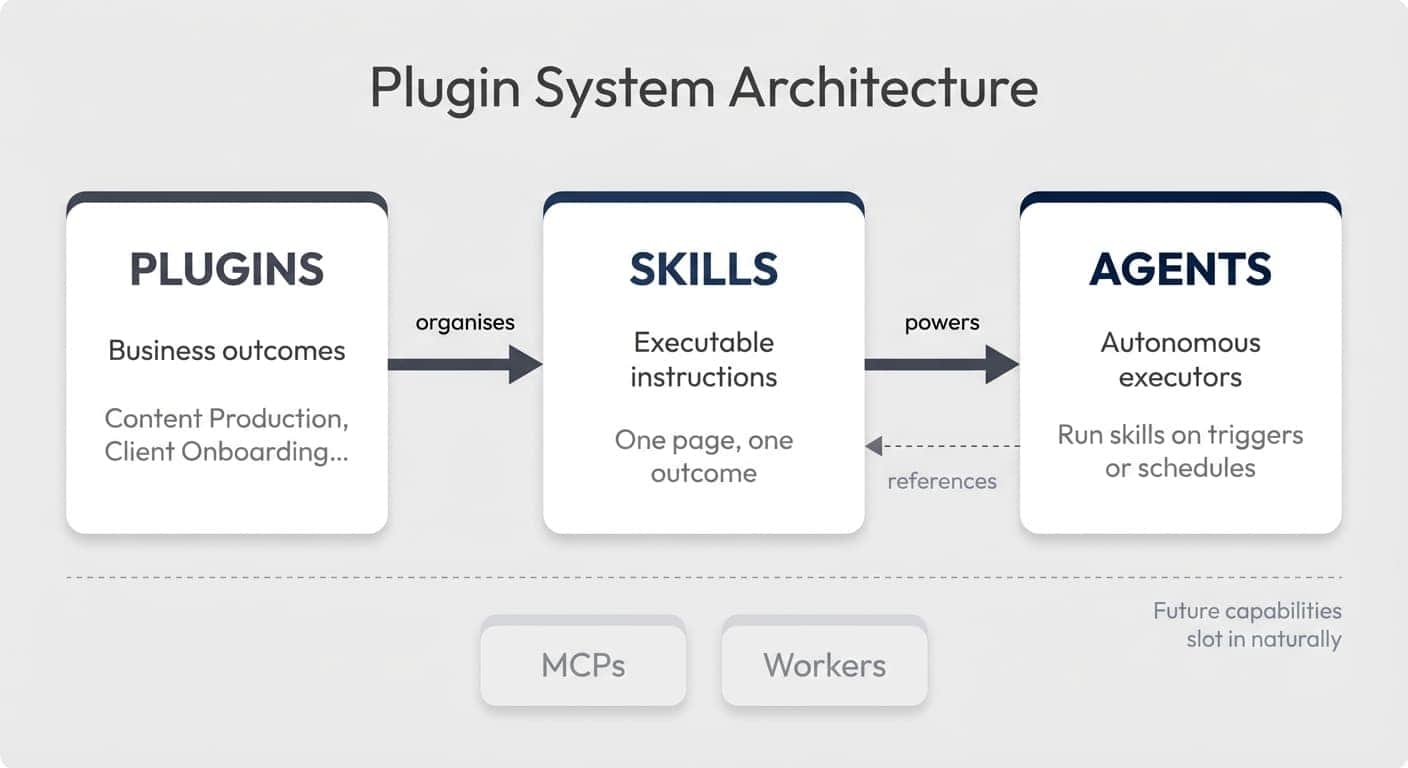
At minimum, you need three interconnected Notion databases:
Plugins — the top-level grouping. A plugin represents a larger business outcome, like “Content Production” or “Client Onboarding.” Each plugin has a description (so AI can find it) and links to the skills that power it.
Skills — the individual executable units. Each skill has a description, links to its plugin(s), and optionally links to agents that run it.
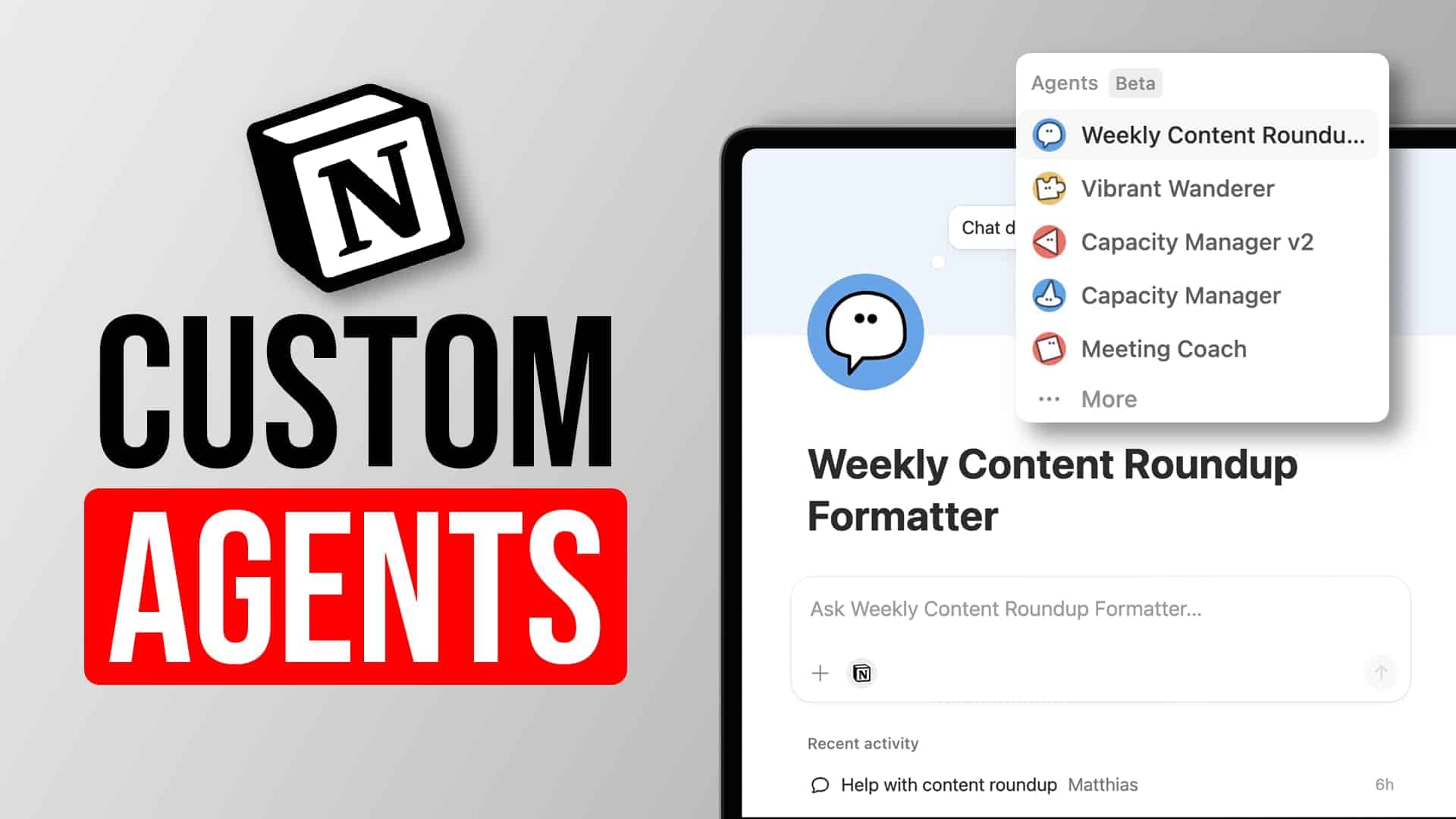
Agents — the autonomous executors. An agent takes one or more skills and runs them on a schedule or in response to a trigger. The agent does not duplicate the skill instructions — it simply reads the skill page when it needs to act.
As Notion expands its platform with features like custom MCPs and code execution (workers), these new capabilities slot naturally into the plugin system as additional databases linked to skills and agents.
Why Does This Structure Matter For Notion AI Skills?
Discoverability. Your context layer prompt can tell AI to scan the plugin database when working on larger tasks. Based on descriptions alone — not the full skill pages — AI can suggest relevant skills. You choose whether it auto-invokes them or just recommends.
Reusability. One skill can serve multiple workflows. A report formatting skill might be used by three different plugins. If you improve it, every workflow benefits immediately.
Team adoption. Not everyone on your team will be an AI power user. By making skills searchable and organised with Notion’s native database features, anyone can discover and use a skill without knowing it exists upfront.
Future-proofing. The plugin architecture grows naturally. New skill? Add a row. New agent? Link it. New tool type like an MCP? Create a database and connect it. The system scales without redesign.
When Should You Split A Notion AI Skill Into Multiple Skills?
This is a judgment call, but here are reliable signals that a skill has outgrown its scope:
- The skill page exceeds roughly 1,500 words
- The skill covers more than one distinct outcome
- You find yourself adding “if X, do this; if Y, do that” branching logic
- The AI consistently underperforms on the later steps (a sign the middle context is getting lost)
When you split, each new skill should deliver value independently. If skill B only makes sense after skill A runs, that is fine — but skill B should still produce a clear, standalone output.
What Are The 3 Principles That Make Notion AI Skills Perform?
Beyond the frameworks and systems, three principles consistently separate skills that look good on paper from skills that actually deliver reliable results.
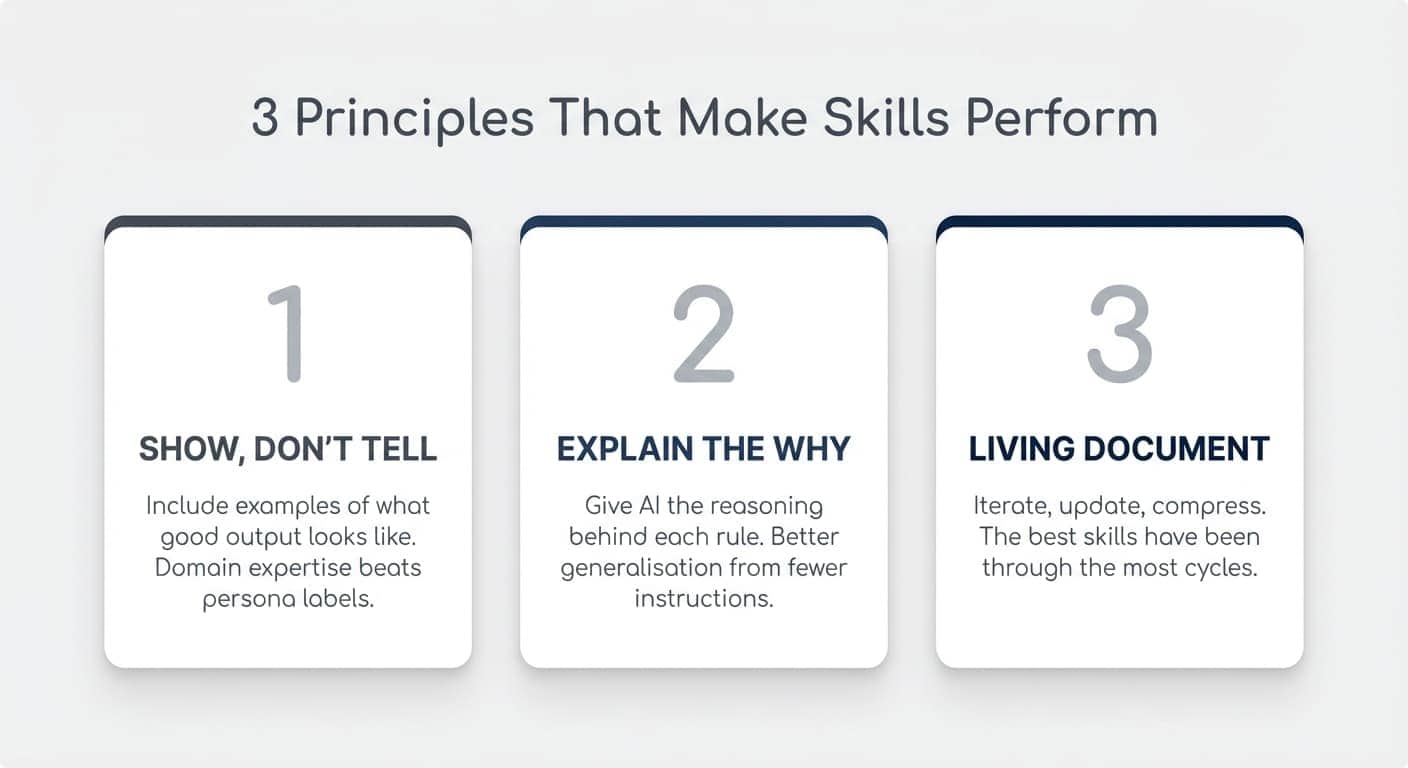
Principle 1: Show, Don’t Tell
If you can show AI what good output looks like, it is remarkably good at figuring out how to get there.
Include examples in your skills. An example of a well-written report section. A before-and-after of a client email. A sample output with annotations explaining why it is good.
Interestingly, current AI research suggests that role prompting (“You are an expert marketer”) mostly makes AI more confident, not more capable. Your domain expertise — what good actually looks like in your specific context — matters far more than a persona label.
Principle 2: Explain The Why Behind Every Rule
Instead of “never use passive voice,” write “use active voice because it makes the reader feel more engaged and keeps paragraphs shorter.”
When AI understands the reasoning behind a rule, it can apply that reasoning to situations the rule does not explicitly cover. You get better generalisation from fewer instructions.
This is a small change in how you write skill instructions that makes a disproportionately large difference in output quality.
Principle 3: Treat Every Skill As A Living Document
Your first version will not be perfect. That is expected and fine.
Build a feedback loop: when you use a skill and notice something off, update the skill page. Over time, it accumulates learnings and edge cases. Periodically, run the skill compressor to distil it back to essentials.
The best Notion AI skills are not the ones written by the smartest person. They are the ones that have been through the most iterations.
How Do You Get Started With Notion AI Skills Today?
If this all feels like a lot, here is the simplest possible starting point:
- Pick one task you repeat at least weekly. It does not have to be complex. A status update, a meeting summary, a client check-in email — anything you do on repeat.
- Write down how you do it. Not for AI — for yourself. What steps do you follow? What does the output look like? What are your quality criteria?
- Put that into a Notion page. That is your first skill. @Mention it next time you need to do the task.
- Notice what the AI gets wrong. Update the skill page. Run it again. Repeat.
You have just entered the AC/DC loop without even realising it. From here, you can gradually add more skills, introduce the skill creator and reviewer, and eventually build out the full plugin system.
The teams getting extraordinary results from Notion AI are not using different technology. They are using skills — well-written, well-maintained, well-organised skills.
And now you know exactly how to build them.
💼 Need the support of certified Notion Consultants? My team and I are here to help!
💡 Looking for more tips? Join 39k Notion Fans on our bi-weekly newsletter and get access to 41+ free resources
Frequently Asked Questions
What Is The Difference Between A Notion AI Skill And A Regular Prompt?
A prompt is a one-off instruction you type into AI chat. A Notion AI skill is a dedicated Notion page with reusable instructions that you @mention whenever you need that specific outcome. The key difference is persistence and shareability — a skill works the same way every time, for everyone on your team, without anyone re-typing instructions.
How Long Should A Notion AI Skill Page Be?
There is no hard limit, but aim to keep the main skill page under roughly 1,500 words. If it grows beyond that, use reference pages for detailed sections and let the skill tell AI when to load them. The principle is progressive disclosure — focused instructions outperform comprehensive ones because AI performs worse when juggling too many parallel rules.
Can You Use Notion AI Skills With Custom Agents?
Yes, and they are designed to work together. A skill is a set of instructions. An agent is an executor that can run skills autonomously on a schedule or in response to a trigger. The best setup is to keep instructions in the skill page and have the agent reference it — never duplicate instructions across both. That way, improving the skill automatically improves the agent.
Do You Need To Know How To Code To Create Notion AI Skills?
Not at all. Notion AI skills are plain-language instructions written on a regular Notion page. If you can explain a process to a colleague, you can write a skill. The AC/DC framework helps you extract and structure that knowledge systematically, even if you have never written a prompt before.
How Do You Get A Team To Actually Use A Skill Library?
Three things help most: keep skills in a searchable database with clear descriptions, include your skill library in your team’s AI context layer prompt so relevant skills get surfaced automatically, and start with two or three high-impact skills that solve real pain points rather than trying to build an exhaustive library from day one. Adoption follows value — once people see a skill save them 30 minutes, they start looking for more.