Notion AI agents aren’t just a product feature — they’re how the company actually operates. In a conversation with Sam Catania, Product Manager at Notion, I got a behind-the-scenes look at how the team runs thousands of AI agent interactions per week, from self-healing wikis that replace Slack channels to agent orchestrators that improve themselves over time. Here’s what stood out and how you can apply the same thinking to your own workflows.
What Is A Self-Healing Wiki And Why Does Notion Use It?
A self-healing wiki is an AI agent that answers questions and writes its own documentation as it goes. It’s one of the simplest and most powerful ways Notion uses AI internally — and you can build one yourself in five minutes with custom agents.
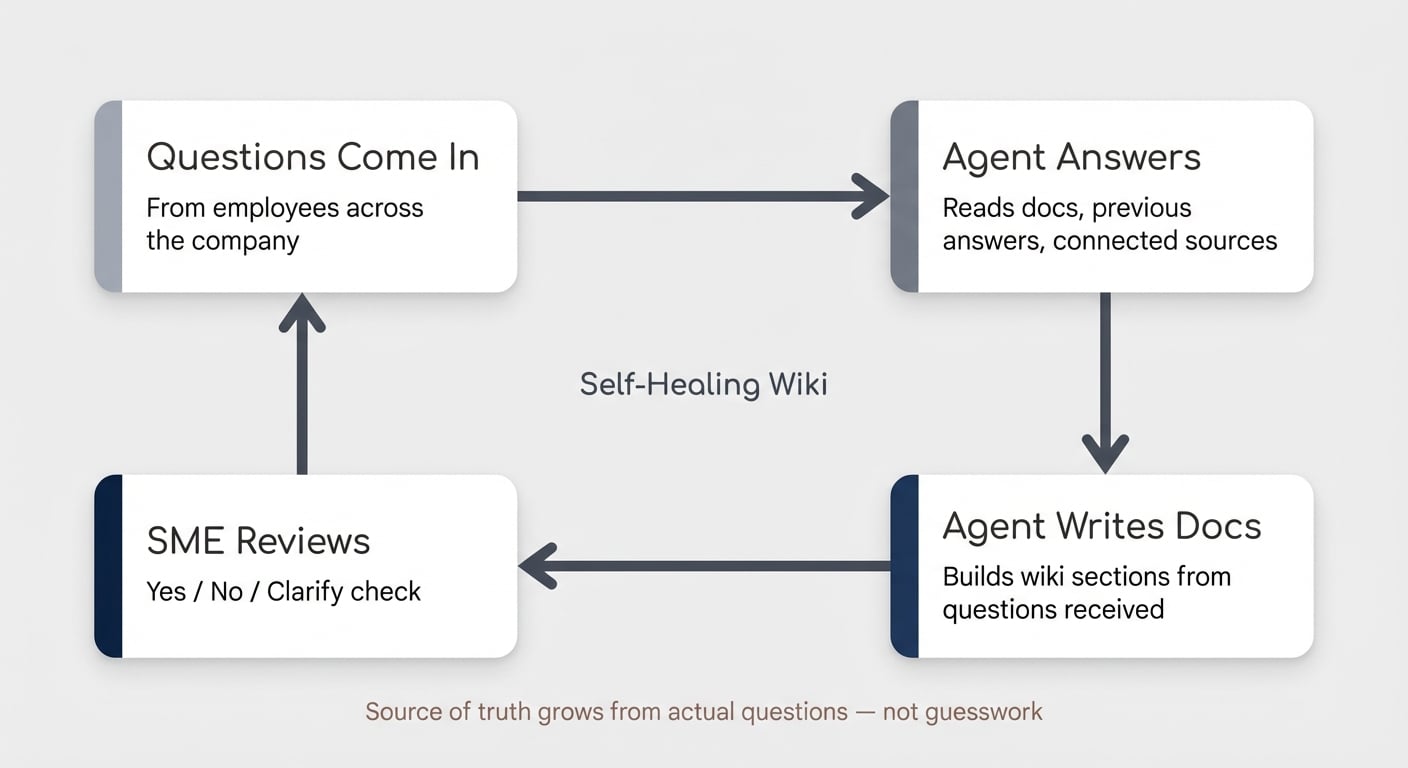
Here’s the setup. Notion used to have dozens of internal Slack channels where people asked questions. All of those channels have been replaced by agents that read existing documentation, previous answers, and connected sources to respond automatically.
But the clever part isn’t the answering — it’s the feedback loop.
The agent doesn’t just respond. It builds out wiki sections based on the questions it receives and tracks every change in a database. Subject matter experts then review those changes periodically — a simple yes, no, or clarification check.
Over time, this creates a source of truth that’s more reliable than two people saying opposite things in Slack. And it grows from actual questions rather than what someone guessed would be useful to document three years ago.
This is also a brilliant jumping-off point for deeper automation. If the agent notices that many “questions” are actually requests — access requests, resource requests, process requests — those become your next candidates for workflow automation.
Pro Tip: Start with a blank page rather than migrating your existing wiki. Let the agent build documentation from the questions it actually receives. You’ll end up documenting what people genuinely need — not what someone thought was important once.
How Are Teams Building Agent Orchestrators?
Some teams at Notion have taken this further by building agent orchestrators — systems where multiple agents monitor and improve each other.
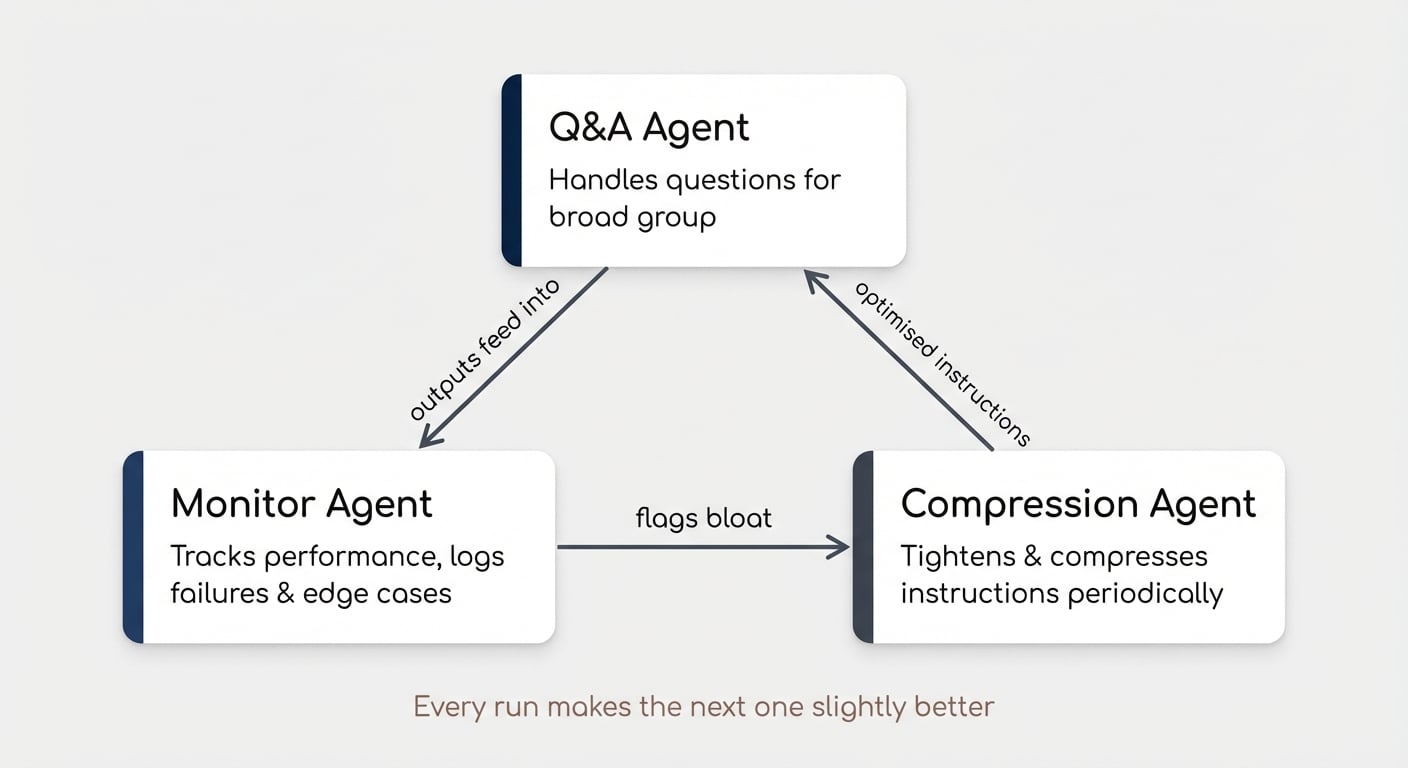
One agent handles Q&A for a broad group. Another tracks how that agent performs, logging failures and edge cases so humans know exactly where to focus their attention. A third runs at irregular intervals to tighten and compress the instructions that other agents have written for themselves — keeping things from getting bloated.
The result is a system that compounds. Every agent run makes the next one slightly better.
This is still early and tricky to get right, but it points to where knowledge work is heading: designing and maintaining the system becomes the highest-leverage work you can do.
How Do You Break Any Workflow Into AI-Ready Stages?
The most actionable framework from this conversation is deceptively simple: break any workflow into discrete stages, then evaluate each stage independently for AI automation potential. Understanding Notion AI capabilities at each stage helps you design systems that scale.
Sam walked through a bug-tracking example to illustrate how this works in practice:
| Workflow Stage | AI Potential | What The Agent Does | Human Role |
|---|---|---|---|
| Bug Report Intake | ~80% | Asks follow-up questions, requests browser details, screen recordings, reproducibility steps | Escalation for edge cases |
| Research & Reproduction | ~40–50% | Clicks through UIs, attempts reproduction, checks known issues | Handles integration complexity and OS/browser edge cases |
| Fix Development | ~50% | Reads codebase, proposes fixes, takes first pass at implementation | Reviews, validates, handles complex logic |
| Deployment | ~100% | Fully automated CI/CD (pre-dates AI) | Monitoring only |
| Customer Follow-Up | Intentionally Low | Drafts initial response, gathers context | Personal touch, relationship building, confirmation |
The key insight: every stage has a different automation ceiling. Knowing that ceiling tells you where to invest your time.
Some stages suit full automation. Others work best as human-AI collaboration. And the last stage — customer follow-up — is kept intentionally human because that’s where relationships are built.
This framework works far beyond engineering. Your content production pipeline, client onboarding process, or hiring workflow — each one breaks into stages where AI excels and stages where human judgement is non-negotiable.
Pro Tip: When evaluating a stage, ask two questions: Is the task repeatable? Is the expected output predictable? If both answers are yes, that’s a strong automation candidate. If either is no, keep a human in the loop.
Why “Demos, Not Memos” Changes How You Make Decisions
“Demos, not memos” is a cultural shift at Notion — and it captures something bigger about what AI makes possible.
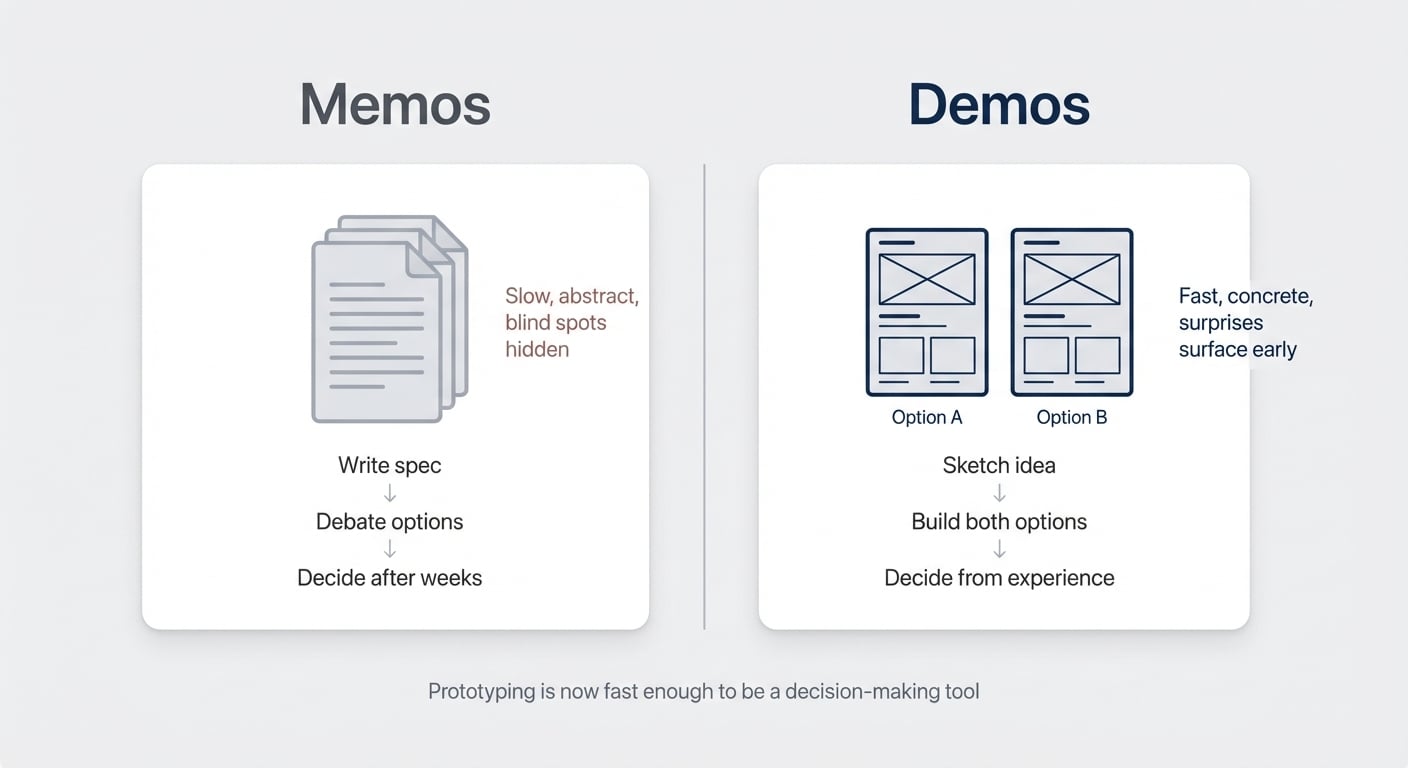
Instead of debating two options for weeks in lengthy specification documents, the team now prototypes both. Someone sketches on a whiteboard, discusses trade-offs, then feeds the meeting note and whiteboard photo into a coding agent with one instruction: build me both options.
This works because prototyping is now fast enough to be a decision-making tool, not just a development step.
You don’t need to be writing code to apply this. Any time you’re stuck choosing between two approaches — two database structures, two workflow designs, two content formats — build a quick version of both instead of debating. You’ll discover things you never would have anticipated from a document.
What Are Notion Workers And Why Should You Care?
Notion Workers are a sandbox environment for running custom code directly within Notion. The first interface lets you build custom agent tools — which means there’s no longer any limit on what Notion AI can connect to. For specific Notion AI terminology and concepts, the Notion AI Dictionary is a useful reference.
But Workers aren’t just about AI. They represent a fundamental platform shift.
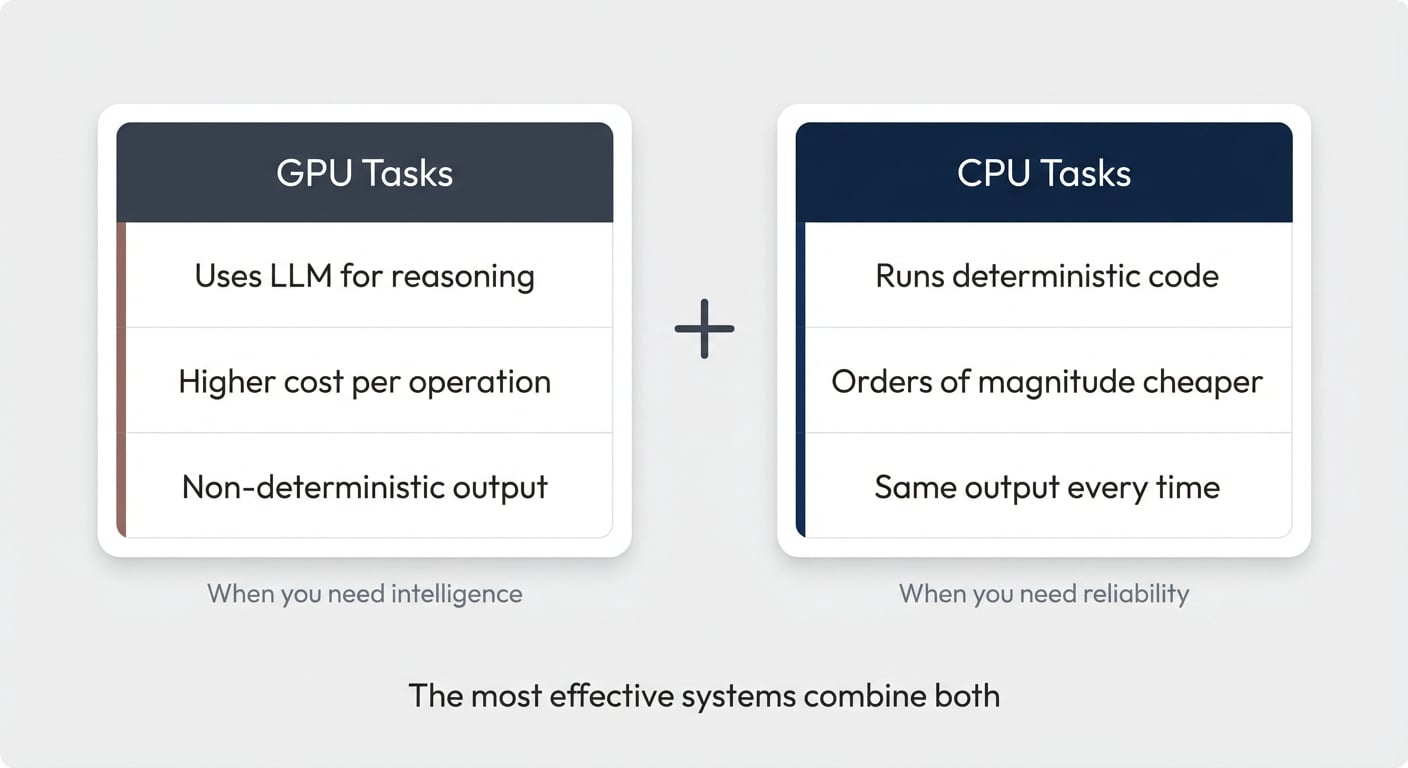
Sam framed it with a useful distinction: many tasks in AI workflows right now are “GPU tasks” — they use an LLM for reasoning even when they don’t need intelligence. Workers let you turn those into “CPU tasks” — deterministic code that runs faster, cheaper, and more reliably.
This matters for three reasons:
- Cost — code execution is orders of magnitude cheaper than LLM calls for predictable operations
- Reliability — deterministic code produces the same output every time
- Scale — operations that were cost-prohibitive with AI become trivial with code
The practical takeaway: not everything in your AI workflow should be AI. The most effective systems will combine both — AI for reasoning and decisions, code for reliable execution at scale.
Workers are in early alpha with custom agent tools as the first interface. More interfaces are coming — and if you think about where else in Notion you’d want custom code to plug in, you can probably guess what’s next.
Pro Tip: Think of Workers as the complement to AI agents, not the replacement. Use AI where you need reasoning. Use code where you need repeatability. The combination is where the real power lives.
Where Should You Start With Notion AI Agents?
If you’re feeling overwhelmed by the pace of AI development, here are three pieces of practical advice from Sam.
Ask the AI to help you break things down. If you’ve got a big, nebulous task you’re not sure how to automate, just describe it honestly. AI is surprisingly self-aware about its own capabilities and limitations — it’ll give you a useful starting framework for what will work and what won’t.
Don’t get discouraged. These systems are non-deterministic, and the underlying models improve constantly. Something that failed three months ago might work perfectly today. Keep experimenting.
Don’t feel pressure to keep up with everything. Be willing to try new things, but don’t burn out chasing every update. Find what resonates with how you work and go deep on that.
And one insight worth sitting with: if AI can handle the how, the real question becomes what should you do — not how to do it. That’s a bigger, scarier, and more exciting question than any productivity hack.
💼 Need help figuring out where AI fits into your team’s workflows? My team and I are here to help.
Want to learn more about building AI systems that compound? Join our weekly newsletter for deep dives on Notion AI, automation frameworks, and practical strategies for scaling with agents.
Frequently Asked Questions
How Does Notion Use AI Agents Internally?
Notion runs custom AI agents across the company to handle repeatable tasks at scale. The most prominent example is the self-healing wiki — agents that replaced internal Slack Q&A channels, answer questions automatically, and build their own documentation over time. Thousands of questions per week are handled this way, freeing the team to focus on harder, more meaningful problems.
What Is A Self-Healing Wiki In Notion?
A self-healing wiki is a custom agent that answers questions by reading existing documentation and connected sources, then writes and updates its own docs based on the questions it receives. Subject matter experts review changes periodically, creating a knowledge base that grows more accurate over time without manual documentation effort. You can build one in minutes with Notion custom agents.
What Are Notion Workers?
Notion Workers are a sandbox environment for running custom code within Notion. The first available interface lets you create custom tools for AI agents, effectively removing any limit on what Notion AI can connect to. Workers handle deterministic, repeatable tasks that don’t require AI reasoning — making workflows faster, cheaper, and more reliable.
When Should You Use AI Agents Versus Custom Code?
Use an AI agent when a task requires reasoning, decision-making, or processing unstructured information. Use custom code via Workers when a task is predictable, repeatable, and needs to run reliably at scale. The most effective workflows combine both — AI handles the thinking, code handles the execution.
How Do You Get Started With Notion AI Agents?
Start by breaking one repeatable workflow into discrete stages. Evaluate which stages have predictable inputs and outputs — those are your best automation candidates. Build a simple agent for one stage first, see how it performs, and expand from there. Don’t try to automate an entire workflow end to end on day one.